

As an Amazon Associate and eBay Partner, toptenpick.com earns from qualifying purchases. Prices and availability are subject to change.
“Lenovo Flex 14” covers several very different generations of laptop, and that matters more here than for most accessories: some Flex 14 models (like the original Flex 4) have a capacitive-only touchscreen with no digitizer at all, while newer ones (FLEX-14IWL, FLEX-14API and later IdeaPad Flex 5/USI-based models) support an active pen with real pressure sensitivity. Check your exact model before buying an active pen — a universal capacitive stylus works on every generation, but an active pen only works if your specific Flex 14 has the matching digitizer. These ten cover both cases.
| # | Product | Price | Where to buy |
|---|---|---|---|
| 1 | Lenovo Active Pen (GX80K32882) | $25-$40 | Amazon · eBay |
| 2 | Lenovo Digital Pen 2 (GX81J19850) | $30-$40 | Amazon · eBay |
| 3 | Lenovo Precision Pen 2 | $70-$80 | Amazon · eBay |
| 4 | Lenovo USI Pen (GX81B10212) | $29.66-$32.99 | Amazon · eBay |
| 5 | Uogic USI 2.0 Stylus Pen | $35.99-$39.99 | Amazon · eBay |
| 6 | LAZARITE M Pen | $53-$83 | Amazon · eBay |
| 7 | LAZARITE M2 Stylus Pen (4-in-1 Protocol) | $60-$90 | Amazon |
| 8 | Genuine Lenovo Active Pen (5T70J33309) | $12.99 | Amazon · eBay |
| 9 | Branded Active Capacitive Pen for Lenovo Flex 14 Convertible Laptop | $15-$30 | Amazon · eBay |
| 10 | MEKO Universal Capacitive Stylus | $10-$15 | Amazon · eBay |
The picks, in detail

Lenovo Active Pen (GX80K32882)
Lenovo’s own AES active pen, built for AES-digitizer Flex/Yoga/Miix models — the safest official pairing if your Flex 14 generation supports active pen input (check for FLEX-14IWL or FLEX-14API drivers on Lenovo’s support site).
- AES active pen technology
- Genuine Lenovo accessory
- Compatible with several AES-digitizer Lenovo laptops
- Official Lenovo part with documented compatibility list
- Reasonably priced for a first-party active pen
- Only works on Flex 14 generations with an AES digitizer — confirm yours has one first

Lenovo Digital Pen 2 (GX81J19850)
Lenovo’s more recent active-pen model with 4,096 pressure levels and an elastomer tip for a more natural pencil-like feel, for newer active-pen-capable Flex 14 units.
- 4,096 levels of pressure sensitivity
- Natural-feel elastomer pen tip
- Extended battery life
- Higher pressure sensitivity than the older Active Pen
- Current Lenovo accessory, still in production
- Still requires your specific Flex 14 to support active-pen input

Lenovo Precision Pen 2
Lenovo’s premium pen, supporting WGP, AES 2.0 and MPP 2.0 protocols with 4,096 levels of pressure and tilt support — the most broadly compatible official Lenovo pen if your Flex 14 uses a newer digitizer standard.
- Supports WGP, AES 2.0 and MPP 2.0 protocols
- 4,096 pressure levels with tilt support
- USB-C rechargeable
- Broadest protocol support of any Lenovo pen on this list
- Tilt support adds real shading control for sketching
- Highest price of the official Lenovo pens here
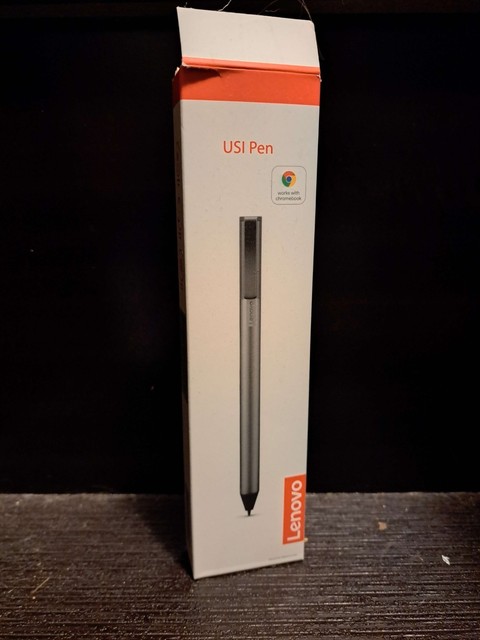
Lenovo USI Pen (GX81B10212)
Lenovo’s USI-protocol pen for Chromebook-based and select IdeaPad Flex laptops that use the Universal Stylus Initiative standard rather than AES.
- USI protocol support
- 4,096 levels of pressure sensitivity
- 150 days battery life on AAAA battery
- Long AAAA-battery life instead of needing frequent recharging
- USI standard works across brands, not locked to one digitizer type
- Only works if your specific Flex 14 variant uses a USI digitizer, not AES

Uogic USI 2.0 Stylus Pen
A third-party USI 2.0 pen with palm rejection and 4,096-level pressure sensitivity, a cheaper alternative to Lenovo’s own USI pen for USI-compatible Flex 14 Chromebook variants.
- USI 2.0 protocol
- Palm rejection
- USB-C fast charging (110 hours from 1 hour charge)
- Fast USB-C charging versus battery-only alternatives
- Works across multiple brands’ USI-compatible devices, not just Lenovo
- Third-party, so support and replacement-tip availability differ from Lenovo’s own pen

LAZARITE M Pen
A widely used third-party active stylus explicitly marketed as compatible with the Lenovo Flex 5/14 line, HP x360 models and Microsoft Surface, at a lower price than Lenovo’s own Precision Pen 2.
- 4,096 pressure sensitivity levels
- Palm rejection and tilt support
- AAAA battery, ~1,000 hours use time
- Explicitly listed as compatible with Flex 5/14 by name, not a generic universal stylus
- Long battery life on a replaceable AAAA battery, no recharging needed
- Third-party pen — verify protocol match (AES) with your exact Flex 14 generation before buying
LAZARITE M2 Stylus Pen (4-in-1 Protocol)
A newer Lazarite pen supporting four digitizer protocols (MPP, AES, WGP, USI) in one pen, aimed at exactly the fragmentation problem the Flex 14 lineup has across generations.
- 4-in-1 protocol support: MPP/AES/WGP/USI
- 4,096 pressure levels with tilt support
- Long battery life (rated 1,000 hours)
- Multi-protocol support hedges against not knowing your Flex 14’s exact digitizer type
- One pen usable across a Surface, Dell, HP or Lenovo Chromebook if you own more than one device
- A multi-protocol pen costs more than a single-protocol one

Genuine Lenovo Active Pen (5T70J33309)
An older genuine Lenovo active pen model listed as compatible across several Flex, Miix and Yoga models, sold at a notably lower price point than the current Active Pen or Digital Pen 2.
- Genuine Lenovo part number 5T70J33309
- Listed compatible with multiple Flex/Miix/Yoga models
- Standard AES active-pen function
- Lowest price of any genuine Lenovo active pen on this list
- Still an authentic Lenovo part, not third-party
- Older part number — confirm it matches your specific Flex 14 generation’s digitizer, not just the Flex name

Branded Active Capacitive Pen for Lenovo Flex 14 Convertible Laptop
A third-party pen marketed specifically by name for the Lenovo Flex 14 2-in-1, rechargeable with an ultra-fine tip and touch-control button for precision writing.
- Marketed specifically for Lenovo Flex 14 convertible laptops
- Ultra-fine tip for higher precision
- Rechargeable, touch-control button
- Product listing names the Flex 14 directly rather than a generic ‘Lenovo laptop’ claim
- High-precision fine tip suited to detailed note-taking
- Confirm the specific protocol (capacitive vs. active AES) matches your Flex 14’s actual touchscreen type before buying

MEKO Universal Capacitive Stylus
A basic capacitive touchscreen stylus that works on any Flex 14 generation regardless of digitizer, including the earliest capacitive-only models with no active-pen support at all — the safe fallback pick.
- Universal capacitive compatibility
- Works on any touchscreen device, no pairing needed
- Multiple tip styles (disc, fiber, rubber) available
- Works on every Flex 14 generation, including ones with no digitizer support
- No pairing, charging or protocol-matching required
- No pressure sensitivity or palm rejection — it’s a finger substitute, not a true digital pen
Buying tips
- Before buying an active pen, check which Flex 14 you actually have: search Lenovo’s support site for your model number (e.g. FLEX-14IWL, FLEX-14API) plus ‘active pen driver’ — if no driver exists for your model, your touchscreen is capacitive-only and only a universal stylus (MEKO) will work.
- AES, MPP/WGP and USI are three different, incompatible digitizer protocols. A pen built for one won’t register on a screen built for another, even though all three look like ordinary styluses.
- If you genuinely don’t know your Flex 14’s digitizer type, a multi-protocol pen (LAZARITE M2) or a universal capacitive stylus (MEKO) removes the guesswork, at the cost of paying more or getting no pressure sensitivity respectively.
- Older genuine Lenovo pens (5T70J33309) are often cheaper than current models but were built for older digitizer generations — check the part’s own compatibility list, not just that it says ‘Lenovo’ on the box.
As an Amazon Associate and eBay Partner, toptenpick.com earns from qualifying purchases. Prices and availability are subject to change.