


As an Amazon Associate and eBay Partner, toptenpick.com earns from qualifying purchases. Prices and availability are subject to change.
An HTPC (home theater PC) needs input gear that works from a couch, not a desk — which usually means a backlit keyboard with an integrated touchpad, or a separate keyboard-and-mouse pair for anyone who does real work on it. These ten combos cover both approaches, from Logitech’s dedicated living-room keyboards to full desktop-style pairs that happen to work fine ten feet from the screen.
| # | Product | Price | Where to buy |
|---|---|---|---|
| 1 | Logitech K400 Plus Wireless Touch Keyboard | $25-$32 | Amazon · eBay |
| 2 | Logitech K830 Illuminated Living-Room Keyboard | $50-$65 | Amazon · eBay |
| 3 | Logitech MK850 Performance Wireless Keyboard and Mouse Combo | $70-$90 | Amazon · eBay |
| 4 | Corsair K83 Wireless Entertainment Keyboard | $70-$85 | Amazon · eBay |
| 5 | Microsoft All-in-One Media Keyboard | $45-$60 | Amazon · eBay |
| 6 | Microsoft Wireless Desktop 900 | $25-$35 | Amazon · eBay |
| 7 | Rii K12+ Mini Wireless Keyboard with Touchpad | $18-$26 | Amazon · eBay |
| 8 | Rii K18 Plus Wireless Backlit Multimedia Keyboard | $22-$30 | Amazon · eBay |
| 9 | Rii i8+ Mini Wireless Keyboard | $15-$22 | Amazon · eBay |
| 10 | Logitech MK270 Wireless Keyboard and Mouse Combo | $18-$25 | Amazon · eBay |
The picks, in detail
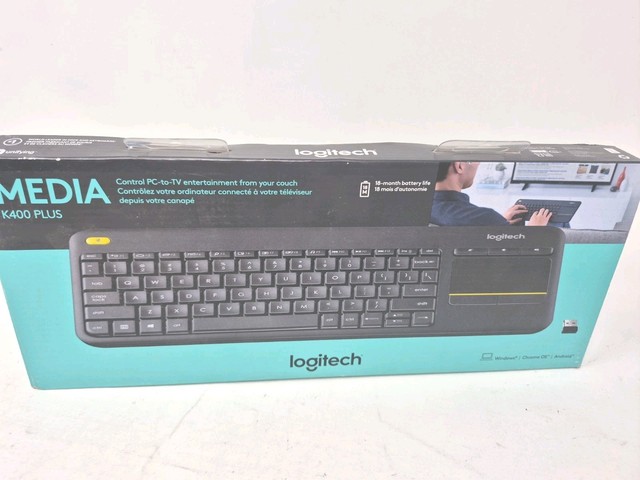
Logitech K400 Plus Wireless Touch Keyboard
The standard entry point for HTPC keyboards — a full-size layout with a built-in touchpad and dedicated media keys.
- Integrated touchpad replaces a separate mouse
- Dedicated media playback keys
- 2.4GHz USB receiver, ~10m range
- One device to lose instead of two
- Reliable, widely reviewed
- Touchpad is basic compared to a real mouse
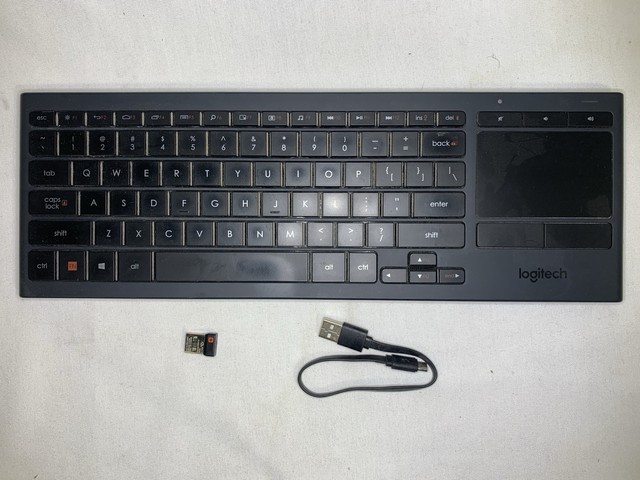
Logitech K830 Illuminated Living-Room Keyboard
A backlit step up from the K400 Plus with a larger, more precise touchpad, built for a dark living room.
- Backlit keys
- Larger integrated touchpad
- Bluetooth or Unifying 2.4GHz receiver
- Best typing and pointing feel in a single-unit HTPC keyboard
- Roughly double the price of the K400 Plus

Logitech MK850 Performance Wireless Keyboard and Mouse Combo
A full desktop-grade keyboard and contoured mouse pair, better suited to an HTPC that also handles browsing, spreadsheets, or light work.
- Full-size keyboard with cushioned palm rest
- Contoured mouse with hyper-fast scrolling
- Multi-device pairing across up to 3 devices
- Far more comfortable than a mini keyboard for extended typing
- Needs real desk or lap space for two separate devices

Corsair K83 Wireless Entertainment Keyboard
A gaming-oriented living-room keyboard with a precision touchpad and a clickable joystick for menu navigation and light gaming from the couch.
- Integrated precision touchpad with 4-finger gesture support
- Clickable joystick for gamepad-style navigation
- 2.4GHz or Bluetooth, up to 40 hours of use per charge
- Joystick makes streaming-app and menu navigation faster than a touchpad alone
- Priced closer to a gaming peripheral than a basic HTPC keyboard

Microsoft All-in-One Media Keyboard
Microsoft’s own living-room keyboard bundles an integrated multi-touch trackpad with customizable media hotkeys and spill-resistant construction.
- Integrated multi-touch trackpad
- Customizable media hotkeys
- Spill-resistant, AES 128-bit wireless encryption
- Straightforward Windows HTPC pairing with Microsoft-native drivers
- Design feels dated next to newer Logitech and Corsair models

Microsoft Wireless Desktop 900
A conventional keyboard-and-mouse combo with quiet-touch keys, a fine fit for an HTPC that mostly gets used like a regular desktop from a nearby chair.
- Quiet-touch keys
- Ambidextrous mouse
- Up to 30-foot wireless range
- Cheap, reliable, easy to find
- No touchpad or media-specific keys — a plain desktop combo, not couch-optimized

Rii K12+ Mini Wireless Keyboard with Touchpad
A stainless-steel-backed mini keyboard with a large touchpad, small enough to store in a drawer next to the HTPC.
- Large touchpad with 360-degree flip design
- Stainless steel back panel
- Rechargeable lithium-ion battery
- Much smaller footprint than a full-size combo
- Smaller keys slow down longer typing sessions

Rii K18 Plus Wireless Backlit Multimedia Keyboard
Adds a 3-color backlight and a bigger trackpad to the K12+ formula, aimed at using the couch in the dark without squinting at the keys.
- 3-color backlight (red, green, blue)
- Multi-touch, large-size trackpad
- About two weeks of battery life per charge
- Backlighting genuinely helps in a dark home theater room
- Touchpad still smaller than a dedicated mouse
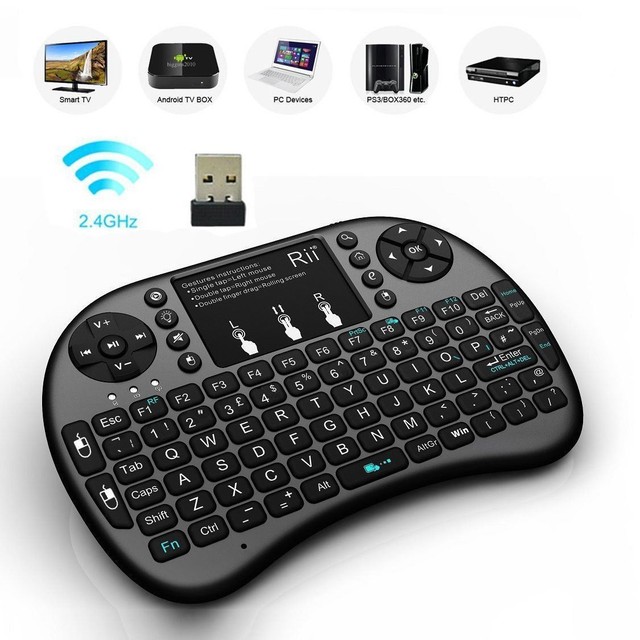
Rii i8+ Mini Wireless Keyboard
The most-reviewed budget mini keyboard on the market, with an adjustable-sensitivity touchpad and a 360-degree flip body for one-handed use.
- Adjustable DPI touchpad
- 360-degree flip design
- 2.4GHz USB receiver
- Cheapest reliable option on this list
- Basic build quality compared to Logitech or Corsair

Logitech MK270 Wireless Keyboard and Mouse Combo
A budget full-size keyboard and separate mouse on one USB receiver — the cheapest way to get real full-size typing and a real mouse for an HTPC.
- Full-size keyboard plus separate wireless mouse
- Single USB receiver for both
- Spill-resistant design
- Lowest price for a genuine keyboard-plus-mouse pair
- Two devices to manage instead of an all-in-one unit
Buying tips
- Decide first whether you need real typing (email, browsing, spreadsheets) or just media navigation — it determines whether a mini touchpad keyboard or a full desktop combo is the right call.
- Backlighting matters more for an HTPC than a desk keyboard, since the room is usually dark when you’re using it.
- A 2.4GHz USB receiver is generally more responsive for video and light gaming than Bluetooth.
- If the HTPC sits more than 10 meters from the couch, check the specific model’s range — most budget keyboards top out around 10 meters.
As an Amazon Associate and eBay Partner, toptenpick.com earns from qualifying purchases. Prices and availability are subject to change.