

As an Amazon Associate and eBay Partner, toptenpick.com earns from qualifying purchases. Prices and availability are subject to change.
Almost nobody has trouble with the hardware in this category. Infrared receivers are simple, cheap and reliable, and a ten-dollar one physically detects a remote about as well as a forty-dollar one. What people actually have trouble with is how the operating system sees the thing, and that is the specification worth shopping on.
There are three distinct classes, and they are not interchangeable.
HID keyboard emulators — FLIRC and the Irdroid HTPC receiver are the well-known ones — do the translation inside the dongle. The receiver learns your remote’s codes once, then presents itself to the computer as an ordinary USB keyboard. Every operating system already knows how to talk to a keyboard, so there are no drivers, nothing to configure in Kodi or Plex, and it works identically on Windows, Linux, macOS and a Raspberry Pi. Crucially, it works with any infrared remote you already own, including your television’s.
MCE / RC6 receivers are the ones that show up in Windows Device Manager as a “Microsoft eHome Infrared Transceiver”. They are supported natively, they are cheap, they are everywhere second-hand, and several of them can wake a PC from a fully powered-off state. The catch is that they expect an RC6-protocol remote, so you are buying into the Media Center remote ecosystem rather than using the remote on your coffee table.
Raw LIRC-class receivers hand the decoded pulse train to the operating system and let software do the rest. On Linux this is the most flexible option there is and it will handle protocols nothing else touches. It is also the one that requires actual configuration work.
So the question that settles your purchase is simple: do you want to use the remote you already own, or are you happy to buy a remote to match the receiver? Answer that and eight of the ten picks below rule themselves out immediately.
| # | Product | Price | Where to buy |
|---|---|---|---|
| 1 | FLIRC USB Receiver | $25-$35 | Amazon · eBay |
| 2 | Microsoft-Compatible MCE / eHome IR Receiver | $10-$25 | Amazon |
| 3 | Internal IR Receiver with Wake-from-S5 | $25-$45 | Amazon |
| 4 | Irdroid HTPC USB Receiver | $20-$35 | Amazon |
| 5 | VS1838B IR Receiver Module and Microcontroller Board | $5-$20 | Amazon |
| 6 | IR Extender and Repeater Kit | $12-$40 | Amazon |
| 7 | Programmable Universal Remote | $25-$120 | Amazon |
| 8 | RF Remote and Receiver Set | $20-$60 | Amazon |
| 9 | Powered USB Hub with Individual Port Switching | $20-$50 | Amazon · eBay |
| 10 | Right-Angle and Short USB Extension Cables | $6-$18 | Amazon · eBay |
The picks, in detail

FLIRC USB Receiver
The default recommendation, and the one to buy if you want your existing remote to work. You plug it into a computer running the FLIRC configuration app, click a key on an on-screen keyboard, press the button on your remote you want mapped to it, and repeat. The mapping is stored in the dongle itself — so once programmed it works on any machine you move it to, with no software installed. Because the computer sees a plain keyboard, Kodi, Plex, Jellyfin and everything else respond to it without knowing an infrared remote exists.
- Learns any IR remote, including a TV remote
- Presents as a standard USB HID keyboard
- Mapping stored in the dongle, not the host
- Works on Windows, Linux, macOS and Raspberry Pi
- No drivers and no application configuration at all
- Use the remote already on your coffee table
- Moves between machines with its settings intact
- Costs several times a bare MCE receiver
- Keyboard emulation cannot send commands a keyboard cannot
Microsoft-Compatible MCE / eHome IR Receiver
The cheap, native option. These register in Windows as a Microsoft eHome Infrared Transceiver under Human Interface Devices and need no driver installation at all — Windows has shipped support for years. Second-hand ones from Philips, Lenovo and HP are plentiful and inexpensive, usually bundled with an RC6 remote. The constraint is that protocol: they respond to RC6 Media Center remotes, not to the remote from your television. If you are happy to keep a dedicated remote in the room, this is the best value here by a wide margin.
- Recognised natively as a Microsoft eHome transceiver
- RC6 protocol Media Center remotes
- Frequently sold bundled with a remote
- Very widely available used
- Costs a fraction of a learning receiver
- Zero driver installation on Windows
- Remote and receiver known to work together
- Only works with RC6 remotes, not your TV remote
- Another remote to keep track of
Internal IR Receiver with Wake-from-S5
The one that solves the problem the others cannot: turning the computer on. An internal receiver wired to a motherboard USB header can draw standby power and signal a wake from S5 — a full shutdown, not just sleep — so one button on the remote starts the whole machine. Inteset’s PC-IRS5-01 is the well-known example and ships with an external IR extender so the sensor can sit outside the case. This only works if your motherboard supports USB wake from S5 and the setting is enabled in BIOS.
- Connects to an internal USB header
- Wakes the PC from a full S5 shutdown
- External IR extender so the eye can sit outside the case
- Works on Windows and Linux
- Powers the machine on from the remote
- Nothing visible on the outside of the case
- Frees an external USB port
- Requires opening the case and a free USB header
- Depends on motherboard BIOS support for S5 USB wake
Irdroid HTPC USB Receiver
A second HID-class option and a good one, aimed squarely at Kodi, Plex, Emby, OSMC and Jellyfin. It enumerates as a standard HID keyboard and sends keystrokes based on the remote button pressed, which puts it in the same driverless category as FLIRC. For anyone who prefers an open-hardware design or wants a second unit for another room, it is a sensible alternative. As with any learning receiver, check which protocols it accepts before assuming it will read the specific old remote you had in mind.
- Enumerates as a standard HID keyboard
- Aimed at Kodi, Plex, Emby, OSMC and Jellyfin
- No host-side drivers required
- Open hardware design
- Same driverless simplicity as FLIRC
- Works across every major media application
- Open design with community documentation
- Smaller community than FLIRC, so fewer worked examples
- Protocol coverage varies — check against your remote
VS1838B IR Receiver Module and Microcontroller Board
The build-it-yourself route, and genuinely satisfying if that appeals. A three-pin IR receiver module and a small USB-capable microcontroller board can be flashed with firmware that turns remote codes into keystrokes — the same trick a commercial receiver performs, for the price of a coffee. The advantage beyond cost is total control: you decide exactly which code maps to which key and you can add buttons for things no commercial mapping offers. The cost is an evening, and no support when it misbehaves.
- Three-pin 38 kHz IR receiver module
- Pairs with a USB-capable microcontroller board
- Open firmware turning codes into HID keystrokes
- Fully customisable mapping
- Costs a few dollars in total
- Complete control over every mapping
- Easy to extend with extra buttons or functions
- An evening of work, and no support when it breaks
- Needs soldering and firmware flashing
IR Extender and Repeater Kit
The fix when the problem is not the receiver but where it has to live. An extender puts a small sensor eye on the front of your cabinet, on a cable, while the receiver stays with the computer — so an HTPC inside a closed cabinet or behind a television still responds. A repeater kit goes further and re-emits the signal to other devices inside the cabinet. This is the single most common actual fix in the category, because an unreliable remote is usually a line-of-sight problem rather than a hardware fault.
- Remote sensor eye on a long cable
- Adhesive mounting for a cabinet front
- Repeater versions re-emit to devices inside the cabinet
- Powered by USB or a small adapter
- Solves closed-cabinet and behind-the-TV installations
- Cheap relative to relocating the computer
- Repeater versions control everything from one remote
- One more cable to route tidily
- Cheap sensors have noticeably shorter range
Programmable Universal Remote
The other half of a learning receiver. If your dongle can learn any remote, a good universal remote lets you control the HTPC, the television and an amplifier from one handset with a sensible button layout — rather than mapping media functions onto whichever spare buttons your TV remote happens to have. Look for one that supports macros, so a single button can switch the television’s input and start playback. This is where the actual living-room experience gets better, and it is usually the last upgrade people make and the one they wish they had made first.
- Controls several devices from one handset
- Macro support for multi-step actions
- Backlit keys on better models
- Learns codes from existing remotes
- One remote instead of three on the table
- Sensible button layout for media control
- Macros make switching sources a single press
- Setup takes a genuine hour or two
- Good models are as expensive as the receiver
RF Remote and Receiver Set
The alternative to infrared entirely, and worth considering if line of sight is the recurring problem. A radio-frequency remote works through cabinet doors and around corners because it does not need to see the receiver at all. Most present as an HID keyboard or mouse just like a learning IR dongle, so there is nothing to configure. The trade-offs: a proprietary paired remote rather than your existing one, batteries in both ends on some systems, and no ability to control your television with the same handset.
- 2.4 GHz radio rather than infrared
- Works without line of sight
- Usually presents as an HID keyboard or mouse
- Often includes a small keyboard or trackpad
- Works through closed cabinet doors
- No aiming required at all
- Frequently includes text entry for searches
- Locked to its own paired remote
- Cannot control the television as well

Powered USB Hub with Individual Port Switching
A supporting item that quietly fixes a class of problem. HTPC cases are often crowded, receivers get plugged into hubs, and an unpowered hub with a hard drive on it can leave a receiver marginal — which shows up as a remote that works from one metre and not from three. A powered hub with per-port switches also lets you reset a receiver that has stopped responding without crawling behind the cabinet or rebooting. It is the fix for ‘it used to work and now it is unreliable’.
- External power supply, not bus powered
- Individual switches per port
- USB 3.0 or later with USB 2.0 compatibility
- Wall or shelf mountable
- Removes marginal-power faults that look like IR problems
- Reset a wedged receiver without a reboot
- Frees ports on a crowded HTPC
- Another power adapter behind the cabinet
- Cheap hubs introduce their own reliability problems
Right-Angle and Short USB Extension Cables
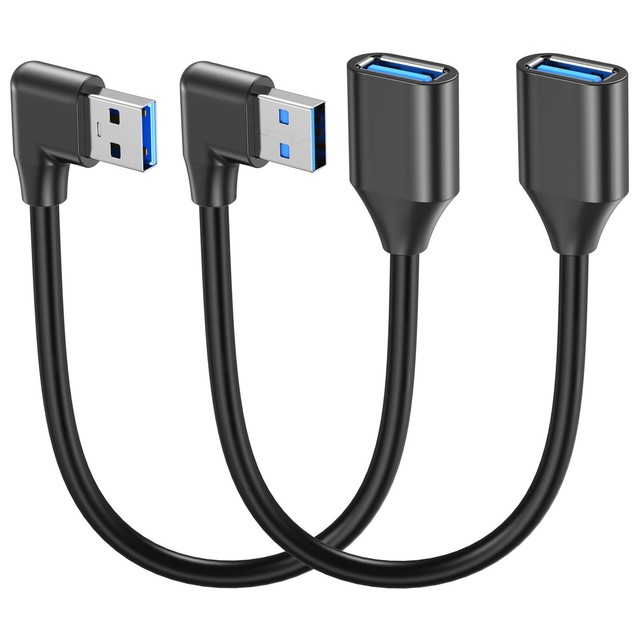
Small but genuinely useful. An IR receiver dongle needs to see the room, and the USB ports on an HTPC usually face the wall. A short extension brings the dongle round to the front of the cabinet where it can actually receive, and a right-angle adapter stops a dongle sticking straight out of a port in a tight space where it will eventually get knocked. Together they cost a few dollars and they solve the most mundane version of ‘my remote only works if I stand up’.
- 0.3-1 m USB extension leads
- Right-angle USB adapters in several orientations
- Shielded cable to avoid interference
- Adhesive clips for tidy routing
- Puts the sensor where it can actually see the remote
- Prevents a dongle being snapped off in a tight space
- Costs almost nothing
- Unshielded cheap leads can pick up interference
- Another thing to route out of sight
Buying tips
- Decide first whether you want to keep your existing remote. If yes, buy a learning HID receiver like FLIRC — it stores the mapping in the dongle and the computer just sees a keyboard. If you are happy with a dedicated Media Center handset, an MCE/eHome receiver does the same job natively on Windows for a third of the price. That single question eliminates most of this list.
- HID keyboard emulation is why the driverless receivers Just Work. Kodi, Plex, Jellyfin and Emby all have keyboard shortcuts built in, so a receiver pretending to be a keyboard needs no application configuration at all. That is also its one limitation: it can only send what a keyboard can send, so anything needing a custom command still wants LIRC.
- Waking the PC from off is a motherboard feature, not a receiver feature. Only a receiver drawing standby power — usually an internal one on a USB header — can do it, and only if your BIOS supports and enables USB wake from S5. Check the BIOS before buying a receiver specifically for this; plenty of boards simply cannot do it.
- Unreliable range is almost always placement, not hardware. An IR sensor needs line of sight, and an HTPC pushed to the back of a cabinet with a glass door in front of it is fighting physics. An extender eye stuck to the front of the cabinet costs very little and fixes it completely. Try that before concluding the receiver is faulty.
- Watch out for infrared interference from lighting and sunlight. Some compact fluorescents, cheap LED drivers and direct sunlight all emit in the infrared band and will swamp a receiver. If your remote works at night and not in the afternoon, or works with the lamp off and not on, that is the cause — move the sensor rather than replacing it.
- Point your existing remote at the receiver during setup, not at the TV. It sounds obvious and it is the most common first-time mistake with a learning dongle. A learning receiver captures the code it is shown, so a partially captured or reflected signal produces a mapping that works sometimes. Hold the remote close and steady for each key.
- Map a smaller set of buttons than you think you need. Play/pause, stop, the four arrows, enter, back and volume cover nearly all real use. Mapping thirty buttons produces a handset nobody remembers and multiplies the chance of a duplicate assignment that makes a key behave unpredictably. Start small and add what you actually miss.
- Test a used MCE receiver by protocol, not by picture. Second-hand eHome receivers are cheap and plentiful, and they look alike. What matters is that it is an RC6 receiver and that Windows shows it under Human Interface Devices as a Microsoft eHome Infrared Transceiver. If it appears as an unknown device needing a driver, it is not the native-support part you wanted.
As an Amazon Associate and eBay Partner, toptenpick.com earns from qualifying purchases. Prices and availability are subject to change.