


As an Amazon Associate and eBay Partner, toptenpick.com earns from qualifying purchases. Prices and availability are subject to change.
Almost every guide to this budget walks you through the same exercise: pick a cheap processor, a cheap motherboard, 8 GB of RAM, an SSD and a cabinet, and assemble them into a new machine. It is a perfectly reasonable article. It also ignores the option that will give most people considerably more computer for the same money.
An ex-corporate refurbished desktop. Companies buy Dell OptiPlex, HP EliteDesk and Lenovo ThinkCentre machines in enormous quantities on three- or four-year replacement cycles, and when those cycles end the machines flood the refurbished market. The prices are startling for what they are: an HP EliteDesk 800 with a Core i5 around ₹11,500, a Dell OptiPlex 3050 with an i5, 8 GB and a 256 GB SSD around ₹12,500, an OptiPlex 7050 small-form-factor around ₹13,500. Meanwhile a genuinely new build at ₹15,000 buys you an entry-level current-generation processor — and a four-generations-old Core i5 comfortably outruns a brand-new budget chip for ordinary work.
There is more to it than the processor. These machines were built for corporate IT departments, which means solid steel cases, proper power supplies, thorough cooling, and parts availability that will still be there in five years. Dell’s OptiPlex line in particular is everywhere in India, so a failed power supply or fan is a cheap and easy fix rather than a hunt.
The trade-offs are real and should be stated plainly. A refurbished machine has a short warranty, usually months rather than years, and an unknown history. It uses older RAM and older interfaces, so future upgrades are limited. And small-form-factor and tiny models have low-profile slots or no expansion slots at all, which rules out adding a graphics card later.
One thing applies whichever route you take. If the machine does not have an SSD, nothing else you spend money on matters. The jump from a mechanical hard disk to a solid state drive is the single largest performance change available at this budget, by a wide margin — larger than any processor difference in this price bracket.
Ten picks below, covering both routes and the upgrades that count.
| # | Product | Price | Where to buy |
|---|---|---|---|
| 1 | Refurbished Dell OptiPlex SFF (Core i5) | ₹11,000-₹15,000 | Amazon |
| 2 | Refurbished HP EliteDesk 800 | ₹10,000-₹14,000 | Amazon |
| 3 | Refurbished Tiny / Micro Form Factor PC | ₹10,000-₹14,000 | Amazon |
| 4 | New Budget Build: Entry APU and Motherboard | ₹7,000-₹11,000 for CPU and board | Amazon |
| 5 | NVMe or SATA SSD, 256-512 GB | ₹1,800-₹4,000 | Amazon |
| 6 | DDR4 RAM Upgrade to 16 GB | ₹1,200-₹2,500 | Amazon |
| 7 | Refurbished or Budget Monitor | ₹3,000-₹7,000 | Amazon |
| 8 | Replacement Power Supply (for a New Build) | ₹2,000-₹4,000 | Amazon |
| 9 | Wireless Keyboard and Mouse Set | ₹800-₹2,500 | Amazon |
| 10 | UPS (Uninterruptible Power Supply) | ₹2,500-₹6,000 | Amazon |
The picks, in detail
Refurbished Dell OptiPlex SFF (Core i5)
The most sensible single purchase in this budget for most buyers. An OptiPlex 7050 or 5050 small-form-factor with a Core i5, 8 GB of RAM and a 256 GB SSD lands around ₹13,500 and will handle office work, browsing with many tabs, video calls and light editing without complaint. Dell’s parts availability in India is the practical advantage — a power supply or fan is a phone call rather than a search. Check the generation of the i5 and confirm the SSD is included rather than assumed.
- Intel Core i5, typically 6th to 8th generation
- 8 GB RAM, expandable
- 256 GB SSD in most listings
- Small-form-factor steel chassis
- Far more processor than a new build at this price
- Excellent parts availability across India
- Corporate build quality throughout
- Short warranty, typically months
- Low-profile slots limit graphics card options
Refurbished HP EliteDesk 800
Dell’s main rival in the corporate refurbished market and equally worth considering, often a little cheaper for the same specification — an EliteDesk 800 with a Core i5 turns up around ₹11,500. HP’s business machines are well built and well cooled, and the tool-less chassis design makes opening one up to add RAM or a drive genuinely easy. As with any refurbished machine, the specification in the listing matters far more than the model name; two EliteDesk 800s can be four generations apart.
- Intel Core i5 across several generations
- Tool-less chassis access
- SFF, tower and tiny form factors
- Business-grade power supply and cooling
- Often slightly cheaper than an equivalent OptiPlex
- Tool-less access makes upgrades simple
- Available in several form factors
- Model names span many generations — check the CPU
- Proprietary power supply in some variants
Refurbished Tiny / Micro Form Factor PC
The one-litre corporate machines — OptiPlex Tiny, EliteDesk Mini, ThinkCentre Tiny — and a genuinely appealing option if desk space matters. A Dell OptiPlex 3050 Tiny with an i5, 8 GB and a 256 GB SSD sits around ₹12,500, uses very little power, is nearly silent, and can be mounted behind a monitor. The trade-off is absolute: there are no expansion slots, so what you buy is what you will always have apart from RAM and storage. For office work that is not a limitation.
- Roughly one-litre chassis
- Core i5 mobile-class processors
- Very low power consumption and noise
- VESA mounting behind a monitor
- Takes almost no desk space
- Nearly silent and very cheap to run
- Excellent for office and study machines
- No expansion slots at all
- External power brick to keep track of
New Budget Build: Entry APU and Motherboard
The route the other guides describe, and it does have real advantages: a full warranty on every part, current-generation interfaces, and a machine you can upgrade for years. A modern entry-level processor with integrated graphics plus a matching motherboard is the starting point, and you avoid needing a graphics card at all. Be realistic about performance — at this price the processor will be an entry-level part, and a refurbished i5 will beat it at most things.
- Current-generation entry processor with integrated graphics
- New motherboard with current interfaces
- Full warranty on every component
- Upgrade path for several years
- Warranty on everything
- Modern interfaces and upgrade path
- You choose every component
- Entry processor is outperformed by an older i5
- ₹15,000 does not stretch far once a cabinet and PSU are included
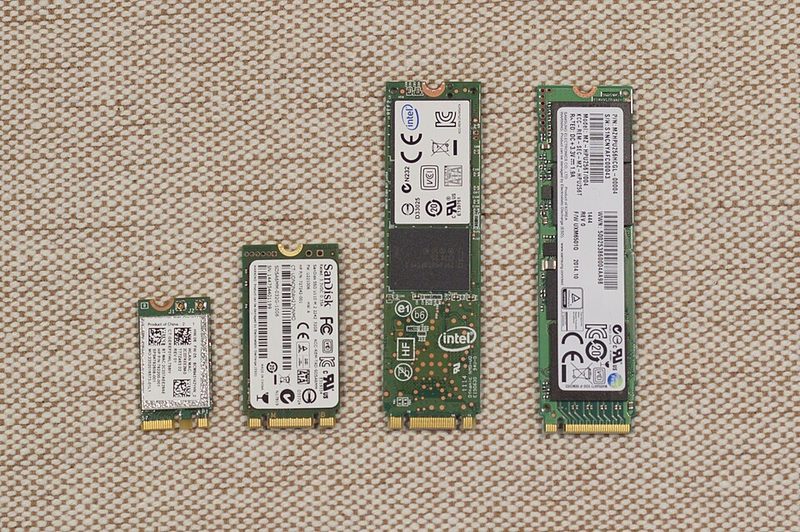 MSATA SATA M.2 NVMeSSD by ガラパリ (CC BY-SA 4.0)
NVMe or SATA SSD, 256-512 GB
The most important component at this budget, without qualification. Moving from a mechanical hard disk to an SSD changes boot times, application launches and general responsiveness more than any processor upgrade available for this money — the difference is measured in multiples, not percentages. If a refurbished machine is listed with a hard disk, subtract the cost of an SSD from what it appears to save you. 256 GB is workable, 512 GB is comfortable.
- NVMe M.2 or 2.5 inch SATA
- 256 GB to 512 GB capacities
- Three to five year warranties typical
- DRAM-less budget and DRAM-equipped options
- The single biggest performance change available here
- Cheap, and prices keep falling
- Transforms an otherwise slow older machine
- Older machines may have no M.2 slot — check before buying NVMe
- Very cheap DRAM-less drives slow down when nearly full
DDR4 RAM Upgrade to 16 GB
The second-biggest change, and cheap on the platforms these refurbished machines use. 8 GB is workable and 16 GB is where a machine stops hesitating when you have a browser with thirty tabs, a video call and a spreadsheet open at once — which is what most people actually do. Second-hand DDR4 is plentiful and inexpensive because the whole corporate fleet is moving on. Match the speed and type to what is already installed, or replace both sticks together.
- DDR4 DIMM or SODIMM depending on form factor
- 8 GB modules to reach 16 GB total
- Matched pairs for dual-channel operation
- Widely available new and used
- Stops the machine hesitating under real multitasking
- Very cheap on DDR4 platforms
- Simple to fit on any of these machines
- Tiny form factors use SODIMM, not desktop DIMM
- Mismatched sticks can disable dual-channel mode
Refurbished or Budget Monitor
Easy to forget in the budget, and the thing you actually look at for eight hours. The corporate refurbished market applies here too — 22 to 24 inch office monitors come off the same replacement cycles as the desktops and cost very little. Look for an IPS panel rather than TN: the viewing angles and colour are noticeably better, and the price difference at this size is now small. Check the input the machine actually has before buying, since older desktops often carry DisplayPort rather than HDMI.
- 22-24 inch, 1080p
- IPS panel on better units
- VGA, DVI, HDMI or DisplayPort inputs
- Height-adjustable stands on business models
- Business refurbished monitors are excellent value
- IPS gives much better colour and angles than TN
- Height-adjustable stands are standard on corporate models
- Check the video output your PC actually has
- Backlights dim with age on old panels
Replacement Power Supply (for a New Build)
The component to not economise on if you are building new, because a failing supply can take other parts with it when it goes. Look for a unit from a known brand with a genuine efficiency rating rather than a wildly optimistic wattage number on a plain box — bundled cabinet-and-PSU deals are where the cost cutting on a budget build usually hides. Work out what your parts actually draw; an integrated-graphics build needs far less than the numbers marketing suggests.
- 80 Plus efficiency certification
- Known-brand manufacture
- Adequate rather than inflated wattage
- Three to five year warranty on good units
- A failing PSU can damage everything attached to it
- Efficiency certification means the rating is real
- Good units outlast several builds
- Bundled cabinet-plus-PSU deals are almost always poor
- Quoted wattages on no-name units are fiction
Wireless Keyboard and Mouse Set
A small purchase that makes a big difference to daily use, and one people leave until last and then buy badly. A decent wireless set with a single USB receiver keeps the desk tidy — worth noting that a tiny form factor PC has few USB ports, so one receiver for both devices matters more than it sounds. Look for a full-size layout with a number pad if you work with spreadsheets, and check that the keyboard has proper key travel rather than a flat membrane.
- Single unifying receiver for both devices
- Full-size layout with number pad
- Long battery life on wireless sets
- Quiet switch options
- One USB port for both devices
- Tidy desk with no cables
- Cheap and immediately better than bundled peripherals
- Batteries to replace or recharge
- Very cheap sets have mushy key feel
UPS (Uninterruptible Power Supply)
Worth serious consideration in most of India, and not only for the obvious reason. A UPS keeps the machine running through a cut so you do not lose work, and it also conditions the supply — an abrupt loss of power during a write is one of the more effective ways to corrupt a file system or damage a drive. A 600 to 1,000 VA unit covers a desktop and a monitor for long enough to save and shut down properly. Check the runtime at your actual load, not the headline figure.
- 600-1,000 VA for a desktop and monitor
- Automatic voltage regulation on better units
- Audible alarm and software shutdown support
- Replaceable battery
- Prevents lost work and file system corruption
- AVR smooths the sags that stress a power supply
- Cheap relative to the machine it protects
- Batteries need replacing every three to five years
- Quoted runtimes assume a much lighter load
Buying tips
- Compare a refurbished corporate desktop before you build new. An ex-office Dell OptiPlex or HP EliteDesk with a Core i5 costs ₹11,000 to ₹14,000 and will comfortably outperform any brand-new machine you can assemble for ₹15,000, because that budget buys an entry-level current chip. The build quality and parts availability are better too.
- An SSD is not optional. The move from a mechanical hard disk to a solid state drive is the largest performance change available at this budget, by a wide margin — bigger than any processor difference here. If a listing quotes a hard disk, add the cost of an SSD to the real price before comparing it with anything else.
- Check the processor generation, not the model name. An OptiPlex 7050 and an OptiPlex 3020 are both ‘OptiPlex’, and they are years apart in performance and in how long they will keep receiving operating system support. Find the exact processor model in the listing and look up its generation before deciding anything.
- Ask what the warranty actually is. Refurbished machines typically carry months rather than years, and sellers vary enormously in what they will do when something fails. That short warranty is the real price of the extra performance. Buy from a seller with a returns policy you have actually read.
- Small-form-factor and tiny machines cannot take a graphics card. SFF cases take only low-profile cards and tiny machines have no slots at all. If there is any chance you will want to game or do GPU work later, buy a full tower — new or refurbished — even though it takes more space. This is the one decision that cannot be reversed later.
- Sixteen gigabytes of RAM is the second-best upgrade. Eight is workable; sixteen is where the machine stops pausing when you have a browser full of tabs, a video call and a spreadsheet at once. DDR4 is cheap right now because the entire corporate fleet is moving past it. Match the type — tiny machines take laptop SODIMMs, not desktop DIMMs.
- Budget for the monitor, keyboard and mouse. They are easy to forget and they are what you touch all day. The same corporate refurbished market that supplies the desktops supplies excellent 24-inch IPS monitors with height-adjustable stands for very little. Check which video output your machine has first — older desktops often have DisplayPort rather than HDMI.
- Add a UPS if your supply is unreliable. It is not just about not losing work: losing power during a disk write can corrupt a file system, and repeated abrupt cuts stress a power supply. A modest 600 to 1,000 VA unit gives you long enough to save and shut down properly, and costs a fraction of the machine.
As an Amazon Associate and eBay Partner, toptenpick.com earns from qualifying purchases. Prices and availability are subject to change.