

As an Amazon Associate and eBay Partner, toptenpick.com earns from qualifying purchases. Prices and availability are subject to change.
Epic is light on raw graphics power but heavy on screen time, multi-window multitasking, and all-day reliability, so the laptops that work best for clinicians and health-system IT staff are business-grade machines with strong keyboards, long battery life, and enough RAM to keep Epic Hyperspace, a browser, and Outlook open at once. Here are nine current options across price points, from ultralight business flagships to a budget browser-based Chromebook.
| # | Product | Price | Where to buy |
|---|---|---|---|
| 1 | Lenovo ThinkPad X1 Carbon Gen 13 | $1,600-$2,200 | Amazon · eBay |
| 2 | Apple MacBook Air 13-inch (M5) | $1,299-$1,599 | Amazon · eBay |
| 3 | Dell Latitude 7450 2-in-1 | $1,500-$2,000 | Amazon · eBay |
| 4 | Dell Latitude 5550 | $800-$950 | Amazon · eBay |
| 5 | HP EliteBook 840 G11 | $1,300-$1,800 | Amazon · eBay |
| 6 | Lenovo ThinkPad T14s Gen 6 | $999-$1,300 | Amazon · eBay |
| 7 | Microsoft Surface Pro for Business (12th Edition) | $1,000-$1,600 (with keyboard) | Amazon · eBay |
| 8 | ASUS Chromebook Plus CX34 | $350-$500 | Amazon · eBay |
| 9 | Panasonic Toughbook FZ-40 MK2 | $2,200-$3,300 | Amazon · eBay |
The picks, in detail

Lenovo ThinkPad X1 Carbon Gen 13
The class-leading business ultralight, built for clinicians who carry a laptop all shift.
- Intel Core Ultra processor
- Sub-2.5 lb carbon-fiber chassis
- Optional OLED display
- Full enterprise device management support
- Excellent keyboard for long charting sessions
- All-day battery life
- Premium price

Apple MacBook Air 13-inch (M5)
Fast, silent, and cool-running for reviewing charts and lab images with several tabs open.
- Apple M5 chip
- 16GB unified memory standard
- 18-hour battery life
- Liquid Retina display
- Bright, crisp screen for chart review
- Long battery life, no fan noise
- Epic runs through a browser/Citrix, not natively

Dell Latitude 7450 2-in-1
A touchscreen 2-in-1 business laptop for mobile rounds where tapping a chart is faster than typing.
- Intel Core Ultra 7 165H
- 360-degree hinge (laptop/tablet/tent modes)
- MIL-STD-810H tested
- Thunderbolt 4
- Touchscreen speeds up quick chart taps
- Durable aluminum chassis
- Heavier than a pure ultrabook
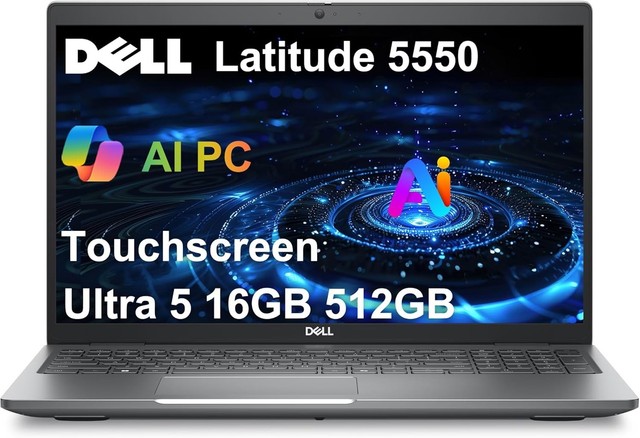
Dell Latitude 5550
The value pick for health systems deploying dozens of identical machines to staff.
- 14-inch business laptop
- Fleet-friendly imaging and management
- Backlit keyboard
- Wi-Fi 6E
- Lower cost per unit for IT deployments
- Reliable, no-frills build
- Less premium materials than the 7000 series

HP EliteBook 840 G11
Expandable up to 64GB RAM, so Epic, a browser with a dozen tabs, and Outlook never fight for memory.
- Intel Core Ultra with NPU
- Up to 64GB DDR5 RAM
- NVMe SSD storage
- Multiple Thunderbolt 4 ports
- Best-in-class multitasking headroom
- Strong enterprise security features
- Wi-Fi 6E, not the newest Wi-Fi 7 standard

Lenovo ThinkPad T14s Gen 6
Roughly 90% of the X1 Carbon experience for meaningfully less money.
- Intel Core Ultra processor
- Spill-resistant keyboard
- MIL-SPEC durability testing
- 14-inch display
- Great value for a business-grade keyboard and build
- Long battery life
- Slightly heavier and thicker than the X1 Carbon

Microsoft Surface Pro for Business (12th Edition)
A detachable 2-in-1 for staff who want a tablet at the bedside and a laptop at the desk.
- Intel Core Ultra Series 3 (business config)
- 13-inch touchscreen
- Detachable keyboard
- Kickstand design
- Genuinely usable as a tablet for quick lookups
- Good display for chart review
- Keyboard sold separately
- Typing for long notes is less comfortable than a clamshell
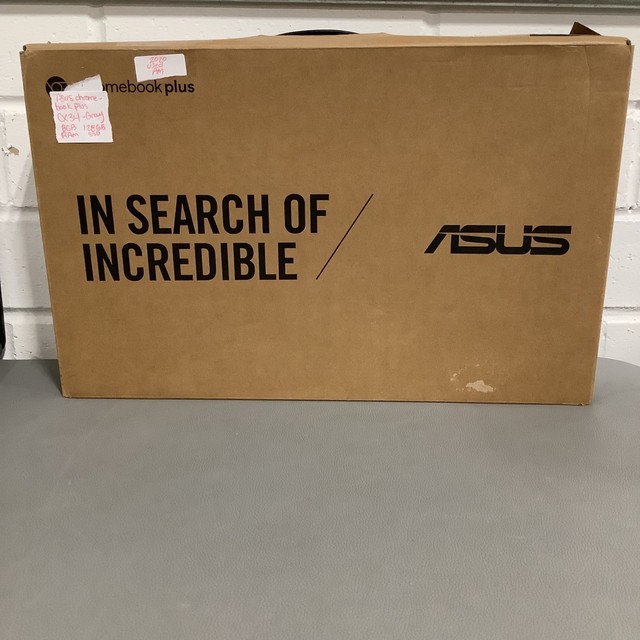
ASUS Chromebook Plus CX34
A budget option for staff who only need Epic through a browser or Citrix session.
- Intel Core i5 processor
- ChromeOS
- Solid port selection
- Fast boot times
- Very low cost per seat
- Low maintenance, automatic updates
- Won’t run Windows-only desktop software

Panasonic Toughbook FZ-40 MK2
A rugged, spill- and dust-sealed option for ED, field nursing, or high-turnover shared carts.
- Intel Core Ultra 7 165H vPro
- MIL-STD-810H / IP66 sealing
- 14-inch touchscreen
- Modular expansion bay
- Survives drops, spills, and heavy daily handling
- Sealed keyboard resists liquid ingress
- Significantly pricier and heavier than a standard business laptop
Buying tips
- Prioritize RAM (16GB minimum, 32GB+ if budget allows) over raw CPU speed — Epic’s own footprint is light, but clinicians run it alongside a browser and email all day.
- If your health system delivers Epic through Citrix or a browser, a Chromebook or entry-level machine is genuinely enough — don’t overpay for power you won’t use.
- A spill-resistant keyboard is worth paying for in any clinical setting; hand sanitizer and coffee both find their way onto shared workstations.
As an Amazon Associate and eBay Partner, toptenpick.com earns from qualifying purchases. Prices and availability are subject to change.