

As an Amazon Associate and eBay Partner, toptenpick.com earns from qualifying purchases. Prices and availability are subject to change.
Emulation is mostly a single-threaded problem, and that single fact overturns how people shop for a cheap laptop. An emulator has to reproduce the behaviour of a console’s main processor in order, instruction by instruction, and that work cannot be spread across cores. Dolphin, PCSX2 and Yuzu-style emulators all lean hard on one or two fast threads. So a budget laptop with eight slow cores is worse at this job than one with four fast ones, even though the spec sheet looks more impressive — and the number to compare is single-core benchmark score, not core count and not the gigahertz figure on the box.
The second thing that separates a usable cheap laptop from a frustrating one is sustained performance, and no spec sheet lists it. A thin budget chassis with one small fan hits its thermal limit within a few minutes and then runs at a fraction of its benchmark speed. Emulation is a sustained load, not a burst — you are playing for an hour, not running a two-minute test. This is why a slightly thicker laptop with proper cooling routinely outperforms a thinner one with a better-sounding processor, and why reading a review that measures performance after thirty minutes is worth more than reading the specification.
Know which era you are actually targeting, because the requirements are wildly different. Everything up to and including the PlayStation 1, SNES, Mega Drive, Game Boy Advance and arcade systems will run on essentially any laptop made in the last decade, including cheap ones with integrated graphics. Nintendo DS and PSP are comfortable. GameCube and Wii need a genuinely capable single core. PlayStation 2 is harder than either. Switch and PlayStation 3 emulation are demanding enough that “cheap laptop” and “good experience” do not really overlap — be honest with yourself about which list you are shopping for.
On graphics: integrated is fine for most of this, and the thing that limits it is memory bandwidth. An integrated GPU has no memory of its own and borrows the system RAM, so dual-channel memory is close to mandatory — a cheap laptop shipped with a single 8 GB stick gives up a large chunk of graphics performance for want of a second stick that costs very little. If you buy one, check whether the RAM is upgradeable and whether it is running in dual channel.
Finally, a Chromebook is a qualified yes rather than a no. Modern Chromebooks run Android apps and, on many models, a Linux container, so RetroArch and lighter emulators work. The desktop Windows builds of the demanding emulators do not, and a low-end Chromebook’s processor is the same constraint as anywhere else.
| # | Product | Price | Where to buy |
|---|---|---|---|
| 1 | Refurbished Business Laptop with an Intel Core i5 or i7 (8th gen or newer) | $200–$400 | Amazon |
| 2 | Laptop with AMD Ryzen 5 and Radeon Integrated Graphics | $400–$600 | Amazon · eBay |
| 3 | Laptop with Intel Core Ultra or 12th Gen and Iris Xe Graphics | $450–$700 | Amazon · eBay |
| 4 | Gaming Laptop with an Entry Dedicated GPU (used or last-gen) | $450–$800 | Amazon |
| 5 | Second RAM Stick for Dual-Channel | $25–$60 | Amazon · eBay |
| 6 | USB Gamepad (8BitDo or Xbox Controller) | $30–$60 | Amazon · eBay |
| 7 | Laptop Cooling Pad | $20–$45 | Amazon · eBay |
| 8 | NVMe SSD Upgrade | $40–$100 | Amazon · eBay |
| 9 | Chromebook Plus (with Android and Linux support) | $300–$500 | Amazon · eBay |
| 10 | Dedicated Handheld Emulation Device | $80–$250 | Amazon · eBay |
The picks, in detail
Refurbished Business Laptop with an Intel Core i5 or i7 (8th gen or newer)
The best value in this whole category and the one most guides skip. An off-lease ThinkPad, Latitude or EliteBook with a quad-core 8th-generation-or-later chip gives you strong single-core performance, a proper cooling system designed for all-day load, upgradeable RAM and a real keyboard — usually for less than a new entry-level machine. Buy from a refurbisher with a warranty rather than an auction listing.
- Quad-core Intel or Ryzen mobile processor
- Upgradeable RAM and storage on most models
- Business-grade cooling and build
- Sold refurbished with a warranty
- Highest single-core performance per pound in this bracket
- Cooling designed for sustained load rather than benchmarks
- RAM upgradeable to dual channel cheaply
- Cosmetic wear and an already-used battery
- Model availability is whatever the refurbisher has
- Older integrated graphics on pre-11th-gen Intel

Laptop with AMD Ryzen 5 and Radeon Integrated Graphics
AMD’s integrated Radeon graphics are substantially stronger than Intel’s older UHD parts, and on a budget machine the GPU is frequently what limits GameCube and PS2 emulation once the CPU is adequate. A Ryzen 5 with Radeon graphics is the sensible new-laptop default under this budget. Check the memory configuration before buying — these benefit enormously from dual channel.
- Ryzen 5 mobile processor
- Radeon integrated graphics
- Usually 8 or 16 GB RAM
- SSD storage as standard
- Much stronger integrated graphics than budget Intel
- Good single-core performance for the price
- Widely available new
- Often shipped with a single RAM stick — check and fix
- Thin chassis models throttle under sustained load
- Screen quality is usually the cut corner

Laptop with Intel Core Ultra or 12th Gen and Iris Xe Graphics
Intel’s Iris Xe integrated graphics closed most of the gap with AMD and these chips have excellent single-core performance, which is the specification that matters most here. A 12th-generation or newer Core i5 handles GameCube and Wii comfortably and makes a decent attempt at PS2. As always, the cooling in the specific chassis decides whether you get the benchmark performance for more than five minutes.
- 12th gen or newer Intel Core processor
- Iris Xe integrated graphics
- Strong single-core benchmark scores
- Thunderbolt on many models
- Excellent single-core performance, which is the binding constraint
- Iris Xe is capable for integrated graphics
- Thunderbolt allows an external GPU later
- Thin models throttle hard under sustained load
- Often sold with soldered single-channel memory
- Battery life suffers under emulation load
Gaming Laptop with an Entry Dedicated GPU (used or last-gen)
A last-generation or used gaming laptop is the honest answer if PlayStation 2 and Wii at higher internal resolutions are the goal. A dedicated GPU removes the memory-bandwidth ceiling entirely, and — more importantly for this job — gaming chassis have cooling designed for sustained load, so the processor holds its clocks. Heavy, loud and with poor battery life, which is the trade.
- Dedicated NVIDIA or AMD mobile GPU
- Cooling designed for sustained load
- Upgradeable RAM and storage on most
- Higher refresh displays
- Holds performance for hours rather than minutes
- Dedicated GPU lifts internal resolution comfortably
- Good used value as models age
- Heavy, loud and poor on battery
- Used units may have degraded thermal paste
- Larger than most people want to carry

Second RAM Stick for Dual-Channel
The cheapest meaningful upgrade available to a budget laptop with integrated graphics, and the one most people never make. An integrated GPU has no memory of its own and borrows system RAM, so running a single stick halves the available bandwidth. Adding a matching second stick can lift integrated graphics performance substantially for the price of a takeaway. Check the laptop has a free slot and is not soldered.
- SO-DIMM matching the existing stick’s speed
- Enables dual-channel operation
- Requires a free slot — many thin laptops have none
- DDR4 or DDR5 depending on the machine
- Large integrated-graphics gain for very little money
- Ten-minute job on most business laptops
- Also raises total RAM
- Soldered memory on many thin and cheap laptops means it is impossible
- Mismatched speeds run at the slower stick’s rate
- Requires opening the machine, which may affect warranty

USB Gamepad (8BitDo or Xbox Controller)
Emulation on a keyboard is a poor experience and this is the cheapest thing that fixes it. A modern pad with enough buttons handles both the game and the emulator hotkeys — save state, load state, rewind, menu — which a period-accurate two-button pad cannot. An Xbox controller is the path of least resistance on Windows because everything supports its layout natively.
- USB or 2.4 GHz wireless connection
- Full modern button layout with triggers
- Recognised natively by Windows
- Rumble support
- Transforms the experience for very little money
- Enough buttons for emulator hotkeys as well as the game
- Works with every emulator without configuration
- Wireless versions need charging or batteries
- D-pads on some modern pads are poor for 2D games
- Another thing to carry
Laptop Cooling Pad
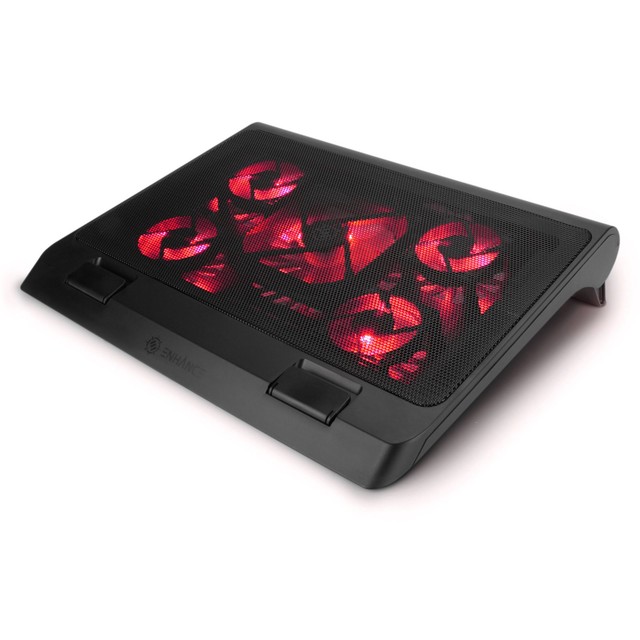
Unfashionable and genuinely effective on exactly the machines this article is about. A cheap budget chassis chokes itself within minutes of a sustained load, and a pad that feeds cool air into the intake underneath buys back some of the clock speed that thermal limits took away. It will not turn a slow laptop into a fast one, but it can stop a fast one becoming slow after ten minutes.
- One or more fans feeding the underside intakes
- USB powered
- Adjustable height and angle
- Various sizes by laptop footprint
- Directly addresses the sustained-performance problem
- Cheap
- Also improves ergonomics through the raised angle
- Useless if the laptop’s intakes are on the sides
- Adds fan noise of its own
- Only helps a machine that is genuinely thermally limited

NVMe SSD Upgrade
Relevant for a specific reason rather than general speed: emulated disc-based systems — PlayStation 1 and 2, GameCube, Wii — stream large images, and a laptop still running a mechanical hard drive stutters on loading in a way that looks like an emulation problem but is not. If a cheap or refurbished machine has a spinning disk, replacing it is the first thing to do and it costs very little.
- M.2 NVMe or SATA depending on the machine
- 500 GB to 2 TB capacities
- Cloning software usually included
- Simple replacement on most business laptops
- Removes stutter that gets misattributed to the emulator
- Cheap per gigabyte now
- Improves everything else the laptop does
- Requires opening the machine and cloning the drive
- Older laptops may only take SATA, not NVMe
- Game libraries fill any capacity
Chromebook Plus (with Android and Linux support)
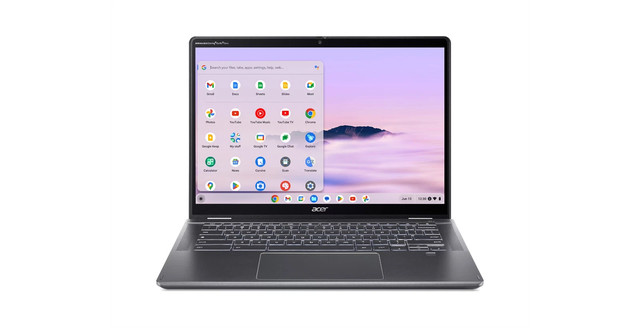
A qualified recommendation rather than a dismissal. A current Chromebook runs Android apps and, on most models, a Linux container — so RetroArch and standalone emulators up to roughly PSP and Nintendo DS work perfectly well, on excellent battery life, for very little money. What does not work is the Windows desktop builds of the demanding emulators, and the processor in a cheap Chromebook is the same constraint as anywhere else.
- ChromeOS with Android app support
- Linux container on most current models
- Long battery life and instant wake
- Check the update expiry date before buying
- Excellent value and battery life for 8-bit through PSP era
- RetroArch runs well via Android or Linux
- Silent and light
- Windows emulator builds do not run at all
- Underpowered for GameCube, Wii and PS2
- Fixed update expiry dates limit useful life

Dedicated Handheld Emulation Device
Worth naming because for a lot of people it is the better purchase. A handheld built for this — running Android or Linux with an integrated screen and controls — costs less than a laptop, plays everything up to roughly PSP and Dreamcast comfortably, and needs no configuration or controller. If the laptop was only ever going to be an emulation machine, this does the job better and fits in a pocket.
- Integrated screen and controls
- Android or Linux based
- Pre-configured emulation front end
- Several performance tiers
- Cheaper than a laptop and purpose-built
- No controller or configuration needed
- Genuinely portable
- Cannot do anything else a laptop does
- Higher tiers needed for GameCube and above cost as much as a laptop
- Firmware and support vary wildly between makers
Buying tips
- Compare single-core benchmark scores, not core counts or clock speed. Emulation reproduces a console’s processor instruction by instruction and that work does not spread across cores.
- Decide which era you are shopping for. Everything up to PS1 and GBA runs on anything; GameCube and Wii need a genuinely fast single core; PS2 is harder still; Switch and PS3 do not belong in a cheap-laptop conversation.
- Read reviews that measure sustained performance, not peak. A thin budget chassis hits its thermal limit in minutes, and emulation is an hour-long load rather than a two-minute benchmark.
- Check the memory configuration before buying. Integrated graphics borrow system RAM, so a laptop shipped with one stick gives up a lot of graphics performance for want of a second cheap one.
- Replace a mechanical hard drive before blaming the emulator. Disc-based systems stream large images, and a spinning disk produces stutter that looks exactly like an emulation fault.
- Buy refurbished business machines rather than new budget ones. They have better single-core chips, cooling built for all-day load, and upgradeable memory, usually for less money.
- Budget for a controller. Emulation on a keyboard is poor, and a modern pad has enough buttons for save states and hotkeys as well as the game.
- Consider a dedicated handheld instead. If the laptop’s only job is emulation, a purpose-built handheld is cheaper, pre-configured and does everything up to roughly PSP better.
As an Amazon Associate and eBay Partner, toptenpick.com earns from qualifying purchases. Prices and availability are subject to change.