

As an Amazon Associate and eBay Partner, toptenpick.com earns from qualifying purchases. Prices and availability are subject to change.
The i7-6800K is a Broadwell-E chip on the X99 platform, and buying memory for it follows different rules than a modern build. Three things decide whether a kit is right. First, quad channel: the 6800K has a four-channel memory controller, so a 4×8 GB kit meaningfully outperforms a 2×16 GB kit of the same capacity and speed. Buy four matched sticks, and populate the slots your board’s manual specifies — usually alternating colours — or you will silently run in dual channel. Second, the official speed is DDR4-2133, with 2400 the practical sweet spot. Broadwell-E was famously inconsistent above that, and there is a specific trap worth knowing: on many X99 boards, memory above 2666 MHz is reached by raising the base clock, which overclocks the CPU as a side effect. That is fine if you intended it and a source of mysterious instability if you did not. Third, the QVL. X99 is a decade-old platform now and memory training is fussy; checking your specific motherboard’s qualified vendor list is worth more here than on any current platform. Capacity is the easy part — 32 GB (4×8) is the sensible target and 64 GB (4×16) is worth it only for genuine workstation loads. One honest note: this is a used-market exercise in 2026. Most kits below are bought second-hand or as old stock, so condition and seller reputation matter as much as the part number.
| # | Product | Price | Where to buy |
|---|---|---|---|
| 1 | Corsair Vengeance LPX 32 GB (4×8 GB) DDR4-2400 — CMK32GX4M4A2400C14 | $70–$120 | Amazon · eBay |
| 2 | G.Skill Ripjaws 4 32 GB (4×8 GB) DDR4-2400 — F4-2400C15Q-32GRK | $75–$130 | Amazon · eBay |
| 3 | G.Skill Ripjaws V 64 GB (4×16 GB) DDR4-3200 — F4-3200C16Q-64GVK | $150–$230 | Amazon · eBay |
| 4 | Corsair Dominator Platinum 32 GB (4×8 GB) DDR4-3000 | $140–$220 | Amazon · eBay |
| 5 | Crucial Ballistix Sport LT 32 GB (4×8 GB) DDR4-2666 | $70–$115 | Amazon · eBay |
| 6 | Kingston HyperX Fury 32 GB (4×8 GB) DDR4-2666 | $65–$110 | Amazon · eBay |
| 7 | G.Skill Trident Z 32 GB (4×8 GB) DDR4-3200 | $150–$240 | Amazon · eBay |
| 8 | Corsair Vengeance LPX 64 GB (4×16 GB) DDR4-2666 | $140–$210 | Amazon · eBay |
| 9 | Patriot Viper 4 32 GB (4×8 GB) DDR4-3000 | $90–$150 | Amazon · eBay |
| 10 | Crucial 32 GB (4×8 GB) DDR4-2400 — CT4K8G4DFD824A | $60–$100 | Amazon · eBay |
The picks, in detail

Corsair Vengeance LPX 32 GB (4×8 GB) DDR4-2400 — CMK32GX4M4A2400C14
The default X99 answer: a true quad-channel kit at the speed Broadwell-E is genuinely happy with, at tight CL14 timings.
- 4 × 8 GB, quad channel
- DDR4-2400 CL14
- Low-profile heatspreader
- CL14 at 2400 is a better real-world result than looser 3000
- Low profile clears big X99 air coolers
- Very widely available second-hand
- Not exciting on a spec sheet
- Prices vary wildly on the used market

G.Skill Ripjaws 4 32 GB (4×8 GB) DDR4-2400 — F4-2400C15Q-32GRK
Designed for X99 specifically rather than adapted to it — the Ripjaws 4 line exists because of this platform.
- 4 × 8 GB quad-channel kit
- DDR4-2400 CL15
- Unbuffered non-ECC with heatspreader
- Built and binned for X99 from the start
- Appears on most X99 QVLs
- Reliable memory training on older boards
- Tall heatspreaders can foul wide CPU coolers
- Long discontinued, so new stock is scarce

G.Skill Ripjaws V 64 GB (4×16 GB) DDR4-3200 — F4-3200C16Q-64GVK
The capacity option for actual workstation use — but read the base-clock warning before you buy for the 3200 rating.
- 4 × 16 GB, 64 GB total
- DDR4-3200 CL16
- Quad-channel kit
- 64 GB in four slots leaves the other four free
- Will happily downclock to 2400 for stability
- Still in production, so buying new is possible
- Reaching 3200 on X99 usually means raising base clock
- Overkill and overpriced for gaming
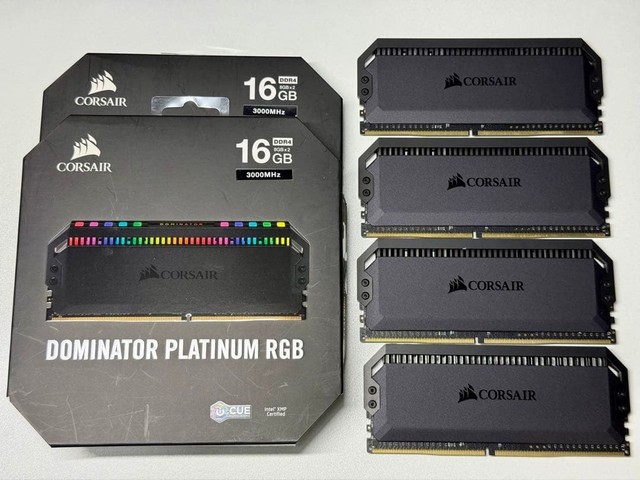
Corsair Dominator Platinum 32 GB (4×8 GB) DDR4-3000
The premium X99-era kit, with the best binned ICs of its generation and the heatspreaders to match.
- 4 × 8 GB quad channel
- DDR4-3000
- Corsair DHX cooling
- Among the best-binned DDR4 of the X99 era
- Handles manual timing tuning well
- Looks the part in a showcase build
- Very tall — check cooler clearance carefully
- Commands a collector premium used

Crucial Ballistix Sport LT 32 GB (4×8 GB) DDR4-2666
The value pick right at the ceiling of what the 6800K does without touching base clock.
- 4 × 8 GB quad channel
- DDR4-2666
- Low-profile aluminium heatspreader
- 2666 is the highest speed that avoids the base-clock trap
- Micron ICs with good compatibility
- Usually the cheapest reputable option
- Looser timings than the 2400 CL14 kits
- The camouflage finish is not to all tastes

Kingston HyperX Fury 32 GB (4×8 GB) DDR4-2666
The set-and-forget option — automatic XMP that just works on a wide range of X99 boards.
- 4 × 8 GB quad channel
- DDR4-2666
- Automatic overclocking to rated speed
- Excellent motherboard compatibility record
- Genuinely plug-and-play on old platforms
- Kingston’s lifetime warranty is often still honoured
- Little manual overclocking headroom
- Plain aesthetic

G.Skill Trident Z 32 GB (4×8 GB) DDR4-3200
The enthusiast X99 kit, for a build where you intend to raise base clock deliberately and tune it.
- 4 × 8 GB quad channel
- DDR4-3200 CL16
- Two-tone aluminium heatspreader
- Strong overclocking headroom for the era
- Well-binned Samsung ICs on many SKUs
- Still the best-looking DDR4 made
- Requires base-clock work on X99, which overclocks the CPU too
- Expensive for the real-world gain

Corsair Vengeance LPX 64 GB (4×16 GB) DDR4-2666
Maximum sensible capacity at a speed that needs no base-clock games — the pragmatic workstation choice.
- 4 × 16 GB, 64 GB total
- DDR4-2666
- Low-profile design
- 64 GB without touching base clock
- Clears tall coolers
- Common enough to find used at fair prices
- 16 GB modules can be fussier to train on old boards
- Real benefit only for VMs and large renders

Patriot Viper 4 32 GB (4×8 GB) DDR4-3000
The budget enthusiast kit — most of the Trident Z experience for meaningfully less money.
- 4 × 8 GB quad channel
- DDR4-3000
- Aluminium heat shield
- Good value against the big-name equivalents
- Handles a manual downclock to 2400 cleanly
- Reasonable timing headroom
- Thinner QVL presence on X99 boards
- Support for a discontinued line is limited

Crucial 32 GB (4×8 GB) DDR4-2400 — CT4K8G4DFD824A
Bare, unheatspread, JEDEC-spec memory. The most boring and most reliably compatible option here.
- 4 × 8 GB quad channel
- DDR4-2400 native JEDEC
- No heatspreader
- Runs at rated speed with no XMP profile needed
- Zero cooler clearance issues
- Micron’s own modules with Micron ICs
- No overclocking headroom at all
- Looks like server memory, because effectively it is
Buying tips
- Buy four sticks, not two. The 6800K has a quad-channel memory controller and a 2×16 GB kit leaves half of it idle — same capacity, meaningfully less bandwidth.
- Populate the slots your motherboard manual specifies. Filling the wrong four leaves you in dual channel with no warning message at all; check with CPU-Z after the first boot.
- Anything above DDR4-2666 on X99 is typically reached by raising the base clock, which overclocks your CPU as a side effect. If you did not intend a CPU overclock, stop at 2666.
- Check your motherboard’s QVL before buying. X99 memory training is fussy, and a decade-old board with an un-updated BIOS can simply refuse a kit that works fine elsewhere.
- DDR4-2400 at CL14 beats DDR4-3000 at CL17 for most real workloads on this platform. Latency in nanoseconds is the number that matters, not the megahertz on the box.
As an Amazon Associate and eBay Partner, toptenpick.com earns from qualifying purchases. Prices and availability are subject to change.