

As an Amazon Associate and eBay Partner, toptenpick.com earns from qualifying purchases. Prices and availability are subject to change.
Primavera P6 has a reputation for needing a workstation, and it is mostly undeserved. The software is a 64-bit Windows database client, not a rendering package: it leans on single-thread processor speed, memory, and above all disk speed, and it barely touches a discrete graphics card. The commonly cited recommended configuration lands around 8–16 GB of RAM on Windows 10 or 11 64-bit with a mid-range processor. What actually makes P6 feel slow is a mechanical drive or a saturated SATA SSD when you open a 20,000-activity schedule, run a full recalculation, or pull a layout with a dozen grouped columns. Three things are worth paying for. An NVMe SSD — this is the single largest real-world difference, and it is why a cheaper machine with NVMe beats a pricier one with SATA on schedule-open time. 16 GB of RAM — 8 GB works, but P6 plus a mail client plus a browser full of document-control tabs is what a real day looks like. A 15 or 16 inch screen at 1920×1080 or better — a Gantt chart is a wide document, and the difference between seeing eight weeks of bars and three is the difference between reading a schedule and scrolling one. Note that P6 Professional is Windows-only; a Mac needs a virtual machine, which is covered at the bottom of this list.
| # | Product | Price | Where to buy |
|---|---|---|---|
| 1 | Dell Inspiron 15 3530 (Core i7-1355U, 16 GB) | $650–$820 | Amazon · eBay |
| 2 | ASUS Zenbook 14 (Core Ultra 7 155U, 16 GB) | $900–$1,150 | Amazon · eBay |
| 3 | Lenovo ThinkPad P16s Gen 3 | $1,100–$1,500 | Amazon · eBay |
| 4 | Lenovo ThinkPad E16 Gen 2 | $800–$1,050 | Amazon · eBay |
| 5 | HP ProBook 460 G11 | $900–$1,200 | Amazon · eBay |
| 6 | Dell Latitude 5550 | $1,100–$1,450 | Amazon · eBay |
| 7 | Lenovo IdeaPad Slim 5 (16 inch) | $600–$780 | Amazon · eBay |
| 8 | HP EliteBook 840 G11 | $1,300–$1,700 | Amazon · eBay |
| 9 | Acer Aspire 5 (15 inch, 16 GB) | $450–$620 | Amazon · eBay |
| 10 | Apple MacBook Air (M4, 16 GB) with Parallels Desktop | $999–$1,399 | Amazon · eBay |
The picks, in detail

Dell Inspiron 15 3530 (Core i7-1355U, 16 GB)
The sensible default. A 13th-generation i7 with strong single-thread turbo, 16 GB of RAM and a 15.6 inch anti-glare FHD panel.
- Intel Core i7-1355U, 10 cores, up to 5.0 GHz
- 16 GB DDR4 with NVMe SSD
- 15.6 inch FHD anti-glare display
- Full-size keyboard with numeric keypad
- Turbo clock is exactly what single-thread recalculation wants
- Anti-glare matters when you live in a Gantt chart all day
- Numeric keypad speeds up duration and cost entry
- U-series chip throttles under sustained load
- Chassis is plastic and flexes

ASUS Zenbook 14 (Core Ultra 7 155U, 16 GB)
The portable pick for planners who live on site visits — Core Ultra 7 performance in a machine that is genuinely light.
- Intel Core Ultra 7 155U
- 16 GB LPDDR5X with NVMe SSD
- 14 inch OLED display
- Thunderbolt 4 and all-day battery
- Genuinely portable without dropping to a weak processor
- OLED contrast makes dense Gantt bars easier to separate
- Charges over USB-C from a phone brick in a pinch
- 14 inch screen is tight for a wide schedule without an external monitor
- Soldered memory — no upgrade path

Lenovo ThinkPad P16s Gen 3
A true mobile workstation at near-consumer money, certified for engineering software and built to a military test spec. Overkill for P6 alone, right if P6 shares the machine with CAD.
- 16 inch display in a workstation chassis
- Independent software vendor certification for AutoCAD and SolidWorks
- Configurable to 64 GB, user-serviceable
- MIL-STD-810 build testing
- 16 inch panel shows meaningfully more of the Gantt
- Memory and storage are replaceable, so it survives a five-year contract
- Best keyboard of anything in this list
- Heavy for daily site carrying
- You pay for graphics capability P6 will never use

Lenovo ThinkPad E16 Gen 2
The business-durable option without the workstation premium — 16 inches of screen, a serviceable chassis and a proper keyboard.
- 16 inch WUXGA display
- Core i5/i7 or Ryzen 5/7 options
- Upgradeable memory and an NVMe slot
- Spill-resistant ThinkPad keyboard
- 16:10 panel is a real advantage on a schedule
- Cheaper than the P-series with most of the practical benefit
- Docking support that works with corporate docks
- Display is dimmer than the premium panels
- Build is a step below the T- and P-series

HP ProBook 460 G11
The IT-department-friendly choice — 16 inch, manageable, and built for a fleet rollout rather than a single buyer.
- 16 inch WUXGA display
- Intel Core Ultra processors
- Wolf Security firmware protection
- Wide port selection including HDMI and USB-C
- Corporate imaging and management support out of the box
- Port selection means no dongle bag on site
- 16:10 panel height suits a stacked work breakdown structure
- Uninspiring build and screen for the money
- Fan noise under sustained load
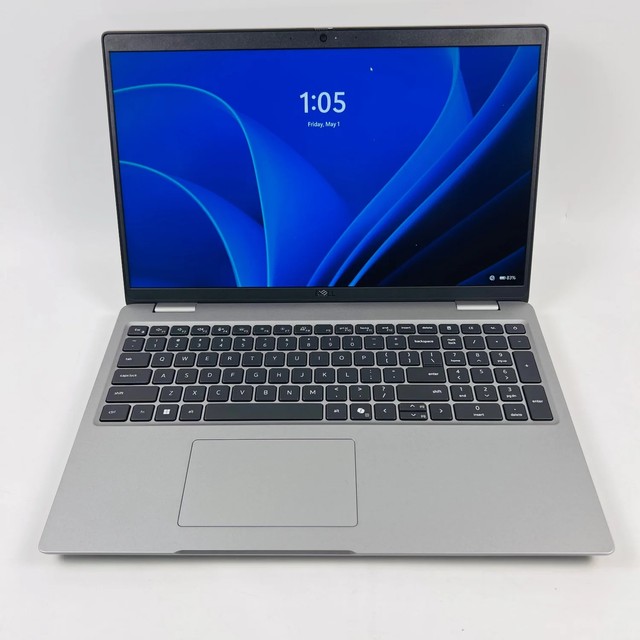
Dell Latitude 5550
The fleet standard on a lot of large construction and engineering contracts, which matters if your IT department has to support it.
- 15.6 inch FHD+ display
- Intel Core Ultra 5/7
- vPro management and TPM 2.0
- Serviceable memory and storage
- Very likely already on your employer approved-hardware list
- Excellent long-term parts availability
- Solid thermals through a long recalculation
- Priced above equivalent consumer machines
- Conservative design, average display

Lenovo IdeaPad Slim 5 (16 inch)
The value pick that gets the two things right that P6 cares about: a 16 inch panel and a fast NVMe drive.
- 16 inch WUXGA IPS display
- Ryzen 5/7 or Core i5/i7
- 16 GB memory standard on most configurations
- NVMe SSD
- Most screen per dollar in this list
- 16 GB as standard rather than as a paid upgrade
- Light enough to carry daily
- Plastic chassis and modest hinge
- Speakers and webcam are basic

HP EliteBook 840 G11
The premium 14 inch business machine, for planners who dock at a desk and travel light between sites.
- 14 inch WUXGA, optional 400-nit panel
- Intel Core Ultra 5/7 vPro
- Aluminium chassis
- Extensive docking and security features
- Best-in-class build and keyboard for travel
- Bright panel is readable in a site cabin
- Excellent Thunderbolt docking behaviour
- 14 inch is small for schedule work undocked
- Priced well above what P6 alone requires

Acer Aspire 5 (15 inch, 16 GB)
The genuine budget entry. It meets the recommended configuration and nothing more, which for a single small schedule is enough.
- 15.6 inch FHD display
- Core i3/i5 or Ryzen 5
- 8–16 GB memory configurations
- NVMe SSD
- Cheapest way to run P6 without cutting the SSD
- Light and unremarkable, which is fine for a spare machine
- Easy memory upgrade on most configurations
- 8 GB base configurations will feel tight — pick 16 GB
- Dim panel and mediocre keyboard
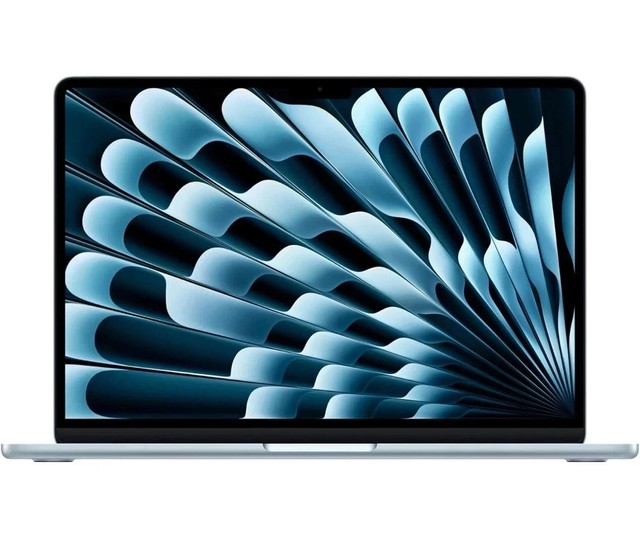
Apple MacBook Air (M4, 16 GB) with Parallels Desktop
The Mac answer, with an honest caveat: P6 Professional is Windows-only, so this runs it inside a virtual machine.
- Apple M4 with 16 GB unified memory
- 13 or 15 inch display options
- Fanless, all-day battery
- Runs Windows 11 on Arm under Parallels Desktop
- Battery life nothing else here approaches
- Windows 11 on Arm under Parallels runs P6 Professional acceptably for typical schedules
- Silent under load
- Parallels Desktop is a separate annual licence on top of the hardware
- Not a supported configuration — a client IT department may refuse it
Buying tips
- Buy the SSD, not the processor. The measurable difference between a pleasant P6 day and a miserable one is almost always storage. An NVMe drive opens a large schedule in seconds where a SATA SSD takes tens of seconds and a mechanical drive takes minutes. Everything else on the spec sheet is secondary.
- P6 recalculation is largely single-threaded. A high turbo clock on four fast cores beats sixteen slow ones, which is why ordinary consumer chips do well here and why paying for a many-core workstation processor buys you nothing on schedule work.
- Check which P6 you are running before you spend anything. P6 Professional is a Windows desktop client and needs a Windows machine. P6 EPPM is browser-based — if your organisation runs EPPM, almost any current laptop will do and this whole list is over-specified.
- A standalone install puts the database on your own disk. P6 Professional installs a local database alongside the client, and it sits on the same drive as everything else — another reason storage matters more than the processor.
- If the schedule is genuinely large, add an external monitor rather than a faster laptop. A 27 inch 1440p panel on the desk shows roughly three times the Gantt of a 15 inch laptop screen, and it costs less than one specification tier.
As an Amazon Associate and eBay Partner, toptenpick.com earns from qualifying purchases. Prices and availability are subject to change.