

As an Amazon Associate and eBay Partner, toptenpick.com earns from qualifying purchases. Prices and availability are subject to change.
A UHS-II card will not run at UHS-II speed in a D800, and buying one for the camera is money spent on nothing. The D800 launched in February 2012 with a CompactFlash slot and a Secure Digital slot, and that SD slot is UHS-I — it predates UHS-II entirely. It is narrower still than that: the camera uses the SDR50 and DDR50 bus modes, roughly a 50 MB/s ceiling, rather than the faster SDR104 mode that UHS-I also allows. Put a UHS-II card in and it falls back to UHS-I and behaves like a UHS-I card, because that is all the camera can ask of it.
The measured write ceiling is lower again. Testing of this body puts SD write speeds at roughly 40 MB/s and CompactFlash at around 70 MB/s. That gap is the single most useful thing to know about this camera’s storage: the CF slot is meaningfully faster than the SD slot, so if you are shooting bursts of 36-megapixel raw files, the card that empties the buffer fastest goes in the CF slot, and the SD slot is for overflow or backup.
So what should you actually buy? A good UHS-I card whose sustained write speed comfortably exceeds 40 MB/s, which today means almost any reputable V30 card. Spending beyond that buys you nothing in the camera. It does buy something at the desk — a UHS-II card offloads far faster in a modern reader — so if you are also buying cards for a newer body, the UHS-II purchase is defensible on transfer speed alone. Just do not expect it to change anything while shooting.
Capacity is the other decision and this camera makes it easy to underestimate. A D800 raw file is large, and 36 megapixels fills a card quickly — a 64 GB card is a sensible working minimum and 128 GB is comfortable. The camera takes SDXC, so large capacities are supported, but format the card in the camera rather than on a computer to avoid file system oddities.
And use the two slots deliberately. The D800 can be set to overflow — fill one then the other — or to write the same images to both, or to send raw to one and JPEG to the other. Simultaneous backup halves your effective speed and is the correct setting for anything you cannot reshoot. Overflow is the right setting for anything you can.
The list below is UHS-I cards for the SD slot, CompactFlash for the fast slot, and the reader that makes the desk half of the workflow bearable.
| # | Product | Price | Where to buy |
|---|---|---|---|
| 1 | SanDisk Extreme Pro UHS-I (95 MB/s class) | $20–$45 | Amazon · eBay |
| 2 | Lexar Professional 1667x UHS-II | $40–$90 | Amazon · eBay |
| 3 | SanDisk Extreme UHS-I V30 | $15–$35 | Amazon · eBay |
| 4 | SanDisk Extreme Pro CompactFlash UDMA 7 | $45–$120 | Amazon · eBay |
| 5 | Lexar Professional UDMA 7 CompactFlash | $45–$110 | Amazon · eBay |
| 6 | Kingston Canvas React Plus / Canvas Go! Plus | $18–$45 | Amazon · eBay |
| 7 | UHS-II SD and CompactFlash Card Reader | $35–$70 | Amazon · eBay |
| 8 | Second Card for In-Camera Backup | $20–$60 | Amazon · eBay |
| 9 | Rugged Card Case | $10–$25 | Amazon · eBay |
| 10 | Cheap Unbranded High-Capacity SD Card | $8–$20 | Amazon · eBay |
The picks, in detail

SanDisk Extreme Pro UHS-I (95 MB/s class)
The sensible default. Its sustained write speed comfortably exceeds the roughly 40 MB/s the D800’s SD slot can absorb, so the camera is the limit rather than the card — which is exactly where you want the bottleneck. V30 rated, widely available, and SanDisk’s failure rate and recovery support are as good as anything in this market. Buy the capacity, not the headline speed.
- UHS-I, V30 video speed class
- Sustained write comfortably above the camera’s ceiling
- SDXC in 64 GB and larger
- Lifetime limited warranty on most SKUs
- Faster than the camera can use, which is the right target
- Excellent reliability record
- Data recovery software included on most retail packs
- Counterfeits are widespread — buy from a reputable seller
- The headline speed is a read figure, not a write one
- No benefit over a cheaper V30 card in this body

Lexar Professional 1667x UHS-II
Listed with the caveat made plainly: in the D800 this runs as a UHS-I card, because the camera has no second row of contacts to talk to. The reason to buy one anyway is the desk — in a UHS-II reader it offloads several times faster than a UHS-I card, which over a wedding’s worth of 36-megapixel raws is real time saved. Buy it for the workflow, not for the camera.
- UHS-II with a second contact row
- Backwards compatible, falls back to UHS-I
- V60 video speed class
- Available to 256 GB and beyond
- Dramatically faster offload in a UHS-II reader
- Ready for a newer camera body later
- Well built with good sustained performance
- No shooting benefit whatsoever in a D800
- Costs considerably more than a UHS-I equivalent
- Requires a UHS-II reader to see any of the advantage

SanDisk Extreme UHS-I V30
The value pick, and genuinely all this camera needs. It is a tier below the Extreme Pro on paper and still writes faster than the D800’s SD slot can accept, which means the pictures land at exactly the same rate. If you want two or three cards rather than one, this is where to spend. V30 guarantees a sustained floor rather than a burst peak, which is the specification that matters.
- UHS-I, V30 sustained write guarantee
- SDXC to 512 GB
- Temperature, water and shock rated
- Limited lifetime warranty
- Same real-world result in this camera as pricier cards
- Cheap enough to own several
- V30 is a guaranteed floor, not a marketing peak
- Slower offload than UHS-II at the desk
- Counterfeited heavily
- Read speeds trail the Extreme Pro
SanDisk Extreme Pro CompactFlash UDMA 7
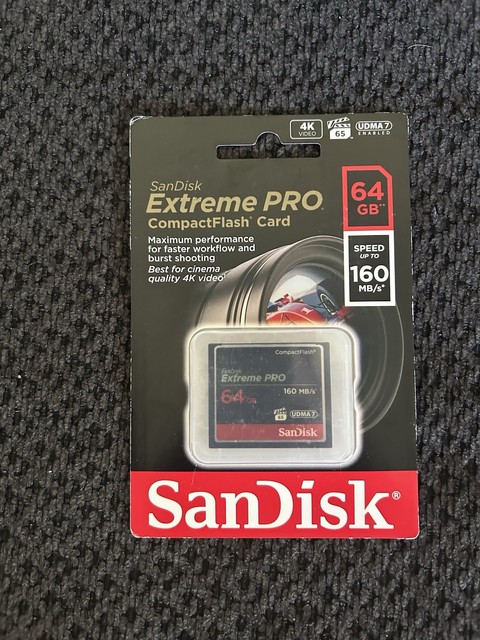
This is the card that should be in the fast slot. Measured CF write speeds on the D800 reach roughly 70 MB/s against about 40 MB/s for SD, so the CF slot empties the buffer nearly twice as quickly. On a 36-megapixel body shooting bursts, that is the difference between the camera continuing and the camera stopping to think. UDMA 7 is what you want.
- UDMA 7 CompactFlash
- Meaningfully faster in this body than any SD card
- Capacities to 256 GB
- Rugged construction with no exposed contacts
- Nearly double the SD slot’s write speed in this camera
- Sturdier physical format than SD
- Deep buffers stay clear during bursts
- CompactFlash is obsolete and getting harder to buy
- Bent pins in the camera slot are an expensive repair
- Needs a separate reader from your SD one

Lexar Professional UDMA 7 CompactFlash
The alternative in a shrinking format, and worth having a second source for given CompactFlash’s decline. Performance in this generation of UDMA 7 cards is broadly comparable to SanDisk’s, comfortably ahead of what the SD slot can do. Buy CF while it is still straightforward to find — this camera has a faster slot and no way to use it once the cards disappear.
- UDMA 7 CompactFlash
- Several capacity tiers
- Rated sustained write for video work
- Limited warranty
- Second source in a format with dwindling supply
- Fully exploits the D800’s faster slot
- Robust physical format
- Format is being discontinued across the industry
- Prices rising as supply tightens
- Requires a CF-capable reader

Kingston Canvas React Plus / Canvas Go! Plus
A reasonable alternative to the SanDisk duopoly at a lower price, with genuine V30 or better ratings. The relevant question for this camera is only whether sustained write clears about 40 MB/s, and these do. Worth considering if you want several cards and the brand premium is not buying you anything the D800 can perceive.
- UHS-I V30 or UHS-II depending on line
- SDXC capacities to 512 GB
- Lifetime warranty
- Sustained write ratings published
- Cheaper than the equivalent SanDisk
- Published sustained figures rather than peak only
- Good capacity range
- Less recovery support than SanDisk offers
- Confusing product line naming
- Fewer independent test results available

UHS-II SD and CompactFlash Card Reader
The place where card speed actually shows up for a D800 owner. The camera is capped, but your computer is not, and a USB 3.2 reader that handles both UHS-II SD and CompactFlash turns offloading a shoot from a coffee break into a moment. It is also the only way a UHS-II card earns its price premium with this body. Look for one that takes both formats, since this camera needs both.
- UHS-II SD plus CompactFlash slots
- USB 3.2 Gen 1 or faster
- Reads both slots simultaneously on better models
- Bus powered
- The only way UHS-II pays for itself with this camera
- Handles both card formats the D800 uses
- Far faster than tethering the camera over USB
- Cheap readers throttle badly and overheat
- Another cable and dongle on the desk
- Combo readers cost more than single-format ones

Second Card for In-Camera Backup
Not a different product, a different purpose. The D800 can write every frame to both slots at once, which halves your effective write speed and means a card failure costs you nothing. For weddings, events and anything else that cannot be reshot, that trade is obviously correct — and it is the reason to own two cards rather than one large one. Set it in the shooting menu, not in the playback menu where people look first.
- Any compatible SD and CF pair
- Backup mode set in the camera’s shooting menu
- Halves effective write throughput
- Raw to one slot, JPEG to the other is also available
- Card failure stops costing you the shoot
- No extra hardware beyond a second card
- Raw/JPEG split is useful for fast turnaround
- Halves burst performance
- Both cards fill at the rate of the smaller one
- Easy to leave set to overflow by mistake

Rugged Card Case
Cheap, unglamorous, and the thing that prevents the failure mode nobody plans for. Loose cards in a camera bag pocket collect grit in the contacts and get bent; a card that has been sat on is the one that fails halfway through a shoot. A hard case with labelled slots also lets you keep shot and unshot cards visibly separate, which is worth more than it sounds at the end of a long day.
- Hard shell with moulded card slots
- SD and CF versions, and combination cases
- Water resistant seals on better models
- Slots for a dozen or more cards
- Prevents bent and contaminated cards
- Keeps shot and unshot cards separate
- Costs almost nothing
- One more thing in the bag
- Cheap cases pop open when dropped
- No protection against you formatting the wrong card
Cheap Unbranded High-Capacity SD Card
Named as the thing to avoid, because the D800 is exactly the camera that exposes it. Counterfeit and low-grade cards commonly report a capacity they do not have and collapse to a few megabytes per second once a cache fills — which on a 36-megapixel raw burst means the camera stops. The failure is not gradual and it happens when the buffer is full, which is always the moment you were shooting something.
- Headline capacity and speed claims
- No published sustained write rating
- Sold at implausible prices
- Frequently counterfeit branded packaging
- Cheap, which is the only argument
- Sustained write collapses once a small cache fills
- Capacity is frequently falsified
- Fails at the exact moment the buffer is full
Buying tips
- Do not buy UHS-II for the camera. The D800’s SD slot is UHS-I and uses only the SDR50 and DDR50 modes, so a UHS-II card falls back and behaves like a UHS-I one.
- Put your fastest card in the CompactFlash slot. Measured write speeds on this body are around 70 MB/s for CF against about 40 MB/s for SD, so CF is where burst performance lives.
- Target a sustained write comfortably above 40 MB/s and stop. Any reputable V30 card clears that, and spending beyond it changes nothing the camera can perceive.
- Buy UHS-II only for the desk. It offloads several times faster in a UHS-II reader, which is a real benefit — just not one you will see while shooting.
- Use 64 GB as a working minimum and 128 GB for comfort. A 36-megapixel raw file is large and fills cards faster than people expect.
- Format cards in the camera, never on a computer. The camera writes the file system it expects, and computer formatting is a common source of odd errors on SDXC.
- Set both slots to backup for anything you cannot reshoot. It halves your write speed and it means a card failure costs you nothing — the setting is in the shooting menu.
- Buy from a reputable seller. Counterfeit cards are widespread in this market, and they fail specifically when the buffer is full, which is the moment you were actually shooting.
As an Amazon Associate and eBay Partner, toptenpick.com earns from qualifying purchases. Prices and availability are subject to change.