

As an Amazon Associate and eBay Partner, toptenpick.com earns from qualifying purchases. Prices and availability are subject to change.
Nobody buys a DDR3 board to win benchmarks. You buy one because you already own a tray of DDR3 sticks, or a Core i7-4790K, or an FX-8350, and replacing a dead motherboard is far cheaper than replacing an entire platform. That narrows the question usefully: the right board is the one that matches the socket you already have and takes the memory you already own. Three sockets cover almost everything worth keeping — LGA 1150 (Intel 4th and 5th generation), LGA 1155 (2nd and 3rd generation) and AM3+ (AMD FX). All ten below are used-market purchases now, so the notes cover what actually fails on a decade-old board as much as what it does on paper.
| # | Product | Price | Where to buy |
|---|---|---|---|
| 1 | ASUS Z97-A | $120–$190 used | Amazon · eBay |
| 2 | ASRock Z97 Extreme4 | $110–$180 used | Amazon · eBay |
| 3 | Gigabyte GA-Z97X-UD3H | $110–$170 used | Amazon · eBay |
| 4 | ASUS Maximus VII Hero | $150–$250 used | Amazon · eBay |
| 5 | MSI Z97 Gaming 5 | $100–$160 used | Amazon · eBay |
| 6 | ASUS P8Z77-V LX | $70–$120 used | Amazon · eBay |
| 7 | Gigabyte GA-Z77X-UD3H | $90–$150 used | Amazon · eBay |
| 8 | ASRock Z77 Extreme4 | $90–$150 used | Amazon · eBay |
| 9 | ASUS M5A99FX PRO R2.0 | $90–$160 used | Amazon · eBay |
| 10 | Gigabyte GA-990FXA-UD3 | $80–$140 used | Amazon · eBay |
The picks, in detail

ASUS Z97-A
The default answer for LGA 1150. A full ATX Z97 board with four DDR3 slots, overclocking that works without ceremony, and the best-documented firmware of its generation — which matters enormously when you are troubleshooting a board older than some of the people repairing it.
- LGA 1150, Intel Z97 chipset
- 4 × DDR3 DIMM, 32 GB maximum
- supports 4th, 4th-refresh and 5th generation Core
- M.2 socket and SATA Express
- full ATX
- easiest board on this list to find help for
- clean UEFI with useful fan control
- unlocked multiplier overclocking on K-series chips
- the M.2 socket runs at SATA speed, not NVMe
- commands a premium over equivalent B85 and H97 boards

ASRock Z97 Extreme4
The value pick of the Z97 generation and the most memory-tolerant board here. ASRock rated it for DDR3 and DDR3L at 3200+ MHz overclocked, which in practice means it will post with mismatched second-hand sticks that fussier boards refuse.
- LGA 1150, Intel Z97 chipset
- 4 × DDR3/DDR3L DIMM, 32 GB maximum
- rated DDR3 3200+ MHz overclocked
- Intel XMP 1.3 and 1.2 support
- M.2 and SATA Express
- unusually forgiving with mixed memory kits
- accepts both 1.5 V DDR3 and 1.35 V DDR3L
- cheaper than the ASUS equivalent
- audio is a step behind the ROG and Gaming boards
- firmware is less polished than ASUS or Gigabyte

Gigabyte GA-Z97X-UD3H
Gigabyte’s mid-range Z97, and the one to buy if you plan to push memory. It carries official overclocked speed ratings all the way from 2133 through 3100 MHz alongside the standard 1600 and 1333, so a high-clocked DDR3 kit has a documented path rather than a hopeful guess.
- LGA 1150, Intel Z97 chipset
- 4 × DDR3 DIMM, 32 GB maximum
- overclocked ratings at 3100, 2933, 2800, 2400 and 2133 MHz
- XMP profile support
- dual BIOS
- widest published memory-speed list of any board here
- solid power delivery for a mid-range board
- dual BIOS recovers a failed flash
- dated mouse handling in the firmware interface
- fewer clean examples on the used market than the ASUS

ASUS Maximus VII Hero
The ROG flagship for LGA 1150, and the board to hunt down if this is a build you intend to keep rather than merely revive. Heavier power delivery, better onboard audio, and firmware whose memory tuning will stabilise a stubborn DDR3 kit that a mainstream board gives up on.
- LGA 1150, Intel Z97 chipset
- 4 × DDR3 DIMM, 32 GB maximum
- ROG firmware with extended memory timings
- SupremeFX onboard audio
- reinforced power delivery
- the best memory tuning control on this list
- audio still competitive with modern onboard
- built to be overclocked hard
- the most expensive LGA 1150 board here
- collector demand keeps used prices high

MSI Z97 Gaming 5
The middle path on LGA 1150 — Z97 overclocking and four DDR3 slots without the ROG premium. Its networking and audio features were the marketing hooks in 2014; today the reason to pick it is simply that clean examples are plentiful and priced sensibly.
- LGA 1150, Intel Z97 chipset
- 4 × DDR3 DIMM, 32 GB maximum
- Killer E2205 gigabit networking
- isolated onboard audio section
- full ATX
- plentiful and fairly priced used
- good fan control in the MSI firmware
- red and black styling suits a period build
- Killer network drivers can be awkward on current Windows
- heatsinks are more decorative than effective
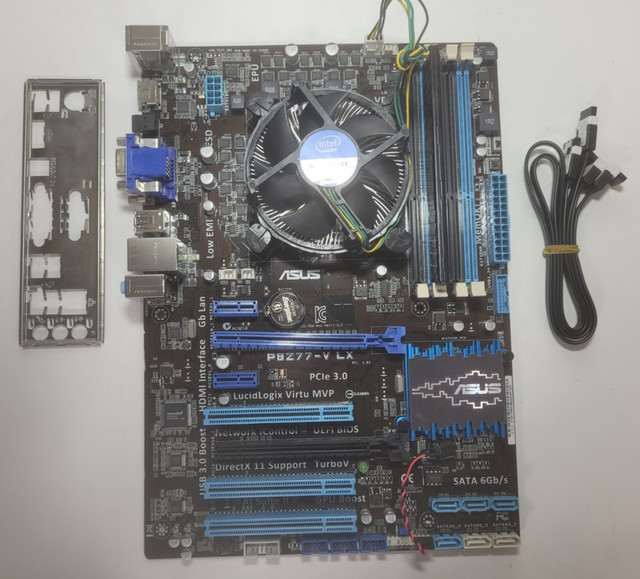
ASUS P8Z77-V LX
The sensible LGA 1155 rescue board. If you are keeping an i5-2500K or i7-3770K alive, this is the cheapest route back to a working Z77 system with four DDR3 slots, and it is common enough that you can afford to be choosy about condition.
- LGA 1155, Intel Z77 chipset
- 4 × DDR3 DIMM, 32 GB maximum
- supports 2nd and 3rd generation Core
- UEFI firmware with simplified mode
- full ATX
- cheapest credible Z77 board on the used market
- very widely available
- handles Sandy Bridge K-series overclocking
- the LX trim drops the extras of the V Pro
- limited rear USB 3.0 provision

Gigabyte GA-Z77X-UD3H
The better-equipped Z77 choice. More rear connectivity, sturdier power delivery and dual BIOS, which is worth real money on a board this old — a failed flash on a single-BIOS board of this vintage is often the end of it.
- LGA 1155, Intel Z77 chipset
- 4 × DDR3 DIMM, 32 GB maximum
- dual BIOS with automatic recovery
- generous rear USB 3.0 and video outputs
- full ATX
- dual BIOS is genuine insurance at this age
- better power delivery than budget Z77 boards
- strong rear connectivity for the era
- pricier than the P8Z77-V LX
- capacitor age is a real risk on any Z77 board

ASRock Z77 Extreme4
The enthusiast bargain of the Z77 generation and still the board most often recommended in retro-build threads. It overclocks Sandy and Ivy Bridge properly, takes 32 GB of DDR3, and turns up cheaper than the ASUS and Gigabyte equivalents almost every time.
- LGA 1155, Intel Z77 chipset
- 4 × DDR3 DIMM, 32 GB maximum
- supports 2nd and 3rd generation Core overclocking
- front panel USB 3.0 header
- full ATX
- best price-to-capability ratio on LGA 1155
- reliable overclocker with a long track record
- layout suits large air coolers
- onboard audio is basic
- less documentation than the ASUS boards
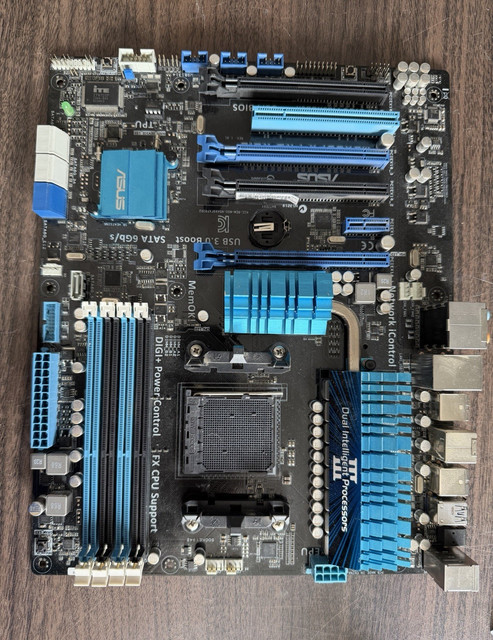
ASUS M5A99FX PRO R2.0
The AM3+ board to buy if you are keeping an FX-8350 or FX-8320 running. The 990FX chipset gives full-bandwidth dual graphics, but the R2.0 revision’s power delivery is the part that matters — eight-core FX chips punish weak power stages, and plenty of cheaper AM3+ boards died proving it.
- AM3+ socket, AMD 990FX chipset
- 4 × DDR3 DIMM, 32 GB maximum
- rated for 125 W FX processors
- heatsinked digital power delivery
- full ATX
- power delivery actually rated for eight-core FX chips
- handles high-capacity DDR3 well
- the standard recommendation for FX builds
- the FX platform is power-hungry and runs hot
- no M.2 and no USB 3.1

Gigabyte GA-990FXA-UD3
The other safe AM3+ landing spot, and usually the cheaper one. Same 990FX chipset and same four DDR3 slots, with dual BIOS as the differentiator. Check the revision before buying — later revisions shipped with newer FX support already in firmware and save you a chicken-and-egg update.
- AM3+ socket, AMD 990FX chipset
- 4 × DDR3 DIMM, 32 GB maximum
- dual BIOS
- supports AMD FX eight-core processors
- full ATX
- typically cheaper than the ASUS 990FX boards
- dual BIOS recovery
- well supported by the FX community
- early revisions need a firmware update for later FX chips
- power-stage cooling is marginal under sustained overclocks
Buying tips
- Match the socket before anything else. DDR3 spans three incompatible platforms — LGA 1155 for 2nd and 3rd generation Core, LGA 1150 for 4th and 5th, and AM3+ for AMD FX. A board that takes your memory is useless if it will not take your processor.
- Check DDR3 against DDR3L voltage. Standard DDR3 runs at 1.5 V and low-voltage DDR3L at 1.35 V. Boards listed as DDR3/DDR3L take both; a DDR3L-only board may refuse 1.5 V sticks outright.
- Buying LGA 1150 for a Devil’s Canyon chip such as the i7-4790K or i5-4690K means the board needs firmware from mid-2014 or later. Ask the seller for the version, or budget for a cheap older CPU to update with.
- Electrolytic capacitors age whether a board is used or not. Ask for close photographs of the power-stage area and reject anything with bulging or weeping capacitors — no price offsets that.
- Most LGA 1155 boards cannot boot from NVMe, and many LGA 1150 M.2 sockets are SATA-speed only. A SATA solid-state drive is the realistic storage upgrade on these platforms.
- 16 GB is the sensible target for a DDR3 build. 32 GB is worth it only if the sticks are already yours — buying DDR3 today to reach 32 GB rarely beats putting the money toward a newer platform.
- Bundles win. A board sold with a matched processor and memory has been tested together as a working set, which removes most of the risk of buying decade-old hardware from a stranger.
As an Amazon Associate and eBay Partner, toptenpick.com earns from qualifying purchases. Prices and availability are subject to change.