

As an Amazon Associate and eBay Partner, toptenpick.com earns from qualifying purchases. Prices and availability are subject to change.
The i5-3470 is a locked, non-K Ivy Bridge chip. Its multiplier is fixed, and Ivy Bridge closed off most of the base-clock tricks that let Sandy Bridge non-K owners squeeze out real headroom, so what is left is a percent or two of overclocking margin, not worth chasing on any chipset. That single fact reorders the whole buying decision here: chipset tier buys you features, not performance. A Z77 board runs this CPU at essentially the same speed as a B75 board costing thirty dollars less.
What the chipset tier does change is I/O. B75 wires the PCIe x16 slot down to eight electrical lanes, gives you a single native SATA 6Gb/s port, and skips RAID support entirely. H77 restores the full sixteen lanes on that slot, adds a second SATA 6Gb/s port, and unlocks RAID 0/1/5/10. Z77 adds native support for splitting those lanes across a second PCIe slot and, on paper, memory and CPU overclocking that a locked i5-3470 cannot use. If you already own a Z77 board from a prior build, there is no reason to swap it out; if you are buying fresh, H77 covers what most builds need unless you specifically want the extra SATA port or RAID.
The bigger complication is that this platform is entirely used-market now. LGA1155 launched in 2011 and nothing new has shipped in over a decade. That shows up in price: tested, working boards across all three chipset tiers are commonly listed between fifty and a hundred dollars on eBay right now, which is not the bargain-bin pricing you might expect for a thirteen-year-old socket. A board that boots reliably and comes from a seller who actually tested it before listing is worth paying for. A five-dollar discount on an untested board is not.
Two things matter more than chipset name when buying used: whether the board actually posts, and whether its BIOS already recognizes Ivy Bridge chips without an update. Most H77, B75, and Z77 boards do, since the i5-3470 is a mainstream 2012 part, but a handful of very early board revisions shipped before Ivy Bridge existed and need a Sandy Bridge chip on hand to flash a BIOS update first. A seller who shows the board running beats a seller who only shows box photos, every time.
The ten boards below span all three chipsets, B75 through Z77, with real current used prices and the honest tradeoffs of each, so you can buy for the ports and form factor you actually need instead of paying a chipset premium the i5-3470 cannot spend.
| # | Product | Price | Where to buy |
|---|---|---|---|
| 1 | ASUS P8H77-M PRO | $75–$100 | Amazon · eBay |
| 2 | ASRock B75 Pro3-M | $65–$85 | Amazon · eBay |
| 3 | Gigabyte GA-H77-DS3H | $60–$75 | Amazon · eBay |
| 4 | MSI H77MA-G43 | $75–$95 | Amazon · eBay |
| 5 | Gigabyte GA-B75M-D3H | $50–$70 | Amazon · eBay |
| 6 | ASRock H77 Pro4-M | $60–$90 | Amazon · eBay |
| 7 | ASUS P8B75-M LX PLUS | $45–$75 | Amazon · eBay |
| 8 | ASUS P8Z77-V LX | $30–$50 | Amazon · eBay |
| 9 | MSI Z77A-G45 | $65–$100 | Amazon · eBay |
| 10 | ASRock Z77 Pro4-M | $50–$85 | Amazon · eBay |
The picks, in detail
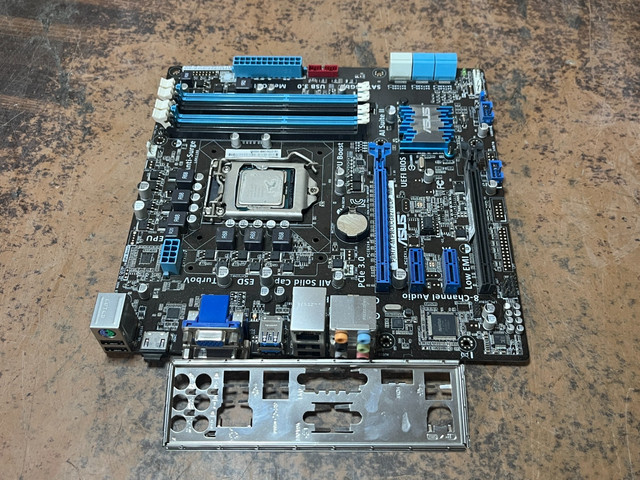
ASUS P8H77-M PRO
A full-featured H77 microATX board with native USB 3.0 and HDMI, the same board many prebuilt i5-3470 systems shipped with, so used units are relatively easy to find with matching documentation. A solid baseline if you want RAID support without paying for Z77 features you cannot use.
- Intel H77 chipset, microATX form factor
- Native USB 3.0, HDMI and DVI outputs
- SATA 6Gb/s ports plus RAID 0/1/5/10 support
- 4 DDR3 DIMM slots, dual channel
- Common enough used that boards and BIOS chips are easy to source
- UEFI BIOS is friendlier than most boards of this era
- Solid-capacitor design has aged well
- Used prices ($75 to $100-plus) are not far below a new budget board
- Bundled listings with a CPU can obscure the board’s individual condition
ASRock B75 Pro3-M
ASRock’s budget microATX board on the B75 chipset. It skips RAID and runs the PCIe x16 slot at x8, but covers everything a non-gaming i5-3470 build needs: USB 3.0, SATA 6Gb/s, and enough video outputs for the CPU’s integrated graphics. A reasonable choice for a home-office or media-center rebuild where the goal is a working, quiet machine rather than expansion headroom.
- Intel B75 chipset, microATX, PCIe x16 slot wired at x8
- USB 3.0 and SATA 6Gb/s support
- DVI, VGA and HDMI outputs for onboard graphics
- 4 DDR3 DIMM slots, dual channel
- One of the lower realistic entry prices for a tested board
- Enough video outputs to run the i5-3470’s integrated graphics on any monitor
- Compact microATX size fits small cases
- No RAID support, a B75 chipset limitation
- PCIe slot bandwidth is limited if you add a demanding GPU later

Gigabyte GA-H77-DS3H
A full-size ATX H77 board with more PCIe and SATA headroom than the microATX options here, aimed at a mid-tower build that wants room for extra drives or expansion cards. One of the more commonly relisted H77 boards, so tested used units are not hard to find.
- Intel H77 chipset, full ATX form factor
- 2 PCIe x16 slots, the second running at x4
- 6 SATA ports including SATA 6Gb/s
- Gigabit LAN, 7.1-channel HD audio
- More expansion slots than the microATX boards on this list
- ATX size makes cable routing easier in larger cases
- Widely available used, often with the I/O shield included
- Larger footprint than necessary for a basic i5-3470 build
- Used pricing (roughly $58 to $75) is close to the smaller H77 microATX options

MSI H77MA-G43
MSI’s H77 microATX competitor to the ASUS and Gigabyte boards above, most often found on the used market already paired with an i5-3330 or i5-3470 as a full parts bundle, which can be the cheaper way to acquire one. Runs MSI’s Click BIOS UEFI interface.
- Intel H77 chipset, microATX form factor
- UEFI Click BIOS 4 interface
- USB 3.0 and SATA 6Gb/s support
- 4 DDR3 DIMM slots, up to 32GB
- Frequently listed bundled with a compatible CPU, sometimes cheaper than board-only listings
- UEFI interface is easy to navigate for a first BIOS update
- Solid VRM for a budget H77 board
- Fewer PCIe lanes than the Gigabyte ATX option
- Bundled listings can make it harder to judge the board’s own condition

Gigabyte GA-B75M-D3H
One of the cheapest tested boards on this list despite running the budget B75 chipset. It adds SATA 6Gb/s ports and a better VRM heatsink than the ASRock B75 Pro3-M at a similar price, a reasonable pick for a secondary or backup PC rather than a daily driver.
- Intel B75 chipset, microATX
- SATA 6Gb/s ports and a USB 3.0 header
- 4 DDR3 DIMM slots, dual channel up to 1600MHz
- DVI-D, D-Sub and HDMI video outputs
- Among the lowest prices seen for fully tested listings, roughly $51 to $70
- Good VRM heatsink coverage for a budget board
- HDMI output included, unlike some competing B75 boards
- No RAID support, a B75 chipset limitation
- Fewer expansion slots than the ATX H77 or Z77 options

ASRock H77 Pro4-M
A step up from ASRock’s own B75 board, adding RAID support and Quad CrossFireX compatibility that a non-gaming i5-3470 build will rarely use, but the four SATA 6Gb/s ports and stronger power delivery are genuinely useful if you plan to run several drives or a NAS-style build with mixed storage.
- Intel H77 chipset, microATX, 4+2 power phase design
- 4 SATA 6Gb/s ports
- PCIe 3.0-ready x16 slot, Quad CrossFireX support
- 7.1-channel HD audio with THX TruStudio
- More SATA 6Gb/s ports than most competing H77 microATX boards
- Stronger VRM than ASRock’s own B75 Pro3-M
- Frequently listed already paired with a working i5 or i7 chip
- RAID and CrossFireX support go unused in a basic single-GPU or integrated-graphics build
- Used prices vary widely, roughly $30 to $90-plus, depending on whether a CPU is bundled

ASUS P8B75-M LX PLUS
ASUS’s entry-level B75 microATX board, a step below the P8H77-M in features but noticeably cheaper on the used market when you find a board-only listing. Covers basic display output and storage needs without RAID, which makes it a fair match for an i5-3470 build that’s doing office work, light browsing, or serving as a spare machine rather than heavy multitasking.
- Intel B75 chipset, microATX
- 5 SATA 3Gb/s ports plus 1 SATA 6Gb/s port
- 4 USB 3.0 ports, 2 rear and 2 via header
- DVI, D-Sub video outputs, Realtek 8111F gigabit LAN
- Among the cheaper ASUS options when bought board-only
- USB 3.0 support despite the budget B75 chipset
- ASUS UEFI BIOS is generally well regarded for this era
- Only one native SATA 6Gb/s port
- Used listing prices are inconsistent, ranging roughly $45 to $100 depending on the seller

ASUS P8Z77-V LX
A full ATX Z77 board that is often the cheapest Z77 entry point on the used market, since it was ASUS’s budget option in the Z77 lineup at launch. Buy it for the four USB 3.0 ports and sixteen PCIe 3.0 lanes, not for overclocking headroom the i5-3470 cannot use.
- Intel Z77 chipset, full ATX form factor
- 16 PCIe 3.0/2.0 lanes, single PCIe x16 slot
- 4 USB 3.0 ports, SATA 6Gb/s
- 4 DDR3 DIMM slots, dual channel
- Cheapest Z77 chipset entry point on the used market
- PCIe 3.0 lanes are useful if you eventually add a modern GPU
- ATX size gives easier cable management
- Z77’s multiplier-unlocking features are wasted on a locked i5-3470
- Skips some higher-end audio and networking chips found on pricier Z77 boards

MSI Z77A-G45
A more fully equipped Z77 ATX board than the ASUS P8Z77-V LX, with better audio components and a stronger VRM, aimed at someone who wants headroom for a mid-range GPU rather than CPU overclocking the i5-3470 cannot do on any board. Used prices swing widely depending on bundled parts.
- Intel Z77 chipset, full ATX form factor
- Military Class III components, digital PWM design
- USB 3.0, SATA 6Gb/s, PCIe 3.0
- 7.1-channel HD audio
- Stronger VRM and component quality than budget Z77 boards
- Good expansion slot layout for a GPU plus add-in cards
- Widely available used across a range of price points
- Used prices are the least predictable on this list, roughly $65 to $120-plus
- Its overclocking-oriented BIOS options are irrelevant with a locked non-K CPU
ASRock Z77 Pro4-M
ASRock’s microATX Z77 board, functionally the H77 Pro4-M with the unlocked chipset added on. Genuinely useful only if you plan to reuse this board later with an unlocked K-series chip; with the i5-3470 installed, it performs identically to the cheaper H77 Pro4-M, so treat the Z77 label as future-proofing rather than a reason to pay more today.
- Intel Z77 chipset, microATX form factor
- 4 SATA 6Gb/s ports, 4 USB 3.0 ports
- DDR3 support up to 2800MHz with a compatible overclocking CPU
- Digi Power design with solid capacitors
- Keeps the option open to drop in a K-series chip later without replacing the board
- Same solid-capacitor build quality as ASRock’s H77 Pro4-M
- Good port selection for a microATX board
- Delivers no benefit over the H77 Pro4-M with a locked i5-3470 installed
- Harder to find board-only listings with a clear price than the more common H77 version
Buying tips
- Buy from a listing that shows the board actually posting, ideally with a photo or video of it running. Dead CMOS batteries and worn capacitors are the two most common failure points on boards this old.
- Check whether the BIOS is already flashed for Ivy Bridge support before buying if the listing is a very early board revision. Updating usually requires a working Sandy Bridge chip on hand to flash from.
- Do not pay a premium for a Z77 board expecting overclocking. The i5-3470 cannot raise its multiplier or base clock in any meaningful way on any chipset, so Z77 buys extra ports and PCIe lanes, not clock speed.
- Confirm the RAM kit’s rated voltage against the board before buying. Some early LGA1155 boards top out at DDR3-1600 and are picky about anything run above 1.5V.
- Ask if the I/O shield is included before you buy. A missing shield means an open gap on the case backplate, and it is a common reason boards get returned even when they test fine.
- Match the form factor to your case before ordering. B75 and H77 boards are mostly microATX, but a handful of listings mix up ATX and microATX photos.
- Budget for a fresh CMOS battery regardless of what the listing claims. Most of these boards have sat powered off for years, and the battery is due.
- If you plan to run a discrete GPU, check whether the listing specifies the PCIe slot’s electrical wiring. B75 boards wire that slot at x8, which matters more once the GPU is faster than entry level.
As an Amazon Associate and eBay Partner, toptenpick.com earns from qualifying purchases. Prices and availability are subject to change.