

As an Amazon Associate and eBay Partner, toptenpick.com earns from qualifying purchases. Prices and availability are subject to change.
Most i5-4460s are not in a PC someone built. They are in an ex-office Dell, HP or Lenovo, and that changes which graphics card you can fit far more than the processor does. This chip shipped by the tens of thousands in OptiPlex, EliteDesk and ThinkCentre machines, and those cases carry three constraints a self-built tower does not: a power supply typically rated somewhere between 180 and 290 W, frequently with a proprietary connector layout and no PCIe power connector at all; a chassis that may be small form factor, taking only low-profile cards; and a length limit that stops well short of a modern triple-fan card. Work those out before reading a single benchmark, because they are what actually decides your shortlist.
So the first question is whether your case is a full tower, a small form factor, or a micro. A full-size OptiPlex tower will usually take a standard dual-slot card if the power supply allows. An SFF takes half-height, low-profile cards only, and those come in a narrow and specific range. A micro or ultra-small chassis takes nothing at all.
The second is the power supply, and it is the one that catches people. If the PSU has no six-pin PCIe connector, your realistic options are cards that draw all their power from the slot — which is a 75 W ceiling and a well-defined set of models. Adapters that make a six-pin out of SATA or Molex connectors exist and are a genuinely bad idea on an OEM supply already close to its limit. Replacing the PSU is often impossible in an OEM case because the form factor and the motherboard connector are proprietary, so this is a real wall rather than an inconvenience.
On the processor itself, be realistic. The i5-4460 is four cores and four threads with no hyperthreading, running around 3.2 GHz with a modest turbo and locked, so there is no overclocking route. In games that lean on the CPU — simulations, strategy, large multiplayer maps — the frame rate floor is set by the chip no matter what card you fit. If your complaint is stuttering rather than a low average, that is the CPU talking, and a bigger card will not answer it.
One more platform note worth knowing: these boards predate Resizable BAR, and modern Intel Arc cards depend on it heavily. That rules out most of the Arc range on this platform regardless of everything above.
| # | Product | Price | Where to buy |
|---|---|---|---|
| 1 | Intel Arc A380 or Low-Power Slot-Powered Card (check ReBAR first) | $110–$160 | Amazon · eBay |
| 2 | NVIDIA GTX 1650 (slot-powered variants) | $110–$180 | Amazon · eBay |
| 3 | AMD Radeon RX 6400 (low profile, slot-powered) | $120–$170 | Amazon · eBay |
| 4 | NVIDIA GTX 1660 Super | $130–$200 | Amazon · eBay |
| 5 | AMD Radeon RX 6600 | $170–$240 | Amazon · eBay |
| 6 | NVIDIA RTX 3050 (6 GB, slot-powered variant) | $170–$220 | Amazon · eBay |
| 7 | Used GTX 1060 6GB or RX 580 8GB | $60–$120 | Amazon · eBay |
| 8 | Replacement ATX Power Supply (tower cases only) | $55–$90 | Amazon · eBay |
| 9 | Low-Profile Bracket Kit | $10–$25 | Amazon · eBay |
| 10 | Additional RAM to 16 GB (dual channel) | $25–$50 | Amazon · eBay |
The picks, in detail

Intel Arc A380 or Low-Power Slot-Powered Card (check ReBAR first)
Listed first with a warning attached rather than a recommendation. Slot-powered cards are the answer when your OEM supply has no PCIe connector — but Intel’s Arc architecture depends on Resizable BAR, which a Haswell-era board does not have, and performance without it falls off a cliff. Check your BIOS for the option before considering any Arc card; on most of these machines it is simply absent.
- Low board power, some variants slot-powered
- Modern media engine including AV1
- Requires Resizable BAR for full performance
- Compact models available
- Excellent video encode and decode for the price
- Low power draw suits a constrained OEM supply
- Cheap on the current market
- Resizable BAR is absent on Haswell-era boards, and Arc needs it
- Driver maturity varies by title
- The performance loss without ReBAR is severe, not marginal

NVIDIA GTX 1650 (slot-powered variants)
The classic answer for an OEM machine with no PCIe power connector. Several GTX 1650 models run entirely from the slot’s 75 W, so they drop into a Dell or HP tower with no power supply question at all, and they are a large step up from integrated graphics. Verify the specific card — some 1650 variants do have a six-pin and will not help you.
- Some variants draw all power from the PCIe slot
- 4 GB GDDR5 or GDDR6 depending on version
- Single-fan compact models common
- Low-profile versions available
- No PCIe power connector needed on the right variant
- Fits the power envelope of an OEM supply
- Widely available new and used
- Only 4 GB of VRAM, which limits modern titles
- Some variants need a six-pin — check the exact model
- Modest performance by current standards
AMD Radeon RX 6400 (low profile, slot-powered)
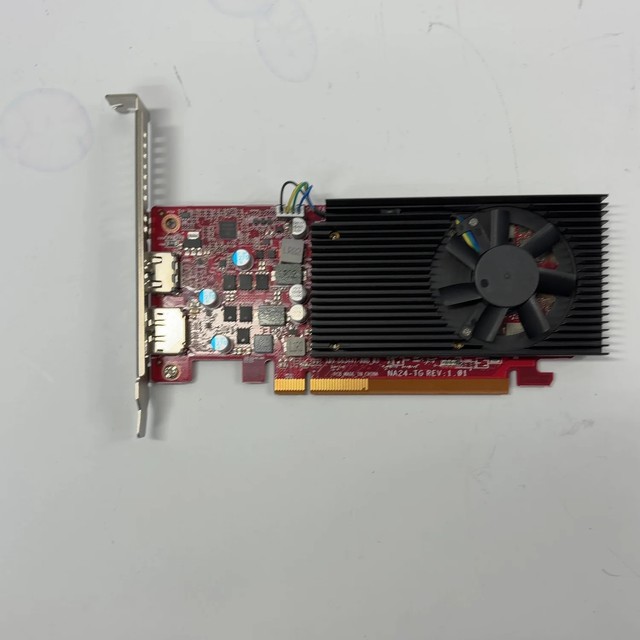
Built for exactly this situation: low power, drawing from the slot alone, and available in genuinely half-height low-profile form for small form factor OEM cases. It is not fast, and it has a real limitation on this platform worth knowing — it runs a narrow PCIe link, which costs more performance on an older PCIe 3.0 board than it would on a modern one.
- Slot-powered, no PCIe connector required
- Low-profile half-height models available
- 4 GB GDDR6
- Narrow PCIe lane configuration
- Genuinely fits SFF OEM cases
- No power connector needed
- Very low power draw and heat
- Narrow PCIe link costs performance on a PCIe 3.0 board
- 4 GB VRAM and limited media encode support
- Modest performance overall

NVIDIA GTX 1660 Super
The sensible choice if you have a full tower and a supply with a six-pin. It is comfortably more card than this processor can keep fed at 1080p, uses a full x16 slot so loses nothing on PCIe 3.0, and draws around 125 W which most 290 W OEM supplies handle. Six gigabytes of VRAM is adequate at 1080p and is where this card shows its age.
- 6 GB GDDR6
- Full PCIe x16 interface
- Around 125 W board power
- Single 8-pin connector
- Well matched to what this CPU can feed at 1080p
- Full x16 so no PCIe 3.0 penalty
- Strong used market availability
- Needs a PCIe power connector the OEM supply may not have
- 6 GB VRAM is the limiting factor in newer titles
- No DLSS support on this generation

AMD Radeon RX 6600
The best performance per watt available at this budget and a good match for an OEM tower with a six-pin: around 130 W, a single connector, and comfortably faster than the 1660 Super with 8 GB of VRAM. The one caveat on this platform is that it runs eight PCIe lanes rather than sixteen, which costs a few percent on a PCIe 3.0 board — real but small.
- 8 GB GDDR6
- Around 130 W board power
- Eight-lane PCIe interface
- Single 8-pin connector
- 8 GB of VRAM outlasts the rest of the machine
- Excellent efficiency for a constrained supply
- FSR upscaling support
- Eight lanes rather than sixteen costs a little on PCIe 3.0
- Needs a PCIe power connector
- This CPU will cap it in thread-heavy games

NVIDIA RTX 3050 (6 GB, slot-powered variant)
Worth knowing about because the 6 GB version was designed to run from the slot alone at around 70 W, which puts a modern NVIDIA card with DLSS support into an OEM machine with no PCIe connector. That combination is rare and genuinely useful here. Confirm you are buying the 6 GB slot-powered version rather than the 8 GB card, which needs a connector.
- 6 GB GDDR6 on the slot-powered variant
- Around 70 W, no PCIe connector needed
- DLSS and NVENC support
- Compact dual-fan designs
- DLSS support in a card that needs no power connector
- Good NVENC encoder for streaming and recording
- Fits the OEM power envelope
- The 8 GB version does need a connector — check carefully
- Modest raw performance
- Priced above older cards of similar speed
Used GTX 1060 6GB or RX 580 8GB
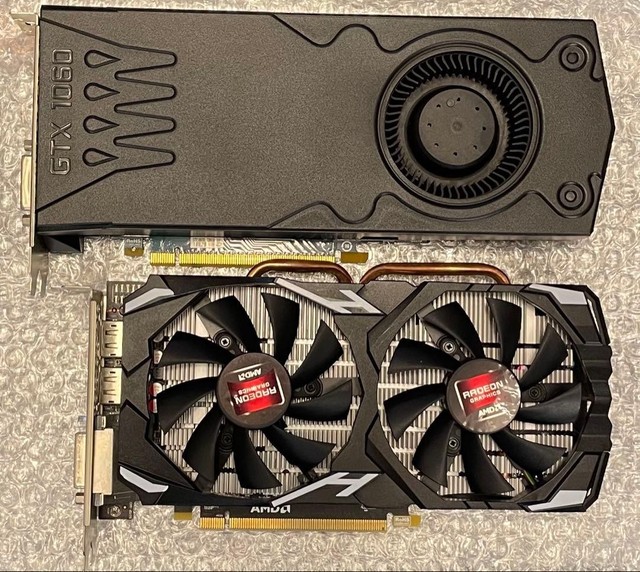
The budget end of the used market, and still capable at 1080p on a CPU like this. The 1060 is the easier fit at around 120 W; the RX 580 is faster but draws closer to 185 W, which is beyond what many OEM supplies will tolerate. Both are old enough that thermal paste and fan bearings are a real consideration — factor a repaste into the price.
- 6 GB or 8 GB VRAM
- Full x16 PCIe interface
- Around 120 W (1060) or 185 W (RX 580)
- Widely available used
- Very cheap for the performance
- Plenty of VRAM for 1080p
- Well matched to a four-thread CPU
- RX 580’s power draw exceeds many OEM supplies
- Ageing thermal paste and fans need attention
- No warranty and mining-era cards are common

Replacement ATX Power Supply (tower cases only)
The enabling purchase if — and only if — your case takes a standard ATX supply. Many full-size OptiPlex and EliteDesk towers do; small form factor and micro machines emphatically do not, using proprietary dimensions and motherboard connectors. Check before buying. Where it fits, a 550 W unit with proper PCIe connectors opens up the whole card list above.
- Standard ATX form factor
- 550 W with 80+ Bronze or better
- Proper 6+2 pin PCIe connectors
- Multi-year warranty
- Removes the power constraint entirely
- Modern protection circuitry on an ageing machine
- Cheap relative to the options it unlocks
- Will not fit SFF, micro or many proprietary OEM cases
- Some OEM boards use non-standard motherboard connectors
- Wasted money if you discover the incompatibility after buying

Low-Profile Bracket Kit
Small and easy to forget. A low-profile card ships with a full-height bracket fitted and the half-height one in the box — or occasionally not in the box at all. If you are buying used for a small form factor machine, confirm the low-profile bracket is included before ordering, because sourcing the right one afterwards for a specific card is surprisingly difficult.
- Half-height replacement bracket
- Card-specific port cutouts
- Usually two screws to swap
- Sometimes sold separately
- The difference between a card fitting and not
- Trivial to fit
- Very cheap when available
- Card-specific — generic brackets rarely line up
- Frequently missing from used listings
- Hard to source separately for older cards

Additional RAM to 16 GB (dual channel)
Frequently a bigger real-world improvement than a faster card on these machines, and much cheaper. Ex-office systems routinely shipped with 8 GB in a single stick, and modern games want 16 GB in two channels. DDR3 for this platform is cheap on the used market. Check whether your board has free slots and match the speed to what is already installed.
- DDR3 for the Haswell platform
- Two matched sticks for dual channel
- 16 GB total is the sensible target
- Cheap on the used market
- Often a larger gain than a GPU upgrade on an 8 GB machine
- Very cheap DDR3 pricing
- Dual channel matters more than capacity beyond 16 GB
- Single-stick machines need matching, not just adding
- Some OEM boards are fussy about mixed modules
- DDR3 has no future beyond this machine
Buying tips
- Identify your case type before anything else. A full tower usually takes a standard dual-slot card; a small form factor takes low-profile half-height only; a micro chassis takes nothing.
- Check whether the power supply has a PCIe connector at all. Many OEM machines have none, which caps you at slot-powered cards drawing 75 W or less.
- Do not use SATA or Molex to PCIe adapters on an OEM supply. They shift a load the supply was never specified for onto rails that were not designed to carry it.
- Check whether your case takes a standard ATX supply before planning a PSU swap. Full-size towers often do; SFF and micro machines use proprietary dimensions and connectors, and that is a wall rather than an inconvenience.
- Rule out Intel Arc unless your BIOS has Resizable BAR. Haswell-era boards predate it, and Arc performance without it falls off a cliff rather than degrading gently.
- Remember the chip is four cores and four threads with no overclocking. If your complaint is stuttering rather than a low average frame rate, that is the CPU, and no card fixes it.
- Check the RAM before buying a card. Ex-office machines commonly shipped with a single 8 GB stick, and going to 16 GB in dual channel is often the bigger improvement for a fraction of the price.
- Confirm the low-profile bracket is included when buying used for an SFF machine. Sourcing the correct one afterwards for a specific card is much harder than it sounds.
As an Amazon Associate and eBay Partner, toptenpick.com earns from qualifying purchases. Prices and availability are subject to change.