

As an Amazon Associate and eBay Partner, toptenpick.com earns from qualifying purchases. Prices and availability are subject to change.
A turbo or rapid-fire controller repeats a button press electronically while you hold it down. On a semi-automatic weapon that turns a finger-destroying mash into a steady stream; on a fighting game it produces inputs no hand can manage; in a grinding sequence it presses A for you while you do something else.
Before you buy one, there is a line worth being clear about, because it decides which of the products below make sense for you.
Using rapid-fire in competitive online multiplayer is cheating, and it is against the terms of service of essentially every online shooter. Detection has become considerably better than it was — the input timing signature of an electronic repeat is machine-regular in a way a human thumb is not, and reports from other players trigger review. Accounts get banned, and a ban on a console account can take the games with it. That is not a moral lecture; it is what actually happens, and it is worth knowing before you spend money on hardware whose main advertised use will get you removed.
Where a turbo controller is completely legitimate, and genuinely valuable:
Accessibility. For anyone with arthritis, a hand injury, a repetitive strain problem or limited grip strength, rapid-fire is the difference between playing a game and not playing it. This is the strongest reason these devices exist and the least discussed.
Single-player and offline. Grinding, farming, chipping through a wall of low-value inputs — nobody is harmed and nobody’s experience is degraded.
Old games with punishing input requirements. A great many arcade-era and early-console games were built around mashing, and revisiting them in middle age with a turbo button is simply a nicer experience.
Ten picks below, covering turbo controllers, the accessibility hardware that often serves better, and the accessories that keep a decade-old console usable.
| # | Product | Price | Where to buy |
|---|---|---|---|
| 1 | Third-Party Controller with Built-In Turbo | $25-$50 | Amazon |
| 2 | Official Xbox 360 Wireless Controller | $25-$60 | Amazon · eBay |
| 3 | Controller with Rear Paddles | $50-$150 | Amazon |
| 4 | Arcade Fight Stick with Turbo | $70-$250 | Amazon · eBay |
| 5 | Adaptive / Accessibility Controller Setup | $100-$400 | Amazon |
| 6 | Rechargeable Battery Pack and Charging Dock | $15-$35 | Amazon · eBay |
| 7 | Replacement Thumbsticks and Grips | $8-$20 | Amazon |
| 8 | Controller Repair Kit (Analogue Stick Modules) | $15-$40 | Amazon · eBay |
| 9 | Wired Controller USB Adapter | $15-$40 | Amazon · eBay |
| 10 | Controller Cleaning Kit | $10-$25 | Amazon |
The picks, in detail
Third-Party Controller with Built-In Turbo
The straightforward option: a wired or wireless Xbox 360-compatible controller with turbo buttons built into the shell from the factory, usually with a switch to assign turbo to specific face buttons and sometimes an adjustable rate. Because it is a factory feature rather than a modification, it is cheap and it does not void anything. Build quality is generally below an official controller — expect sticks and triggers to wear faster — but for single-player and accessibility use it does exactly what is wanted.
- Turbo assignable to individual face buttons
- Adjustable repeat rate on better models
- Wired or 2.4 GHz wireless
- Standard Xbox 360 layout
- Turbo without modifying anything
- Cheap and widely available
- Assignable per button rather than globally
- Build quality below an official pad
- Will get you banned if used in online multiplayer

Official Xbox 360 Wireless Controller
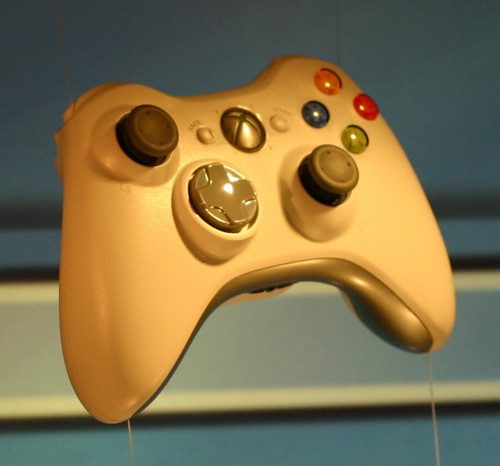
Included because for many people it is the better buy. The official pad has no turbo, and it has the thing third-party controllers consistently lack: stick and trigger quality that holds up over years, correct wireless behaviour, and no compatibility oddities. If your interest in turbo was mild convenience rather than accessibility, a good official controller plus a rechargeable battery pack is a more satisfying purchase than a cheap pad with an extra button.
- Official Microsoft wireless controller
- Proprietary 2.4 GHz wireless to the console
- Takes AA batteries or a play-and-charge pack
- Widely available used
- Stick and trigger quality far above third-party pads
- No compatibility issues of any kind
- Plentiful and cheap second-hand
- No turbo function at all
- Needs batteries or a charge pack
Controller with Rear Paddles
A genuinely better answer than turbo for a lot of the problems people buy turbo to solve. Rear paddles map face buttons to levers under your fingers, so you can jump or shoot without taking a thumb off the stick — which for anyone with limited hand mobility removes a real physical barrier, and which is entirely legitimate online. Paddles are permitted where rapid-fire is not, because they change where an input comes from rather than generating inputs you did not make.
- Two or four rear paddles
- Remappable to face buttons
- Standard controller layout otherwise
- Some have adjustable trigger stops
- Legitimate in online play, unlike rapid-fire
- Solves the thumb-off-stick problem directly
- Genuinely useful for limited hand mobility
- Takes practice to stop pressing them accidentally
- Good paddle controllers are not cheap

Arcade Fight Stick with Turbo
The format where turbo has always been normal and uncontroversial. Arcade sticks for fighting games have carried turbo switches since the arcade era, and for single-player play against the computer they are simply part of the furniture. A stick also solves a different physical problem: it moves the input from thumbs to a whole hand and arm, which many people with hand pain find dramatically more comfortable than a pad. Buy one with replaceable buttons if you intend to keep it.
- Arcade-style stick and eight face buttons
- Turbo switches per button
- Replaceable parts on better sticks
- Weighted base
- Turbo is a normal and accepted feature here
- Whole-arm input is easier on painful hands
- Repairable rather than disposable
- Large and awkward to store
- Useless for most non-fighting genres
Adaptive / Accessibility Controller Setup
For anyone whose reason for wanting turbo is physical rather than convenience, this is the category that deserves the attention. Adaptive controllers accept external switches, buttons and foot pedals, so an input that is difficult with a thumb can be made with a palm, an elbow or a foot. Support for the 360 generation is via adapters rather than native, so check compatibility carefully before buying. It is a more involved setup and it solves the actual problem rather than working around it.
- Large accessible buttons and external switch ports
- Compatible with a wide range of assistive switches
- Foot pedals and alternative inputs supported
- Requires an adapter for 360-era hardware
- Addresses physical barriers directly
- Enormously configurable
- Switches can be placed wherever you can reach
- Needs an adapter for Xbox 360 compatibility
- Considerably more expensive and more setup

Rechargeable Battery Pack and Charging Dock
A practical necessity on a console this old. Xbox 360 wireless controllers run on AA batteries or a rechargeable pack, and the original packs in circulation now are more than a decade old — lithium cells age whether used or not, so a pack that came with a used controller may hold very little charge. A new pack plus a dual charging dock costs very little and removes the recurring irritation of a controller dying mid-session. Buy two packs and alternate them.
- Replacement rechargeable packs
- Dual charging dock
- Charge status indicators
- USB or mains powered
- Old packs no longer hold charge — this fixes it
- Dock keeps both controllers ready
- Cheaper than AA batteries over time
- Cheap packs have optimistic capacity claims
- Another thing on the shelf
Replacement Thumbsticks and Grips
The cheapest way to make a decade-old controller feel new. The rubberised coating on 360 thumbsticks wears through to slick plastic, which makes precise aiming genuinely harder and is a specific problem for anyone with reduced grip strength. Replacement stick caps press on in seconds and cost almost nothing. Textured grip covers for the controller body do the same for the palms, and both are far cheaper than replacing a controller whose electronics are perfectly fine.
- Press-on replacement stick caps
- Textured or domed profiles
- Silicone grip covers for the body
- Multipacks
- Restores grip on worn sticks in seconds
- Helps anyone with reduced grip strength
- Costs almost nothing
- Loose-fitting caps can pull off during play
- Does not fix worn potentiometers underneath
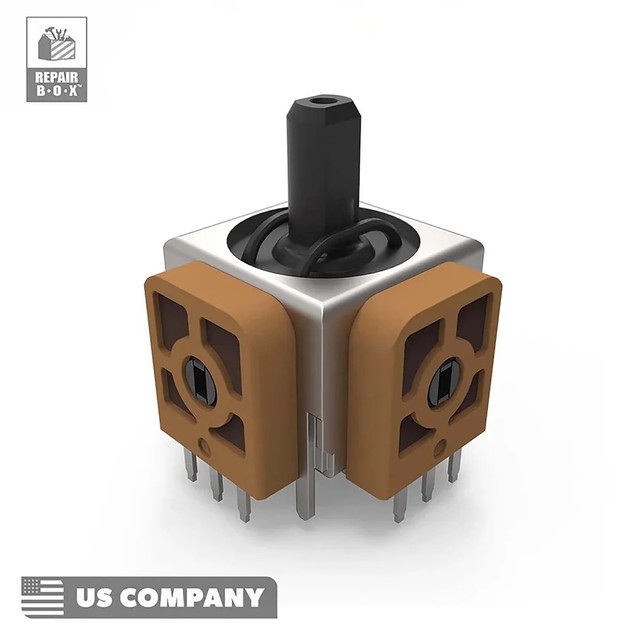
Controller Repair Kit (Analogue Stick Modules)
For drift, which on ten-year-old controllers is close to universal. The analogue stick module is a wearing part and it is replaceable — a repair kit with new modules, the right screwdrivers and a set of replacement screws turns a drifting controller into a working one for a fraction of the cost of a replacement. It needs basic soldering on most designs, which is the real barrier. If that puts you off, it is still worth knowing the controller is repairable rather than disposable.
- Replacement analogue stick modules
- Security screwdrivers for the shell
- Replacement screws and trigger springs
- Detailed guides widely available
- Fixes stick drift permanently
- Far cheaper than a replacement controller
- Kits include the security bits you need
- Most designs require soldering
- Fiddly, with small parts to lose

Wired Controller USB Adapter
Solves two problems at once. A wired connection removes the battery question entirely and, more usefully on a console of this age, sidesteps a failing wireless board — which is a common 360 fault that presents as controllers disconnecting randomly and gets blamed on the controllers. An official wired controller, or a wireless one with a play-and-charge cable, also has marginally lower input lag. Worth having one wired controller in the box regardless, as a known-good troubleshooting reference.
- USB wired connection
- No batteries required
- Bypasses the console’s wireless board
- Slightly lower input lag
- Works around a failing console wireless board
- No battery management at all
- A known-good controller for troubleshooting
- A cable across the living room
- Play-and-charge cables vary in quality
Controller Cleaning Kit
A decade of hands, crumbs and dust inside a controller does measurable damage: sticky buttons, triggers that do not return, and grit under the stick modules that accelerates the wear causing drift. Isopropyl alcohol, cotton swabs, compressed air and a set of security screwdrivers is everything needed. Opening a 360 controller requires a Torx security bit, which is the only specialist item — and it is the same bit you will need for the repair kit above, so buy them together.
- Isopropyl alcohol and lint-free swabs
- Compressed air
- Torx security screwdriver for the shell
- Soft brushes
- Fixes sticky buttons and sluggish triggers
- Slows the grit wear that causes drift
- Very cheap
- Requires a security Torx bit to open the shell
- Liquid near electronics needs care and drying time
Buying tips
- Do not use rapid-fire in online multiplayer. It is against the terms of service of essentially every online shooter, the machine-regular input timing is detectable, and reports from other players trigger review. Bans on a console account can take your library’s online access with it. Whatever you think of the ethics, this is what actually happens.
- Accessibility is the strongest reason these exist. For arthritis, a hand injury, repetitive strain or limited grip strength, rapid-fire is the difference between playing and not playing. If that is your situation, look beyond turbo pads at paddle controllers and adaptive setups, which solve the problem more thoroughly and are permitted everywhere.
- Rear paddles are legitimate where rapid-fire is not. They change where an input comes from rather than generating inputs you did not make, which is why competitive play allows them. For the common problem of needing to jump or shoot without taking a thumb off the stick, a paddle controller is both the better tool and the permitted one.
- Turbo is completely uncontroversial in single-player. Grinding, farming, and the mash-heavy design of a lot of older games are exactly what it is for, and nobody else’s experience is affected. If your use case is offline, buy whatever is most comfortable and stop worrying about it.
- Third-party pads wear faster. The sticks and triggers on cheap controllers are the first thing to go, usually within a year of regular use. If you want turbo for a specific game and an official pad for everything else, that is a sensible two-controller setup and still cheaper than replacing a cheap pad every year.
- Check the battery pack on any used controller. Xbox 360 rechargeable packs in circulation are more than a decade old, and lithium cells degrade whether used or not. A controller that seems to die instantly almost certainly has a dead pack rather than a fault. New packs are cheap; buy two and alternate them.
- Stick drift is repairable, not terminal. The analogue stick module is a wearing part and replacement modules are cheap. Most designs need basic soldering, which is the real barrier, but it is worth knowing a drifting controller is a repair rather than a write-off. The security Torx bit to open the shell is the only specialist tool.
- If controllers disconnect randomly, suspect the console. A failing wireless board in the 360 itself is a known fault and it presents exactly as controllers dropping out, which everyone blames on the controllers. Keep one wired controller as a known-good reference — if the wired one behaves and every wireless one does not, the console is the problem.
As an Amazon Associate and eBay Partner, toptenpick.com earns from qualifying purchases. Prices and availability are subject to change.