

As an Amazon Associate and eBay Partner, toptenpick.com earns from qualifying purchases. Prices and availability are subject to change.
The question hiding inside “what monitors work with a 2i2″ is really a connector question, not a sound question. Focusrite’s own spec sheet lists the 2i2’s monitor outputs as two balanced 1/4” TRS jacks running at a variable +10 dBu — not XLR, and not consumer RCA line level. That’s a proper balanced, pro-level connection, and the shopping mistake is assuming every speaker marketed as a “studio monitor” speaks that language back.
Most monitors built for exactly this job do. XLR, TRS, or a combo jack that takes either, sometimes with an RCA input thrown in for a turntable or a laptop headphone-out. Plug in a standard 1/4″ TRS cable and you’re done — the 2i2’s output level is also variable, so you’re not stuck guessing whether a quieter monitor is underpowered. But a few genuinely good desktop monitors, the IK Multimedia iLoud Micro Monitor among them, only give you RCA and a 3.5mm jack. Buy one of those expecting a balanced hookup and you’ll be hunting for a TRS-to-RCA cable before you hear anything. Check the back-panel photo before checking the price.
The mismatch that actually bites once cables are sorted is room size versus woofer size. A 5.25″ or bigger woofer moves more air and reaches lower, which reads as “better” on a spec sheet. But three feet from your head on a desk in a small, untreated bedroom, that extra low end has nowhere to go — it reflects off the wall behind the monitor and the desk in front of it and comes back as boom, not detail. A smaller 3-4″ nearfield monitor in the same room routinely images tighter and translates better, because it isn’t fighting the room it’s sitting in.
So the honest shopping order is: confirm the input jack matches the 2i2’s balanced TRS output, or budget for a cheap adapter cable if it doesn’t, then size the woofer to the room rather than the budget. A tiny desk in a bedroom wants a 3-4″ pair. A treated space or a larger room can use a 5-5.25″ pair without regret. The ten picks below span both ends of that range, plus the input-connector trade-off each one makes, so you’re not guessing at checkout.
| # | Product | Price | Where to buy |
|---|---|---|---|
| 1 | PreSonus Eris E5 XT | $220–$260 | Amazon · eBay |
| 2 | JBL 305P MkII | $320–$340 | Amazon · eBay |
| 3 | Yamaha HS5 | $380–$420 | Amazon · eBay |
| 4 | KRK Rokit 5 G5 | $380–$400 | Amazon · eBay |
| 5 | Mackie CR5-X | $200–$220 | Amazon · eBay |
| 6 | IK Multimedia iLoud Micro Monitor | $280–$300 | Amazon · eBay |
| 7 | M-Audio BX5 D3 | $280–$320 | Amazon · eBay |
| 8 | Adam Audio T5V | $440–$480 | Amazon · eBay |
| 9 | Edifier MR4 | $120–$140 | Amazon · eBay |
| 10 | PreSonus Eris E3.5 | $100–$120 | Amazon · eBay |
The picks, in detail
PreSonus Eris E5 XT
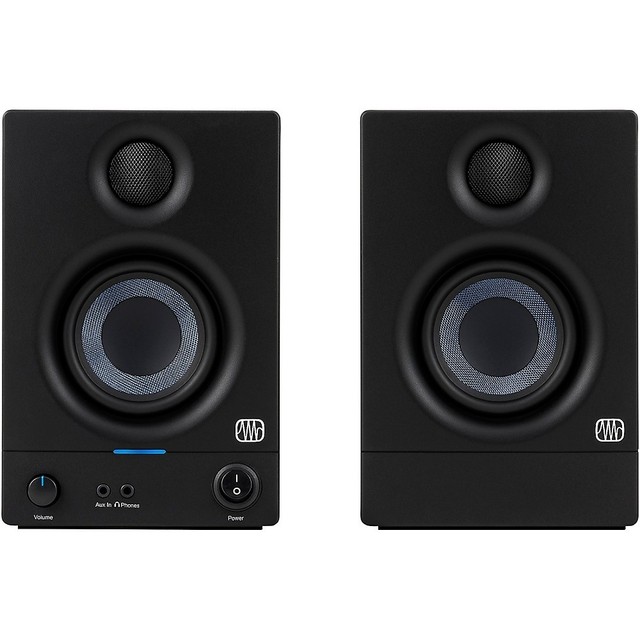
The 5.25″ model in PreSonus’s long-running Eris line, built for more room than the smaller E3.5. Its combination of XLR, balanced 1/4″ TRS, and unbalanced RCA inputs means it plugs into the 2i2’s TRS outputs with a standard cable, no adapter needed. Front-panel Acoustic Tuning switches let you knock back the low end if desk position or room size is pushing bass into boom.
- 5.25″ woven-composite woofer, 1″ silk-dome tweeter
- 80W Class AB biamplification, 102 dB max SPL
- XLR, balanced 1/4″ TRS, and RCA inputs
- Front-panel acoustic space and high-frequency trim controls
- TRS input matches the 2i2’s output with a plain cable
- Acoustic tuning switches compensate for a boomy desk position
- Bigger driver has headroom for a larger or partially treated room
- 5.25″ woofer is more low end than a small bedroom wants at close range
- Ported cabinet needs several inches of clearance from the back wall
- No Bluetooth or 1/8″ input if you also want it as a casual speaker

JBL 305P MkII
One of the most common monitors in home-studio setups for a reason: an Image Control Waveguide that widens the usable listening spot, plus a switchable +4dBu/-10dBV input sensitivity control that lets you match the 2i2’s balanced output exactly instead of guessing at gain staging on a fixed-sensitivity monitor.
- 5″ woofer, 1″ neodymium tweeter, Image Control Waveguide
- 82W Class D biamp (41W LF / 41W HF)
- Combo XLR/TRS input plus RCA, switchable +4dBu/-10dBV sensitivity
- Boundary EQ switch for near-wall placement
- Sensitivity switch matches the 2i2’s balanced line level cleanly
- Wide sweet spot forgives imperfect desk positioning
- Boundary EQ tames bass buildup for a monitor pushed against a wall
- No acoustic-space control beyond the single boundary switch
- 5″ woofer is still more bass than a very small room wants
- Plastic cabinet feels lighter-duty than the metal-front competition

Yamaha HS5
The monitor most audio engineers name first when asked for a flat, honest nearfield, and its single Neutrik combo jack takes the 2i2’s balanced 1/4″ TRS cable directly. Yamaha’s white-cone tuning deliberately avoids flattering bass or treble, which is useful for mixing but can sound thin next to a consumer speaker on first listen.
- 5″ cone woofer, 1″ dome tweeter, 54Hz–30kHz response
- 70W biamp (45W LF, 25W HF)
- Single combo XLR/TRS input per channel
- Rear ROOM CONTROL and HIGH TRIM trim switches
- Combo jack takes the 2i2’s TRS output with no adapter
- Deliberately flat tuning is trusted across home and pro studios alike
- Compact 5″ cabinet suits most desk placements
- No RCA fallback if you ever add a consumer source
- Bass rolls off around 54Hz without a subwoofer
- Flat tuning can sound underwhelming next to consumer speakers at first

KRK Rokit 5 G5
The fifth-generation Rokit replaces the older separate RCA jack with a single combo XLR/1/4″ input, so it takes the 2i2’s balanced TRS cable directly. What sets it apart is DSP: three voicing modes and 25 room-tuning combinations dialed in through KRK’s app, a real answer to a boomy small room instead of a single boundary switch.
- 5″ Kevlar woofer, 1″ silk-dome tweeter, 54Hz–30kHz response
- Up to 55W Class D biamp, 104 dB max SPL
- Combo XLR/1/4″ TRS input (no RCA)
- 3 voicing modes plus 25-setting DSP room EQ via companion app
- DSP room tuning is a real answer to a small, untreated room
- Combo input matches the 2i2’s TRS output directly
- Three voicing modes adapt the same speaker to mixing vs. casual listening
- Dropped the RCA input the older G3/G4 models had
- Getting value from the DSP means installing KRK’s app and doing the setup work
- Stock tuning runs bass-forward until you dial the room EQ back
Mackie CR5-X
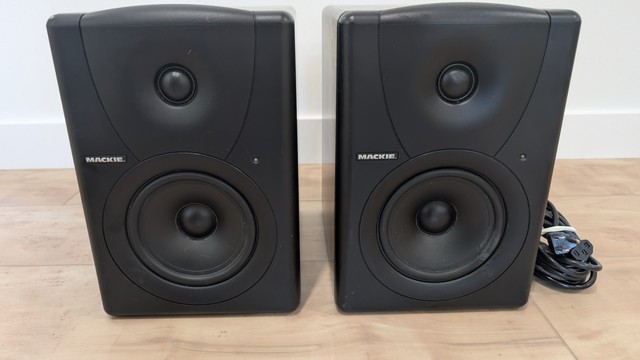
Mackie’s CR-X series sits between a multimedia speaker and a real monitor, and the rear panel spells that out: balanced 1/4″ TRS alongside 1/8″ stereo and RCA, so it takes the 2i2’s TRS output on the same jack a dedicated studio monitor would use, while still doubling as a desktop speaker for a phone or laptop plugged in over 1/8″.
- 5″ woofer, 0.75″ silk-dome tweeter, 50Hz–20kHz response
- 80W Class AB amplification, 105 dB max SPL
- Balanced 1/4″ TRS, 1/8″ stereo, and RCA inputs
- Front-panel headphone output and volume knob
- TRS input takes the 2i2’s balanced output without an adapter
- Front headphone jack and volume knob are genuinely convenient at a desk
- Cheapest pair here with a real balanced input, not just RCA
- Voicing leans toward a fun consumer sound over flat accuracy
- Metal front panel is the whole story on build quality — plastic elsewhere
- 5″ woofer still wants some room to breathe, not a cramped shelf

IK Multimedia iLoud Micro Monitor
The pick for a genuinely tiny desk, but it’s also the connector trap this whole topic is about: no XLR and no 1/4″ TRS at all, just RCA, a 3.5mm jack, and Bluetooth. Pairing it with a 2i2 means running a 1/4″ TRS-to-RCA cable — unbalanced over a short desk run is fine — rather than plugging straight in like the other monitors here.
- 3″ driver, 3/4″ silk-dome tweeter, down to 55Hz
- 2 x 25W amplification
- RCA and 3.5mm inputs, Bluetooth A2DP — no XLR or 1/4″ TRS
- 3-switch rear EQ for desk or wall placement
- Small enough for desks where a 5″ monitor simply won’t fit
- Bluetooth makes it double as a phone speaker between sessions
- Surprisingly extended bass response for the cabinet size
- Needs a 1/4″ TRS-to-RCA cable to reach the 2i2 — not a direct connection
- No balanced input at all, unlike nearly everything else on this list
- 3″ driver has an obvious ceiling on max volume and low-end depth

M-Audio BX5 D3
A long-running budget favorite that still turns up in Amazon’s studio-monitor results even though M-Audio has since moved to newer lines. XLR and 1/4″ TRS inputs cover the 2i2 directly, and the rear-panel Acoustic Space switch is a simple two-position bass cut for a monitor placed close to a wall or in a small room.
- 5″ Kevlar woofer, 1″ silk-dome tweeter, 52Hz–35kHz response
- 100W Class AB biamp, 110 dB max SPL
- Balanced XLR and 1/4″ TRS inputs
- 2-position Acoustic Space bass-cut switch
- TRS input takes the 2i2’s output directly
- Acoustic Space switch is a quick fix for a wall-adjacent desk
- Usually the least expensive 5″ pair with a real balanced input
- Discontinued at several major retailers — check current stock before ordering
- Bass-cut switch is only two positions, not fine-grained EQ
- Plainer industrial design than the JBL or KRK

Adam Audio T5V
The step up in driver technology on this list: Adam’s U-ART ribbon tweeter instead of a dome, resolving detail few monitors in this price range match. The catch for a 2i2 owner is the input panel — XLR and RCA only, no 1/4″ TRS — so plan on a TRS-to-XLR cable rather than assuming your existing 1/4″ cables plug straight in.
- 5″ polypropylene woofer, 1.9″ U-ART ribbon tweeter, 45Hz–25kHz response
- 70W Class D biamp (50W LF / 20W HF), 106 dB max SPL
- XLR and RCA inputs only — no 1/4″ TRS
- Rear high-shelf and low-shelf trim switches
- Ribbon tweeter resolves high-frequency detail above cheaper dome tweeters
- XLR input works cleanly off the 2i2’s balanced output with the right cable
- Shelf trims are genuinely useful for correcting a difficult room
- No 1/4″ TRS input — needs a TRS-to-XLR cable, not a plain TRS cable
- Priced noticeably above the other 5″ options here
- Ribbon tweeter is more failure-prone than a dome if ever driven too hard

Edifier MR4
A genuine budget entry with a real balanced input, not just RCA: the MR4’s TRS jack is rated at +4dBu, squarely inside the range the 2i2 outputs at. The 4″ woofer is deliberately smaller than most of this list, which is the right call for a small desk in a small room rather than a compromise you’re settling for.
- 4″ woofer, 1″ tweeter, 60Hz–20kHz response
- 21W + 21W total power
- Balanced 1/4″ TRS input plus two RCA/AUX inputs
- Switchable Monitor/Music voicing modes
- TRS input matches the 2i2’s balanced output directly
- 4″ woofer is sized right for a small room instead of overloading it
- Lowest price on this list with a real balanced input
- 21W per side is noticeably quieter than the 5″ options here
- Bass response stops at 60Hz — no real low-end extension
- Plastic cabinet and port can buzz at higher volumes
PreSonus Eris E3.5
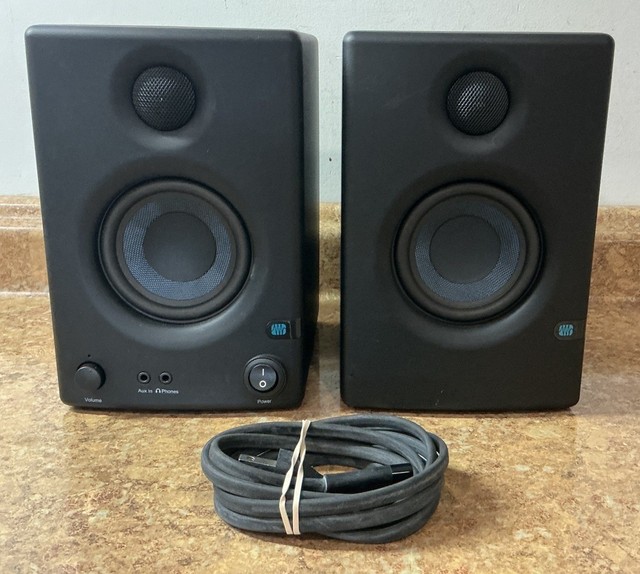
PreSonus’s smallest Eris, built specifically for a desk too tight for anything with a 5″ driver. Rear TRS and RCA inputs both work with the 2i2 — TRS directly, RCA if you’d rather. At this size it’s honestly closer to a very good desktop speaker than a mixing reference, and that’s the right tool for a lot of small rooms.
- 3.5″ woven-composite woofer, 1″ silk-dome tweeter
- 50W (25W/side) Class AB amplification, 100 dB max SPL
- Rear 1/4″ TRS and RCA inputs, front-panel 1/8″ input
- Front-panel headphone output
- Smallest footprint here for a genuinely cramped desk
- TRS input takes the 2i2’s output directly, no adapter needed
- Cheapest pair on this list by a wide margin
- 3.5″ woofer has real limits on bass and max volume
- Less accurate for critical mixing than the larger monitors above
- No XLR input if you later upgrade to gear that only outputs XLR
Buying tips
- Check the monitor’s rear panel for a 1/4″ TRS or combo XLR/TRS jack before buying — that’s what plugs into the 2i2’s outputs with a standard cable.
- If a monitor only has RCA inputs, budget for a pair of 1/4″ TRS-to-RCA cables rather than assuming you already own the right cable.
- Size the woofer to the room: a 3-4″ monitor on a small desk in an untreated bedroom usually images tighter than a 5″+ pair fighting the same walls.
- Use the 2i2’s monitor output knob to set a comfortable level first — the output is variable, so a smaller or quieter monitor isn’t automatically underpowered.
- Leave a few inches of clearance behind a ported monitor, which nearly all of these are, so the port isn’t firing directly into a wall.
- Toe the monitors in slightly toward your listening position instead of leaving them pointed straight ahead — it narrows and stabilizes the sweet spot at a nearfield desk distance.
- If a monitor offers acoustic-space or boundary EQ switches, use them — they exist specifically to cut bass buildup from a desk placed close to a wall.
- Keep the connection wired while mixing even on a Bluetooth-capable monitor — Bluetooth’s own compression and latency work against the accuracy you bought the interface for.
As an Amazon Associate and eBay Partner, toptenpick.com earns from qualifying purchases. Prices and availability are subject to change.