

As an Amazon Associate and eBay Partner, toptenpick.com earns from qualifying purchases. Prices and availability are subject to change.
Alienware used the Area-51m name on two importantly different laptops. The 2019 Area-51m (R1) has 4 DDR4 SO-DIMM slots and Dell specifies up to 64GB using 4 16GB modules at 2400 MT/s; it also lists 2666 and Dell-supplied 2933 XMP configurations. The Area-51m R2 has only two SO-DIMM slots and supports up to 64GB as 2x32GB DDR4-2933, while Dell says third-party XMP modules are unsupported. Buy 260-pin DDR4 SO-DIMMs, not full-size desktop DIMMs. The compatible retail kits below use standard 1.2V profiles and may run below their 3200 label in either generation; do not assume a third-party 3200 XMP kit will deliver 3200 MT/s.
| # | Product | Price | Where to buy |
|---|---|---|---|
| 1 | Crucial 32GB DDR4-3200 SO-DIMM Kit (CT2K16G4SFRA32A) | $190–$280 | Amazon · eBay |
| 2 | Kingston FURY Impact 32GB DDR4-3200 CL20 SO-DIMM Kit (KF432S20IBK2/32) | $180–$280 | Amazon · eBay |
| 3 | Corsair Vengeance 32GB DDR4-3200 SO-DIMM Kit (CMSX32GX4M2A3200C22) | $190–$290 | Amazon · eBay |
| 4 | G.Skill Ripjaws 32GB DDR4-3200 SO-DIMM Kit (F4-3200C22D-32GRS) | $190–$290 | Amazon · eBay |
| 5 | TEAMGROUP T-Force Zeus 32GB DDR4-3200 SO-DIMM Kit (TTZD432G3200HC22DC-S01) | $180–$270 | Amazon |
| 6 | Timetec 32GB DDR4-3200 SO-DIMM Kit (76TT32NUS2R8-16GK2) | $170–$250 | Amazon |
| 7 | Samsung 32GB DDR4-3200 SO-DIMM Pair (2x M471A2K43DB1-CWE) | $180–$280 | Amazon · eBay |
| 8 | Crucial 64GB DDR4-3200 SO-DIMM Kit (CT2K32G4SFD832A) | $390–$560 | Amazon · eBay |
| 9 | Corsair Vengeance 64GB DDR4-3200 SO-DIMM Kit (CMSX64GX4M2A3200C22) | $400–$600 | Amazon · eBay |
The picks, in detail

Crucial 32GB DDR4-3200 SO-DIMM Kit (CT2K16G4SFRA32A)
A 2x16GB 260-pin kit for a 32GB upgrade; it can downclock in an Area-51m whose firmware does not use its 3200 MT/s profile.
- 32GB (2x16GB)
- DDR4-3200 CL22
- 260-pin SO-DIMM, 1.2V
- Matched dual-channel pair
- Standard-voltage laptop memory
- R1 needs two more 16GB modules to reach its official 64GB layout
- May run below 3200 MT/s

Kingston FURY Impact 32GB DDR4-3200 CL20 SO-DIMM Kit (KF432S20IBK2/32)
A 2x16GB laptop kit with a low-latency 3200 listing; use it as a capacity upgrade, not a promise of third-party XMP operation in either Area-51m.
- 32GB (2x16GB)
- DDR4-3200 CL20
- 260-pin SO-DIMM, 1.2V
- Matched kit
- Lower advertised latency than CL22 options
- Dell limits third-party XMP support
- May downclock in the laptop

Corsair Vengeance 32GB DDR4-3200 SO-DIMM Kit (CMSX32GX4M2A3200C22)
A 2x16GB retail SO-DIMM pair for a 32GB dual-channel upgrade; verify the displayed speed in BIOS after installation.
- 32GB (2x16GB)
- DDR4-3200 CL22
- 260-pin SO-DIMM, 1.2V
- Matched laptop-memory kit
- Straightforward 32GB capacity
- Not desktop DIMM RAM
- 3200 label may exceed the laptop’s operating speed

G.Skill Ripjaws 32GB DDR4-3200 SO-DIMM Kit (F4-3200C22D-32GRS)
A 2x16GB SO-DIMM choice for an Area-51m owner replacing an entire pair rather than mixing it with factory memory.
- 32GB (2x16GB)
- DDR4-3200 CL22
- 260-pin SO-DIMM, 1.2V
- Matched dual-channel pair
- Well-known laptop-memory line
- R1’s four slots make a full 64GB plan more involved
- May operate at 2933, 2666, or 2400 MT/s
TEAMGROUP T-Force Zeus 32GB DDR4-3200 SO-DIMM Kit (TTZD432G3200HC22DC-S01)
A 2x16GB standard-voltage laptop kit that is a sensible alternative when the more familiar brands are unavailable.
- 32GB (2x16GB)
- DDR4-3200 CL22
- 260-pin SO-DIMM, 1.2V
- Matched capacity for dual channel
- No tall desktop-style heat spreader
- Expect platform downclocking when required
- No guarantee of third-party XMP
Timetec 32GB DDR4-3200 SO-DIMM Kit (76TT32NUS2R8-16GK2)
A 2x16GB CL22 kit for a budget-conscious 32GB upgrade, provided the buyer checks the return policy and confirms both slots are recognized.
- 32GB (2x16GB)
- DDR4-3200 CL22
- 260-pin SO-DIMM, 1.2V
- Matched pair
- Non-ECC unbuffered laptop format
- May downclock
- R1 owners need four matching modules for Dell’s listed 64GB configuration

Samsung 32GB DDR4-3200 SO-DIMM Pair (2x M471A2K43DB1-CWE)
Two identical OEM-style 16GB Samsung SO-DIMMs for a 32GB pair; buy from a reputable seller and avoid mixing revisions.
- 32GB (2x16GB)
- DDR4-3200
- 260-pin SO-DIMM, 1.2V
- OEM-style JEDEC memory
- Two identical modules form a dual-channel pair
- Sold as individual modules rather than a factory kit
- Third-party marketplace listings vary
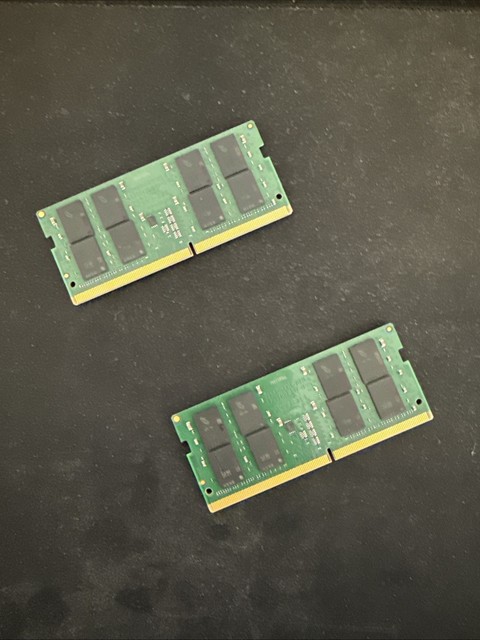
Crucial 64GB DDR4-3200 SO-DIMM Kit (CT2K32G4SFD832A)
A 2x32GB capacity option aimed at the two-slot Area-51m R2, whose Dell specification lists 64GB as two 32GB DDR4-2933 modules.
- 64GB (2x32GB)
- DDR4-3200 CL22
- 260-pin SO-DIMM, 1.2V
- Fills the R2’s official 64GB capacity target with two modules
- Matched pair
- Not Dell-supplied XMP memory
- R1 officially documents four 16GB modules for 64GB

Corsair Vengeance 64GB DDR4-3200 SO-DIMM Kit (CMSX64GX4M2A3200C22)
A second 2x32GB route for an Area-51m R2 that needs the official 64GB total, with the same expectation that the machine may use a lower supported speed.
- 64GB (2x32GB)
- DDR4-3200 CL22
- 260-pin SO-DIMM, 1.2V
- Matched 64GB kit for R2’s two slots
- Laptop SO-DIMM form factor
- Expensive DDR4 option
- Do not use it to assume 3200 MT/s third-party XMP support
Buying tips
- Identify R1 or R2 in Dell SupportAssist or the service tag before buying: R1 has 4 SO-DIMM slots; R2 has two.
- For R1’s documented 64GB layout, use 4 identical 16GB SO-DIMMs; for R2, use a matched 2x32GB kit.
- After fitting memory, check BIOS for total capacity and operating speed, then run a memory test before relying on the laptop.
As an Amazon Associate and eBay Partner, toptenpick.com earns from qualifying purchases. Prices and availability are subject to change.