

As an Amazon Associate and eBay Partner, toptenpick.com earns from qualifying purchases. Prices and availability are subject to change.
The FiiO X1 is a 2014-era player, and the thing that actually trips buyers up is not sound quality or speed class — it is whether the card gets recognized at all. A modern, high-capacity microSD card can simply not mount on this device, and speed class, the number most people check first, is nearly irrelevant to playing back music files. What actually matters is the capacity ceiling and the file system — FAT32 versus exFAT.
FiiO’s original firmware for the X1 reads FAT32 only, and the card slot was tested and officially supported up to 128GB; exFAT support for larger SDXC cards arrived in a later firmware update and, by most owner reports, stayed inconsistent even after that. The catch is that almost every 64GB-and-up microSD card ships from the factory pre-formatted in exFAT, because that is the SDXC standard — so a brand-new 128GB or 256GB card can come straight out of the packaging and simply show no music at all until it is reformatted to FAT32 on a computer. Check this before buying, not after: confirm the player’s firmware version, and if there is any doubt, either buy a card that ships FAT32-native (generally 32GB or smaller) or plan on reformatting a larger one yourself.
It also matters which X1 is actually in hand. The original X1 (2014) and the X1 2nd Gen, or X1ii (2016), are different players under a near-identical name — the X1ii moved the card slot, added Bluetooth, and fixed the exFAT problem, officially supporting cards up to 256GB in either file system. If the unit is the original single-slot X1 with no Bluetooth, treat 128GB and FAT32 as the safe ceiling rather than assuming the newer spec applies.
One more quirk worth knowing before loading up a big library: early X1 firmware capped the on-device music database at a few thousand tracks, so a card stuffed with tens of thousands of files could show up fine in a plain file browser but never fully index in the library view. It is a firmware limit, not a card defect, but it means the safer move for a large collection is smaller, well-organized folders rather than one huge card and hoping the database keeps pace.
| # | Product | Price | Where to buy |
|---|---|---|---|
| 1 | SanDisk Ultra 16GB microSDHC UHS-I | $7–$10 | Amazon · eBay |
| 2 | SanDisk Ultra 32GB microSDHC UHS-I A1 | $7–$11 | Amazon · eBay |
| 3 | SanDisk Ultra 128GB microSDXC UHS-I | $14–$20 | Amazon · eBay |
| 4 | SanDisk Extreme 64GB microSDXC UHS-I A2 | $10–$15 | Amazon · eBay |
| 5 | SanDisk Ultra 200GB microSDXC UHS-I | $20–$30 | Amazon · eBay |
| 6 | Samsung EVO Select 128GB microSDXC UHS-I U3 | $14–$19 | Amazon · eBay |
| 7 | Samsung EVO Plus 64GB microSDXC UHS-I | $8–$12 | Amazon · eBay |
| 8 | Kingston Canvas Select Plus 128GB microSDXC UHS-I | $10–$15 | Amazon · eBay |
| 9 | PNY Elite-X 128GB microSDXC UHS-I U3 | $13–$18 | Amazon · eBay |
| 10 | Lexar Professional 633x 64GB microSDXC UHS-I | $9–$13 | Amazon · eBay |
The picks, in detail

SanDisk Ultra 16GB microSDHC UHS-I
The smallest, lowest-risk way to get music playing on an X1. 16GB microSDHC cards ship FAT32-formatted from the factory by default, so there is no reformatting step and no exFAT question to worry about — it just works on arrival.
- microSDHC UHS-I, Class 10
- Ships FAT32-formatted by default
- Includes SD adapter
- Works with zero reformatting
- Well under any capacity risk
- Cheap way to confirm the player works before spending more
- Small library ceiling — a few hundred CD-quality albums at most
- Easy to outgrow if the collection is large
- Not a long-term card for lossless audio hoarders

SanDisk Ultra 32GB microSDHC UHS-I A1
The capacity sweet spot for the X1: the SD spec requires SDHC cards up to 32GB to ship FAT32-formatted, so this size avoids the reformatting problem entirely while still holding a genuinely large lossless music library.
- microSDHC UHS-I, A1 rated
- Ships FAT32-native
- Up to 98MB/s read speed
- No reformatting needed out of the box
- Holds thousands of tracks
- Long-standing reliable card line
- Read speed is irrelevant for audio playback anyway
- Counterfeit listings exist for this exact popular SKU, so buy carefully
- Short of the 128GB ceiling FiiO actually tested

SanDisk Ultra 128GB microSDXC UHS-I
The specific capacity independent reviewers confirmed working on the original X1. It ships exFAT out of the box because it’s an SDXC card, so plan to reformat it to FAT32 in Windows or macOS before loading music, or the X1 may not read it correctly.
- 128GB microSDXC UHS-I, A1 rated
- Ships exFAT-formatted from the factory
- Includes SD adapter
- Matches the capacity FiiO’s own review testing used
- Huge headroom for a lossless library
- Trusted, widely available brand
- Needs a manual FAT32 reformat for guaranteed compatibility
- Windows’ built-in formatter won’t create FAT32 above 32GB, so a third-party tool is needed
- USB transfer to the X1 itself is slow regardless of card speed

SanDisk Extreme 64GB microSDXC UHS-I A2
A faster, pricier card from a trusted brand, worth mentioning mainly because that speed buys nothing here: the X1 reads files sequentially for playback, not the random small-file access A2 is built for, so the premium is wasted unless the card will pull double duty in a phone or camera too.
- UHS-I, A2 app-performance class
- Up to 170MB/s read speed
- 64GB capacity
- Comfortably inside every X1 generation’s supported capacity
- Reputable brand with a long track record
- Genuinely fast if reused in a phone or camera
- Pays a real price premium for speed the X1 cannot use
- Still ships exFAT, so the same FAT32 reformat applies
- Overkill unless it does double duty elsewhere

SanDisk Ultra 200GB microSDXC UHS-I
The largest single card that turns up repeatedly in FiiO owner reports as actually working, including on X1 2nd Gen units. It sits above the original X1’s officially tested capacity, so treat it as reported-to-work rather than a guaranteed default.
- 200GB microSDXC UHS-I
- Ships exFAT-formatted
- Includes SD adapter
- Largest capacity with real owner reports of it working
- Holds an enormous lossless library
- Adapter makes it easy to load from a full-size SD slot too
- Exceeds FiiO’s official spec for the original X1, so compatibility is anecdotal
- Needs a FAT32 reformat, and some tools handle that poorly above 128GB
- Early firmware’s database track limit may bite before the capacity does
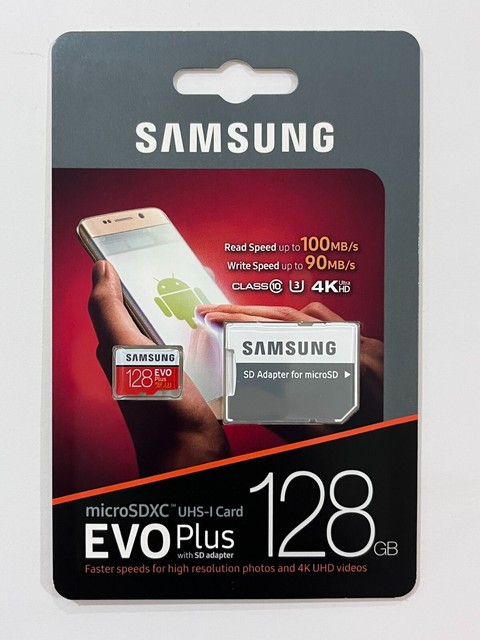
Samsung EVO Select 128GB microSDXC UHS-I U3
A well-known second-source alternative at the same 128GB capacity FiiO tested. The same reformatting caveat applies since it ships exFAT, but it’s a solid pick for buyers who want to sidestep the counterfeit-SanDisk-listing problem on marketplace sites.
- 128GB microSDXC UHS-I U3
- Up to 130MB/s read speed
- Includes SD adapter
- Reliable, widely stocked second-source brand
- Same capacity FiiO’s own testing used
- Durable six-proof build
- Same mandatory FAT32 reformat as any 64GB+ card
- U3 write-speed rating goes unused for audio playback
- Durability claims don’t matter much inside a pocketed DAP

Samsung EVO Plus 64GB microSDXC UHS-I
A mid-capacity Samsung option for buyers who want more headroom than 32GB without paying 128GB prices. It still needs the same FAT32 reformat as any SDXC card, but 64GB sits comfortably inside every X1 generation’s supported range.
- 64GB microSDXC UHS-I
- V30/A2 rated
- Up to 160MB/s read speed
- Good capacity-to-price balance
- Reputable, widely available brand
- Safely inside the supported capacity range for either X1 generation
- Ships exFAT, so the reformat step is not optional
- Faster speed class is wasted on sequential audio playback
- No real advantage over cheaper Ultra-tier cards for this specific use

Kingston Canvas Select Plus 128GB microSDXC UHS-I
A budget-friendly way to hit the 128GB mark FiiO actually tested, usually priced under SanDisk or Samsung at the same capacity. Same reformat caveat as any SDXC card, but often the best price-per-GB of the major brands at this size.
- 128GB microSDXC UHS-I, A1 rated
- Up to 100–150MB/s read (version-dependent)
- Includes SD adapter
- Usually the cheapest of the well-known 128GB options
- Reputable brand
- Matches FiiO’s tested capacity
- Read-speed spec has varied across silent revisions of the same model number
- Still ships exFAT and needs the reformat
- A1 app-load rating is irrelevant to a device that only plays audio

PNY Elite-X 128GB microSDXC UHS-I U3
Another 128GB option worth cross-shopping on price against the cards above — functionally interchangeable for X1 use since none of the speed or durability marketing matters for audio playback, so the deciding factor is usually just whichever is cheapest that week.
- 128GB microSDXC UHS-I U3, V30, A1 rated
- Up to 100MB/s read speed
- Includes SD adapter
- Competitively priced against the bigger brands
- Matches the tested 128GB capacity
- Widely stocked at major retailers
- Same mandatory FAT32 reformat as every other SDXC card here
- Less common brand, so buying from PNY-fulfilled listings matters more
- Marketed on 4K video speed the X1 will never touch

Lexar Professional 633x 64GB microSDXC UHS-I
An older but still-sold card line long used in cameras and other older devices, at a capacity comfortably inside every X1 generation’s range. A reasonable pick for buyers who want a well-proven card rather than the newest release, though current stock still ships exFAT and needs the same reformat.
- 64GB microSDXC UHS-I, U1/Class 10
- Includes SD adapter
- Limited lifetime warranty
- Long production history and proven reliability
- Comfortable capacity for either X1 generation
- Adapter and warranty included
- Rated write speed is well below newer cards (irrelevant for music, relevant elsewhere)
- Still needs a FAT32 reformat for guaranteed compatibility
- Harder to find at retail than the big three brands
Buying tips
- Check which X1 is actually owned — the original single-slot X1 (2014) officially tops out at 128GB and needs FAT32, while the X1 2nd Gen / X1ii (2016) supports up to 256GB in FAT32 or exFAT.
- Format any card 64GB or larger to FAT32 before loading music, since it almost certainly ships from the factory in exFAT and the original X1 may not read it otherwise.
- Use the manufacturer’s own formatting utility for FAT32 on cards over 32GB — Windows’ built-in formatter refuses to create FAT32 volumes above that size.
- Do not pay extra for a high speed class or an A2 app-performance rating — the X1 plays music sequentially, so that speed is never actually used.
- Buy from the manufacturer or a listing explicitly fulfilled by Amazon rather than an unknown third-party seller, since high-capacity microSD cards are a common counterfeit target.
- Keep libraries organized into a modest number of well-named folders rather than one flat folder of tens of thousands of files, since early X1 firmware had a database indexing limit.
- Update the player’s firmware to the final available version before assuming any exFAT or high-capacity support, since earlier firmware on the original X1 was noticeably more limited.
- If in doubt about compatibility, start with a 32GB card, which is small enough to ship FAT32-native and needs no reformatting, then size up once it’s confirmed the player reads it correctly.
As an Amazon Associate and eBay Partner, toptenpick.com earns from qualifying purchases. Prices and availability are subject to change.