

As an Amazon Associate and eBay Partner, toptenpick.com earns from qualifying purchases. Prices and availability are subject to change.
FireWire audio interfaces are unusually fussy about the card they are plugged into, and the reason comes down to one component.
FireWire cards are built around a controller chipset, and for audio work there has been a clear consensus for twenty years: Texas Instruments chipsets work, and most others cause trouble. The problems with non-TI controllers are not subtle — clicks and pops in the audio stream, devices that disappear mid-session, interfaces that will not be recognised at all, and drivers that refuse to install. Manufacturers of FireWire interfaces have spent two decades telling customers the same thing, and it is still the first question any support desk asks.
The practical difficulty is that listings almost never state the chipset. A card described as “1394b PCIe, three ports” tells you nothing about what is actually on it, and the same product photo gets reused across cards with different controllers. The reliable approach is to search for the specific card model plus the word “chipset”, look for the TI part number in the description or a review, or buy from a music retailer rather than a general electronics seller — music shops know exactly why this matters and stock accordingly.
Two other practicalities decide whether this works at all.
The card usually needs auxiliary power. A FireWire bus can supply power to a bus-powered interface, and a PCIe slot on its own cannot always provide enough. Cards for audio use generally have a Molex or SATA power connector, and if your interface is bus-powered you need to plug it in.
And FireWire 800 and 400 are not the same socket. A 9-pin 800 port and a 6-pin 400 port need an adapter cable between them, and a 4-pin port carries no power at all. Check which your interface has before ordering anything.
Ten picks below, including the honest alternatives if the card route becomes impossible.
| # | Product | Price | Where to buy |
|---|---|---|---|
| 1 | PCIe FireWire Card with a Texas Instruments Chipset | $30-$90 | Amazon · eBay |
| 2 | FireWire 800 (1394b) PCIe Card | $40-$100 | Amazon · eBay |
| 3 | FireWire 400 (1394a) PCIe Card | $25-$70 | Amazon |
| 4 | Combination FireWire 800 and 400 Card | $40-$100 | Amazon · eBay |
| 5 | ExpressCard FireWire Adapter | $30-$80 | Amazon |
| 6 | Thunderbolt to FireWire Adapter | $40-$120 | Amazon · eBay |
| 7 | FireWire Cables (800 to 400 and 800 to 800) | $10-$30 | Amazon · eBay |
| 8 | Molex-to-SATA or SATA-to-Molex Power Adapter | $6-$15 | Amazon · eBay |
| 9 | USB Audio Interface (the Honest Alternative) | $120-$800 | Amazon · eBay |
| 10 | Anti-Static Wrist Strap and Slot Blanking Plates | $8-$20 | Amazon |
The picks, in detail

PCIe FireWire Card with a Texas Instruments Chipset
The only specification that really matters, and the thing to search for by name. A card built on a TI 1394 controller is what every FireWire interface manufacturer recommends, and it is the difference between an interface that works and one that clicks, drops out or refuses to be recognised. Look for the TI part number explicitly stated in the listing or confirmed in a review. If a seller cannot tell you the chipset, assume it is not TI and buy elsewhere.
- Texas Instruments 1394 controller
- PCIe x1 interface
- Two or three external ports
- Molex or SATA auxiliary power connector
- The chipset every interface manufacturer recommends
- Stable device recognition and clean audio
- Works across Windows and macOS with stock drivers
- Listings rarely state the chipset — you have to dig
- TI cards cost more than generic ones

FireWire 800 (1394b) PCIe Card
The 9-pin standard, and what most later FireWire audio interfaces use. FireWire 800 is backward compatible with 400 devices through an adapter cable, so a 1394b card with TI silicon covers both generations — which makes it the more flexible purchase even if your current interface is a 400 device. Check the port count you need: a card with two external ports lets you daisy-chain an interface and a drive, which is often the reason people are on FireWire at all.
- 9-pin FireWire 800 ports
- Backward compatible with 400 via adapter
- TI chipset on the good ones
- Auxiliary power connector
- Covers both FireWire generations
- Higher bandwidth for daisy-chained devices
- The connector most later interfaces use
- Needs an adapter cable for 6-pin 400 devices
- Same chipset lottery as any FireWire card
FireWire 400 (1394a) PCIe Card
The 6-pin standard, and the right choice if your interface is a 400 device and you want no adapters in the chain — fewer connectors is fewer things to go wrong, and FireWire connections are notoriously sensitive to a marginal cable. A 1394a card with a TI controller and an auxiliary power connector is all most older interfaces need. Cheaper than an 800 card, though slightly less useful if you ever change interfaces.
- 6-pin FireWire 400 ports
- TI chipset on the good ones
- PCIe x1
- Auxiliary power connector
- No adapter needed for 400 devices
- Cheaper than an 800 card
- Fewer connectors in the chain
- Not useful if you upgrade to an 800 interface
- Increasingly hard to find with a TI chipset
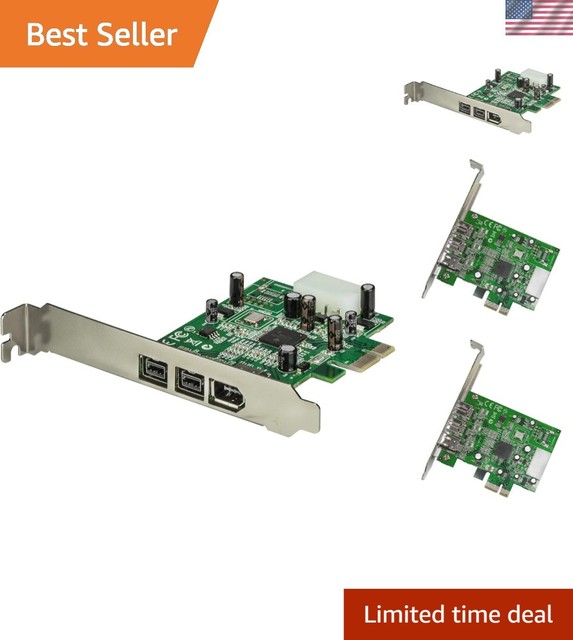
Combination FireWire 800 and 400 Card
Both connectors on one bracket, which removes the adapter question entirely. If you have a mix of devices — an older interface on 400 and a drive on 800, say — a combo card lets both plug in directly. The caveat is that the ports usually share one controller and therefore share bandwidth, so heavy simultaneous use of both is not the same as having two independent buses. For a single audio interface plus occasional storage it is a tidy solution.
- Both 9-pin and 6-pin ports
- Single controller shared between ports
- TI chipset on the good ones
- Auxiliary power connector
- No adapter cables needed for either generation
- Tidy single-slot solution
- Useful across a mixed set of devices
- Ports share bandwidth on one controller
- Fewer models available, so less chipset choice
ExpressCard FireWire Adapter
For a laptop with an ExpressCard slot, which is the laptop equivalent of this whole problem. The same chipset rule applies exactly — a TI controller or expect trouble — and ExpressCard adapters have the additional constraint that the slot supplies limited power, so a bus-powered interface may need its own power supply regardless. Increasingly a niche item as laptops with these slots age out, but if you have one, it is the direct answer.
- ExpressCard/34 or /54 form factor
- FireWire 400 or 800 ports
- TI chipset on the good ones
- Limited bus power available
- The direct laptop solution where a slot exists
- Same TI chipset advice applies
- Compact and removable
- Slot supplies limited power for bus-powered devices
- Laptops with ExpressCard slots are increasingly old

Thunderbolt to FireWire Adapter
The route for a modern machine with no PCIe slot and no ExpressCard. A Thunderbolt-to-FireWire adapter presents a FireWire bus over Thunderbolt, and on Macs in particular this has been the standard bridge for years. It generally works well, with two caveats: on newer machines you may need a second adapter from Thunderbolt 3 or 4 to Thunderbolt 2, and each additional adapter in the chain is another point of failure. Check your interface’s driver support for your operating system version first.
- Thunderbolt to FireWire 800 bridge
- Widely used on Mac systems
- May need a further Thunderbolt generation adapter
- Bus powered
- Works on machines with no expansion slots
- Well established on Mac systems
- Compact and portable
- Often needs a second adapter for Thunderbolt 3 or 4
- Every adapter in the chain adds a failure point

FireWire Cables (800 to 400 and 800 to 800)
Do not economise here, and buy a spare. FireWire connections are notably sensitive to cable quality, and a marginal cable produces exactly the symptoms people blame on the card — dropouts, clicks, and a device that disconnects when something is moved. A good shielded cable in the shortest length that reaches is the right answer. The 800-to-400 cable is the one most people need and the one most often missing, since it bridges a 9-pin card to a 6-pin interface.
- 9-pin to 9-pin and 9-pin to 6-pin
- Shielded construction
- Short lengths preferred
- Locking connectors on some
- Cheap fix for dropouts blamed on the card
- Short shielded cables are far more reliable
- A spare removes a whole diagnostic step
- 4-pin cables carry no power at all
- Cheap cables are a common source of trouble

Molex-to-SATA or SATA-to-Molex Power Adapter
The small part that makes the card work with your specific power supply. Cards for audio use generally have an auxiliary power connector so they can supply the FireWire bus properly, and it will be either Molex or SATA — while modern power supplies increasingly have only SATA connectors and older ones only Molex. An adapter costs almost nothing and resolves the mismatch. Use a moulded adapter from a reputable source rather than a cheap crimped one, which is a known fire risk on the SATA side.
- Molex to SATA and SATA to Molex versions
- Moulded rather than crimped construction
- Short lengths
- Standard PSU connectors
- Resolves a connector mismatch for a few dollars
- Lets the card power a bus-powered interface properly
- Immediately available
- Cheap crimped SATA adapters are a genuine fire risk
- One more connector in the power path

USB Audio Interface (the Honest Alternative)
Worth stating plainly: FireWire is a dead standard, driver support for old interfaces gets worse with every operating system release, and at some point the hardware you are keeping alive costs more in effort than a replacement costs in money. A modern USB audio interface offers lower latency than most FireWire units managed, current driver support, and no chipset lottery. If you are reading this because your FireWire setup has become unreliable, price a replacement before you buy a third card.
- USB-C or USB-B connection
- Current driver support
- Latency generally better than older FireWire units
- Wide range of channel counts
- No chipset compatibility problem at all
- Drivers maintained for current operating systems
- Often better performance than the FireWire unit it replaces
- Replacing a working interface is a real cost
- Existing outboard and cabling may need rethinking
Anti-Static Wrist Strap and Slot Blanking Plates
The basics of fitting a card, and the ones people skip. A wrist strap grounded to the case means a static discharge goes somewhere other than through a controller chip — the damage from that is usually not immediate failure but intermittent misbehaviour, which is maddening to diagnose on a card whose whole purpose is reliability. Blanking plates over unused slots keep airflow directed through the case rather than leaking through open holes, which matters in a machine full of drives.
- Grounded anti-static wrist strap
- Metal slot blanking plates
- Case screws in the usual sizes
- Compact enough to keep in a drawer
- Static damage causes intermittent faults, not clean failures
- Blanking plates keep case airflow directed
- Costs almost nothing
- The strap must actually be grounded to work
- Easy to dismiss until something goes wrong
Buying tips
- Buy a card with a Texas Instruments chipset. This is the single specification that matters, and it has been the consensus among FireWire audio interface manufacturers for twenty years. Non-TI controllers produce clicks, dropouts, devices that vanish mid-session and drivers that will not install. If the seller cannot tell you the chipset, assume it is not TI.
- Listings rarely state the chipset, so search for it specifically. Look up the exact card model plus the word ‘chipset’, check reviews for a TI part number, or buy from a music retailer rather than a general electronics seller — music shops understand exactly why this matters and stock accordingly. Product photos get reused across cards with different controllers.
- Connect the auxiliary power lead. Most audio-suitable FireWire cards have a Molex or SATA power connector, and a bus-powered interface needs it — a PCIe slot alone cannot always supply enough for the FireWire bus. An interface that works intermittently or will not power up is very often this, and it takes thirty seconds to check.
- Know which connector your interface has. FireWire 800 is 9-pin, 400 is 6-pin, and the 4-pin variant carries no power at all. An 800 card connects to a 400 device with an adapter cable, but you need to have bought one. Check the socket on your interface before ordering anything.
- Suspect the cable before the card. FireWire is unusually sensitive to cable quality, and a marginal cable produces dropouts, clicks and disconnections that look exactly like a chipset problem. Use the shortest good shielded cable that reaches, and keep a spare so you can swap it as a first diagnostic step rather than a last one.
- Never hot-plug FireWire. Unlike USB, FireWire connectors carry power on pins that can contact in the wrong order, and hot-plugging has a long history of damaging ports on both ends. Power down the interface, and ideally the computer, before connecting or disconnecting. This is old advice that is still correct.
- Check driver support for your operating system before buying a card. A perfect TI card cannot help if your interface’s manufacturer stopped writing drivers three operating system versions ago. That is the more common reason old FireWire setups stop working, and no amount of hardware fixes it. Confirm driver availability first.
- Consider whether it is time to move on. FireWire is a dead standard and support only gets worse. If you are buying your second or third card chasing reliability, price a modern USB interface against the time you are spending — a current unit will have better latency, maintained drivers, and none of this problem.
As an Amazon Associate and eBay Partner, toptenpick.com earns from qualifying purchases. Prices and availability are subject to change.