


About this guide
Every SOA and CAS exam room has a hard rule: only calculators from a short approved list are allowed at your seat, and showing up with anything else — even a more powerful one — gets you turned away. Here are the current models on that list, and which to pair for which exam.
As an Amazon Associate and eBay Partner, toptenpick.com earns from qualifying purchases. Prices and availability are subject to change.
The picks, in detail
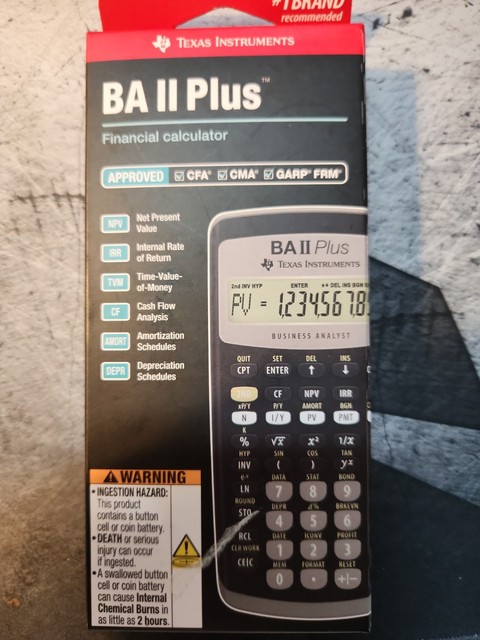
Texas Instruments BA II Plus
The financial-math workhorse most FM/2 candidates carry, with dedicated TVM, cash-flow, and amortization keys.
- Time-value-of-money worksheet
- Cash flow/NPV/IRR functions
- Amortization worksheet
- One-line display
- Purpose-built for actuarial financial math
- Widely used, tons of study-guide keystroke walkthroughs available
- No fraction display, weaker for probability-heavy exams like P

Texas Instruments BA II Plus Professional
Same approved TVM engine as the standard BA II Plus, with extra NPV/bond/depreciation worksheets some candidates prefer.
- All BA II Plus functions plus bond and depreciation worksheets
- Modified duration/convexity
- Metal casing
- Everything the base BA II Plus does, plus a few extras
- Costs more than the standard model for functions most exam-takers never touch

Texas Instruments TI-30XS MultiView
The pick for probability-heavy exams like P — its two-line display shows fractions, exponents, and expressions the way they're written.
- MultiView 4-line display
- Fraction and mixed-number entry
- Scrollable entry history
- Easiest display for probability/statistics notation
- Solar + battery power
- No financial (TVM) functions, so it won’t cover FM alone

Texas Instruments TI-30XB MultiView
The battery-powered sibling of the TI-30XS, functionally identical and equally approved.
- Same MultiView display and fraction functions as the TI-30XS
- Battery powered
- Identical exam-day functionality to the TI-30XS
- No real advantage over the solar TI-30XS other than power source preference

Texas Instruments TI-30X IIS
A simpler two-line scientific calculator, still on the approved list, for candidates who don't need MultiView formatting.
- Two-line display
- Basic statistics functions
- Solar + battery
- Inexpensive, straightforward layout
- No fraction/expression display like the newer MultiView models

Texas Instruments TI-30X IIB
The battery-only version of the TI-30X IIS, same approved scientific functions.
- Two-line display
- Basic statistics functions
- Battery powered
- Same approved functions as the IIS at a similar price
- Same display limitations as the IIS

Texas Instruments TI-30Xa
The most basic approved scientific calculator — one-line display, no memory of prior entries, but still legal for exam day.
- Single-line display
- Basic scientific and trig functions
- Cheapest approved option, fine as a backup calculator
- No entry history or fraction display, awkward for anything beyond simple arithmetic
What each one costs
Typical price, cheapest first. Tap a name to jump to that pick and its buy link.
Compare any three
| Texas Instruments BA II Plus | Texas Instruments BA II Plus Professional | Texas Instruments TI-30XS MultiView | |
|---|---|---|---|
| Price | $25-$35 | $35-$45 | $15-$20 |
| Key features |
|
|
|
| Pros |
|
|
|
| Cons |
|
|
|
Buying tips
- Check the current SOA/CAS approved-calculator list before every exam sitting — approval is decided by the societies, not by what a retailer calls “exam safe.”
- Bring two calculators if the rules allow it: a BA II Plus for financial math and a TI-30XS MultiView for probability notation covers both bases.
- You cannot bring the calculator’s instruction manual into the exam room, so practice with your exact model well before test day.
As an Amazon Associate and eBay Partner, toptenpick.com earns from qualifying purchases. Prices and availability are subject to change.