

As an Amazon Associate and eBay Partner, toptenpick.com earns from qualifying purchases. Prices and availability are subject to change.
If your television is an HDR set, a Blu-ray calibration disc cannot calibrate most of what you actually watch. Standard Blu-ray carries SDR video only. HDR10 and Dolby Vision patterns live on Ultra HD Blu-ray, which is a different disc format and needs a 4K player. So the single most important thing to establish before buying is which of the two you need — and for anyone with a set bought in the last several years, watching HDR streaming and 4K discs, the answer is the UHD disc, even though the search term everyone types is “Blu-ray calibration disc”.
The second split is between setting controls by eye and actually measuring. A disc gets you brightness, contrast, colour, tint and sharpness set correctly using test patterns and a pair of blue filter glasses, and that is genuinely most of the available improvement — televisions leave the factory in a wildly oversaturated shop mode, and simply turning that off is worth more than anything that follows. What a disc cannot do is measure greyscale or colour accuracy; that needs a colorimeter and software, and the disc then becomes the pattern source rather than the instrument.
The honest ranking of what improves the picture goes: turn off the shop mode and the motion smoothing, pick the Filmmaker or Cinema preset, set the five basic controls with a disc, control the room lighting, and only then consider measurement. Most people stop being disappointed somewhere around step two.
One structural warning about this category: much of it is out of print. Calibration discs are niche, they are pressed in small runs, and several of the classics — the Disney WOW disc, AVIA, Digital Video Essentials — are long discontinued and now trade at collector prices for a disc whose patterns were designed for televisions nobody owns. Check publication dates before paying a premium. Region coding bites here too, since these are often imported.
And a free option that deserves naming honestly: the AVS HD 709 pattern set has been distributed free for years as files you can burn or play from a USB stick, and for the basic five controls it does the same job as a paid disc. If your set plays files from USB, try that before spending anything.
The list starts with the current standard and works outward.
| # | Product | Price | Where to buy |
|---|---|---|---|
| 1 | Spears & Munsil Ultra HD Benchmark (3-disc set) | $40–$60 | Amazon |
| 2 | Spears & Munsil HD Benchmark 2nd Edition | $25–$40 | Amazon · eBay |
| 3 | AVS HD 709 Pattern Set (free download) | $0–$5 | Amazon |
| 4 | Blue Filter Glasses for Colour and Tint | $6–$15 | Amazon |
| 5 | Disney WOW: World of Wonder | $20–$60 | Amazon · eBay |
| 6 | Ultra HD Blu-ray Player | $150–$350 | Amazon · eBay |
| 7 | Colorimeter with Calibration Software | $150–$300 | Amazon |
| 8 | THX Tune-Up or Manufacturer Setup App | $0–$10 | Amazon · eBay |
| 9 | Digital Video Essentials: HD Basics | $15–$40 | Amazon · eBay |
| 10 | Certified High Speed HDMI Cable | $10–$25 | Amazon · eBay |
The picks, in detail
Spears & Munsil Ultra HD Benchmark (3-disc set)
The current reference, and the one to buy if you own a 4K HDR television. It is a three-disc Ultra HD Blu-ray set carrying hundreds of patterns in both SDR and HDR, plus demonstration footage shot for the purpose and a set of blue filter glasses for setting colour and tint. It is the disc professional calibrators actually use, and the instructions are written for someone doing it themselves.
- Three-disc Ultra HD Blu-ray set
- SDR and HDR10 pattern suites
- Blue filter glasses included
- Detailed written instructions
- Covers HDR, which ordinary Blu-ray discs cannot
- Used by professional calibrators, not just enthusiasts
- Demo material is genuinely good reference footage
- Needs a 4K Ultra HD Blu-ray player
- Overkill if you only want the five basic controls
- Dolby Vision coverage depends on the edition

Spears & Munsil HD Benchmark 2nd Edition
The standard-Blu-ray predecessor, and still the right answer if the display is a 1080p set or a projector without HDR. Same rigour, same clear instructions, SDR patterns only. It is also the cheaper way in if all you want is to set the basic controls properly on an older television, and it plays in any Blu-ray player.
- Standard Blu-ray, SDR patterns
- Comprehensive pattern suite
- Blue filter glasses included
- Plays in any Blu-ray player
- No 4K player required
- Thorough and well documented
- Cheaper than the UHD set
- No HDR patterns at all
- Superseded for any modern television
- Availability is increasingly second-hand
AVS HD 709 Pattern Set (free download)
Free, and honest enough to name first if budget is the constraint. AVS HD 709 is a long-established set of calibration patterns distributed as files to burn to disc or play from a USB stick, covering the basic controls and a good deal more. For setting brightness, contrast, colour, tint and sharpness it does the same job as a paid disc, without the disc.
- Free download, community maintained
- Burn to disc or play from USB
- Basic and advanced pattern sets
- SDR / Rec.709 patterns
- Costs nothing
- Works from a USB stick on most modern televisions
- Long-established and widely documented
- No HDR patterns
- Requires burning a disc or file playback support
- No printed instructions — you follow online guides
Blue Filter Glasses for Colour and Tint
The cheap accessory that does the single most useful part of the job. Looking at the colour bars through a blue filter makes the colour and tint controls settable by eye with real precision — the bars match in brightness when the settings are right. Most calibration discs include a pair, but they get lost, and a spare set costs almost nothing.
- Blue filter lenses in card or plastic frames
- Used with standard SMPTE colour bars
- Included with most calibration discs
- Sold separately in packs
- Makes two of the five controls objectively settable
- Very cheap
- No power, software or player needed
- Only helps with colour and tint
- Cheap card frames are flimsy
- Useless without a pattern source

Disney WOW: World of Wonder
The friendliest calibration disc ever made, built around Disney footage with a guided walkthrough that explains each control as you set it. It has been recommended for years precisely because it does not assume you know anything. It is also SDR-only and long out of print, so check the price before buying — it is worth having, but not at collector money.
- Guided, narrated setup walkthrough
- Standard Blu-ray, SDR patterns
- Blue filter glasses included in original packaging
- Disney demonstration footage
- By far the most approachable for a beginner
- Explains what each control actually does
- Enjoyable to sit through
- Out of print — prices vary wildly
- SDR only, no HDR patterns
- Less thorough than Spears & Munsil

Ultra HD Blu-ray Player
The prerequisite people discover after ordering the disc. HDR patterns need an Ultra HD Blu-ray player — a standard Blu-ray player will not read the disc at all, and neither will a games console that lacks a UHD drive. If you are buying the UHD Benchmark and do not already own a 4K player, this is part of the cost of the exercise and worth planning for.
- Reads Ultra HD Blu-ray discs
- HDR10 output, Dolby Vision on some models
- HDMI 2.0 or later output
- Plays standard Blu-ray and DVD as well
- Required for any HDR calibration work
- Also the best available picture quality for films
- Doubles as a CD and DVD player
- A significant purchase alongside a disc
- The market has thinned and models are fewer
- Not needed at all if the television is SDR
Colorimeter with Calibration Software
The step past a disc, for anyone who wants greyscale and colour measured rather than eyeballed. A colorimeter reads the screen while software drives patterns and tells you what to change in the service menu or the calibration controls. This is where a calibration disc stops being an instrument and becomes a pattern source. It is a genuine hobby, not an afternoon.
- USB colorimeter probe
- Works with free or paid calibration software
- Measures greyscale, gamma and colour gamut
- Pairs with a pattern generator or disc
- Measures rather than estimates
- Free software options exist
- The only route to genuinely accurate colour
- A real learning curve, not a quick job
- Cheap probes drift and need profiling
- Most of the benefit was already had from the basic controls

THX Tune-Up or Manufacturer Setup App
Worth trying before spending, because it may already be free. Several manufacturers and THX have distributed basic setup patterns through apps and streaming channels, and for the five basic controls these are perfectly adequate. The patterns arrive over a streaming path rather than from a disc, which is slightly less pure and entirely good enough for the job.
- Delivered by app or streaming channel
- Basic pattern set for the five main controls
- Often free
- No player or disc required
- Free and immediately available
- No hardware needed at all
- Fine for the basic controls
- Streaming compression slightly degrades the patterns
- Availability varies by platform and region
- Nothing beyond the basics
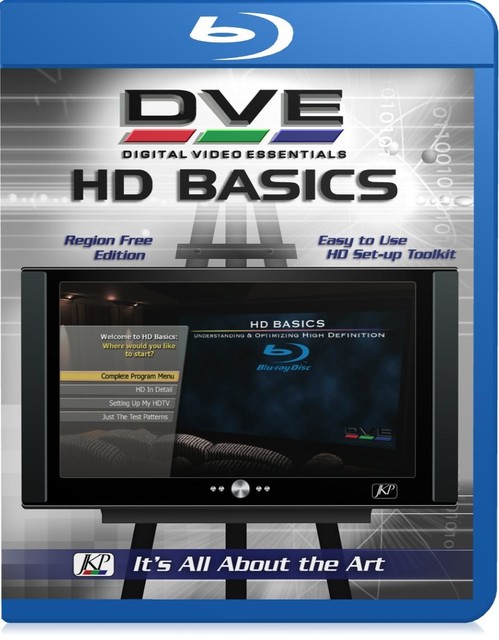
Digital Video Essentials: HD Basics
One of the older reference discs, thorough and considerably drier than the Disney one. It covers audio setup as well as video, which is genuinely useful and something most video-focused discs skip — speaker levels, phase and channel identification. Long out of print and SDR only, so treat it as a second-hand curiosity rather than a first purchase.
- Video and audio test patterns
- Standard Blu-ray, SDR
- Speaker level and phase checks
- Detailed technical explanations
- Covers audio setup as well as picture
- Very thorough technical content
- Cheap second-hand
- Out of print and SDR only
- Presentation is dry and dated
- Patterns assume displays of its era

Certified High Speed HDMI Cable
Listed last and deliberately unexciting: a cable cannot improve a picture that is already arriving intact, and expensive ones are the classic waste of money in this hobby. What matters is whether the cable carries the bandwidth for 4K HDR at the frame rate you want — an old cable genuinely can drop you out of HDR, and that is a real fault worth ruling out before you start calibrating anything.
- Certified for the bandwidth it claims
- Required for 4K HDR at higher frame rates
- Lengths from 1 m upward
- Certification label on the packaging
- Rules out a real cause of missing HDR
- Cheap when bought sensibly
- Certification is a checkable claim
- No picture improvement if the existing cable already works
- Long runs need active cables and cost more
- The most over-sold accessory in home cinema
Buying tips
- Work out whether you need SDR or HDR patterns first. Standard Blu-ray carries SDR only — HDR10 and Dolby Vision patterns require an Ultra HD Blu-ray disc and a 4K player.
- Do the free things before buying anything. Switch out of the shop or Vivid preset, turn off motion smoothing, and pick Filmmaker or Cinema mode — that is the largest single improvement available.
- Try AVS HD 709 first if money is tight. It is a free pattern set you can play from a USB stick and it covers the five basic controls as well as any paid disc.
- Check the publication date before paying a premium. Several classic discs are out of print and trading at collector prices, with patterns designed for displays nobody owns any more.
- Use the blue filter glasses for colour and tint. Those two controls become objectively settable through a blue filter, which is the difference between guessing and knowing.
- Calibrate in the lighting you actually watch in, and do it separately for day and night if your set stores multiple picture modes. A setting optimised for a dark room is unwatchable in daylight.
- Remember a disc sets controls; it does not measure. Greyscale and colour accuracy need a colorimeter, and the disc then becomes a pattern source rather than the tool.
- Rule out the cable before you blame the television. An older HDMI cable that cannot carry the bandwidth will silently drop you out of HDR, which no amount of calibration fixes.
As an Amazon Associate and eBay Partner, toptenpick.com earns from qualifying purchases. Prices and availability are subject to change.