

As an Amazon Associate and eBay Partner, toptenpick.com earns from qualifying purchases. Prices and availability are subject to change.
The thing that actually separates a good iPad lap stand from a bad one isn’t softness, it’s viewing angle under load and where the heat goes. A bean-bag cushion holds a light e-reader at almost any angle for as long as you like, but rest a full iPad on one at a steep angle through an hour of video calls or gaming and two things happen: the fill slowly settles, so the angle you set isn’t the angle you have twenty minutes later, and the iPad’s back – the surface it dissipates heat through, since unlike a laptop it has no fan – is sitting against fabric and foam instead of open air. That’s a checkable failure mode, not a comfort preference: cooling-case makers specifically warn against covering the vents and hotspots on the back and top edge, and it’s exactly why hard-surface lap desks with raised device ledges exist alongside pure cushions rather than replacing them.
That doesn’t make bean bags or pillows the wrong choice. For reading, video, and light browsing, where the iPad sits mostly still and doesn’t run hot, a soft pillow-style stand is genuinely more comfortable on the lap, folds flatter for travel, and costs less than a hard desk. The distinction that matters is what you’re doing with the iPad: passive viewing favors a cushion, and anything closer to sustained typing, gaming, or video calls favors a hard-surface lap desk with a bracket or ledge that keeps the device off the fabric and lets air move around it.
The other thing worth checking honestly before buying is size. An 11-inch iPad and a 13-inch iPad Pro aren’t a rounding error apart – the larger model is both wider and meaningfully heavier, and several popular pillow stands and lap-desk tablet slots on the market were sized for older, smaller iPads and say so in their own specifications. A slot or stand rated only up to a roughly 9.6-inch tablet will not seat a modern 10.9-inch or 11-inch iPad cleanly, let alone the 13-inch Pro, so check the stated maximum size against your specific iPad rather than trusting the word “iPad” in the listing.
What follows is a mix of both approaches – pure bean-bag and microbead pillows, hybrid hard-tray-on-cushion designs, rigid folding stands, and one minimalist stick-on stand for people who don’t want a cushion at all – with the honest trade-offs on each.
| # | Product | Price | Where to buy |
|---|---|---|---|
| 1 | Lamicall Tablet Pillow Stand | $25–$36 | Amazon · eBay |
| 2 | iProp Bean Bag Universal Tablet Holder | $28–$40 | Amazon · eBay |
| 3 | LapGear Original Microbead Tablet Pillow Stand | $20–$30 | Amazon · eBay |
| 4 | IPEVO PadPillow Stand | $25–$35 | Amazon |
| 5 | LapGear Ergo Pro Lap Desk | $38–$45 | Amazon · eBay |
| 6 | Bosign Anti-Slip Laptray, Willow Wood | $49–$77 | Amazon |
| 7 | Sofia + Sam Memory Foam Lap Desk with Tablet Slot | $40–$46 | Amazon · eBay |
| 8 | Twelve South Compass Pro for iPad | $55–$65 | Amazon · eBay |
| 9 | Rain Design iRest Lap Stand for iPad | $30–$50 | Amazon · eBay |
| 10 | MOFT Snap Tablet Stand | $35–$45 | Amazon · eBay |
The picks, in detail
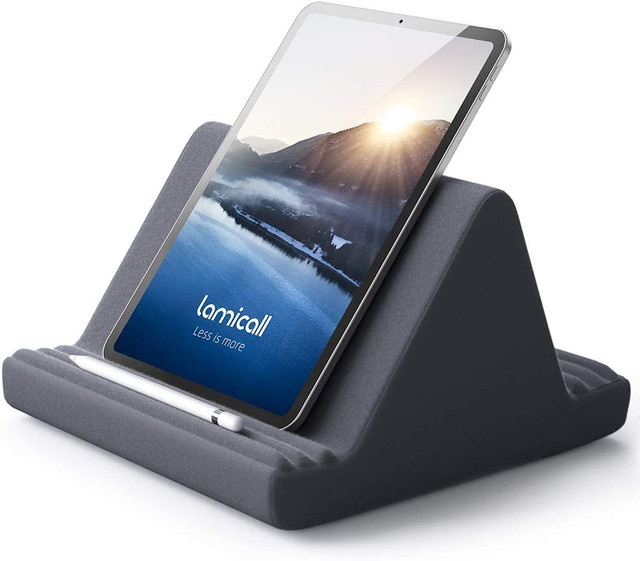
Lamicall Tablet Pillow Stand
A dense memory-foam pillow rather than loose beads or microbeads, so it holds its shape and angle better over time than bean-bag designs. Six viewing angles cover propped-up reading through steeper video-call positions, and it’s rated for tablets from 9.7 inches up through a 12.9/13-inch iPad Pro, so it’s sized for current hardware rather than an older, smaller generation.
- Molded memory foam, not loose beads
- 6 adjustable viewing angles
- Rated for 4-13 inch tablets, covering 11 and 12.9/13-inch iPad Pro
- Soft fabric cover with no hard edges against the lap
- Holds its angle better than loose-fill bean bags
- Wide size compatibility including large iPad Pro models
- Comfortable directly on the lap for long reading or viewing sessions
- No hard surface, so typing on it is unstable
- Foam and fabric cushion the iPad’s back, which can trap heat during heavier use
- Bulkier to pack than a folding hard stand

iProp Bean Bag Universal Tablet Holder
The long-running original in this category – a genuine bean bag base that lets you push the iPad into any angle rather than clicking between fixed positions, which reviewers consistently call out as its real advantage over notched stands. It fits any device under about 17mm thick, so it isn’t iPad-specific, and that also means no built-in cable or accessory pockets.
- Loose bean-bag fill for infinitely adjustable angle
- Fits any tablet or device under roughly 17mm thick
- Lightweight and compresses flat for travel
- No moving parts or hinges to wear out
- Truly stepless angle adjustment, unlike click-stop stands
- Very packable for travel or bed use
- Simple, durable design with decades on the market
- Loose bean fill settles and shifts under a heavier iPad over a session
- No hard surface for typing
- No pockets for cables, stylus or phone

LapGear Original Microbead Tablet Pillow Stand
A budget pillow stand filled with microbeads instead of a molded foam block, with a front pocket sized for the tablet and a smaller side pocket for a phone or cable. It’s a straightforward comfort-first pick for propping an iPad up in bed or on the couch, not a typing surface.
- Microbead fill conforms to lap and tablet
- Front tablet pocket plus side phone/accessory pocket
- Lightweight, under 6 oz, and packable
- Machine-washable cover on most versions
- Inexpensive way into the pillow-stand category
- Pockets are genuinely useful for a phone or charging cable
- Conforms comfortably to an uneven lap
- Microbeads compress and shift more than molded foam over time
- Pocket-style hold gives less angle control than a hinged stand
- Not built for typing or sustained interaction
IPEVO PadPillow Stand
A cushioned pillow stand iterated for over a decade, with a stonewashed denim cover, a stylus pocket, a cable pocket, and one detail most pillow stands don’t offer: it unfolds flat to double as a base for a wireless keyboard. Good for propped-up video with the option to type on an external keyboard rather than the iPad’s own surface.
- Cushioned pillow base with removable, washable denim cover
- Stylus pocket and separate cable/accessory pocket
- Unfolds flat to serve as a wireless-keyboard base
- Long production history with consistent design updates
- Doubles as a stable-enough keyboard base when unfolded
- Washable cover keeps it cleaner over time than most cushions
- Well-reviewed and widely available
- Still a soft cushion under the iPad itself, with the same heat and angle-drift trade-offs as other pillows
- Not specifically sized for the largest 13-inch iPad Pro
- Bulkier than a folding hard stand

LapGear Ergo Pro Lap Desk
A hard 20.5-inch work surface built primarily for laptops but explicitly sized to also hold a tablet, with a retractable device ledge and a non-slip strip to keep the iPad from sliding, 20 angle settings on fold-down legs, and dual bolster cushions underneath designed specifically to vent heat away from your lap rather than trap it against the device.
- Rigid work surface with retractable device ledge
- 20 adjustable typing/viewing angles via fold-down legs
- Built-in mouse pad, pen slot and phone holder
- Dual-bolster cushion underside designed to vent heat from your lap
- An actual hard surface for stable typing, unlike pillow stands
- Device ledge and non-slip strip keep the iPad from sliding
- Doubles as a full laptop desk
- Larger and heavier than a dedicated iPad-only stand
- Overkill if you only ever prop the iPad up for video
- Device ledge is sized generically, not iPad-specific
Bosign Anti-Slip Laptray, Willow Wood
A genuine hard tray top – lacquered wood, not plastic – mounted on a shapeable bean-bag cushion underneath, which the maker specifically designs to disperse heat from the device rather than trap it, while the non-slip tray surface keeps the iPad from sliding as you shift position. The cushion attaches via velcro with a machine-washable cover.
- Lacquered wood tray with non-slip coating
- Shapeable bean-bag cushion base that adjusts to your lap
- Cushion attaches via velcro, cover is machine-washable
- Available in multiple tray sizes
- Combines a genuinely hard, stable surface with lap comfort
- Explicitly designed to vent heat rather than trap it against the cushion
- Washable cushion cover
- Premium price versus foam-only pillow stands
- Wood tray adds weight compared to a folding plastic stand
- No built-in device ledge or bracket to lock the iPad in place
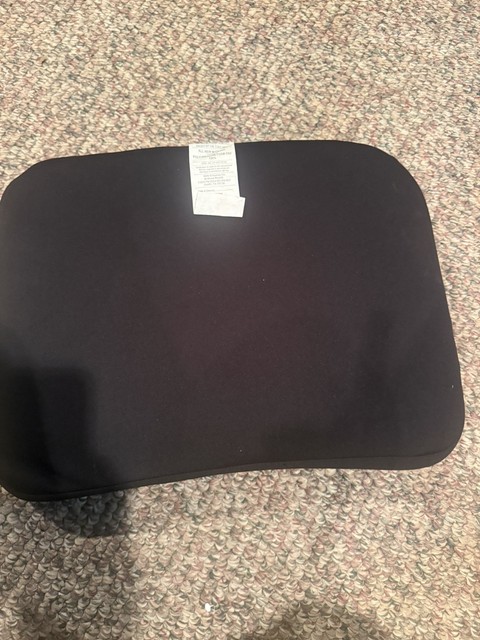
Sofia + Sam Memory Foam Lap Desk with Tablet Slot
A wood-finish-topped tray on a memory-foam base with a routed slot at the front edge that holds a tablet upright for hands-free viewing while you type or write on the flat surface above it. Worth checking carefully: the tablet slot on this design is specced for tablets up to roughly 9.6 inches, which fits an iPad mini comfortably but is narrower than a standard 10.9-inch iPad and well short of an 11-inch or 13-inch iPad Pro.
- Hard wood-finish top surface for writing or a keyboard
- Memory-foam base cushion for lap comfort
- Routed front slot holds a tablet upright
- Available in multiple sizes
- Genuine hard surface plus lap cushioning in one product
- Slot keeps a compatible tablet stable and upright hands-free
- Doubles as a general lap desk, not just a tablet holder
- Tablet slot is sized for smaller tablets, not a standard or Pro-size iPad
- Slot only holds one fixed viewing angle
- Bulkier than a folding stand
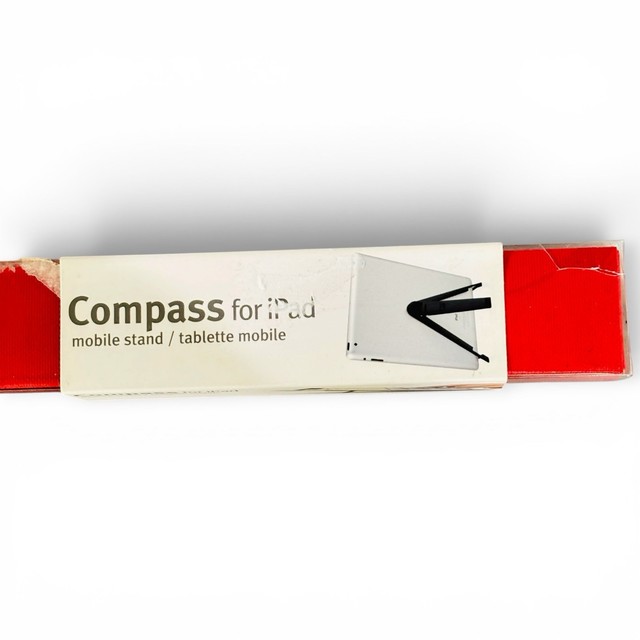
Twelve South Compass Pro for iPad
A premium folding hard-surface stand rather than anything soft, purpose-built around typing: a short rear leg holds the iPad at about 20 degrees, a longer leg lifts it to roughly 50 degrees – close to the angle of Apple’s own Magic Keyboard – with a further steeper position available. There’s no lap cushioning at all, so it’s best on a table, tray, or a hard lap desk rather than directly on soft fabric.
- Solid, folding aluminum-and-silicone construction
- Three fixed angle positions, roughly 20/50/60 degrees
- Holds iPad in portrait or landscape
- Folds flat and compact for a bag
- Rock-solid, wobble-free typing surface
- Angle options genuinely matched to real typing and sketching positions
- Compact and travels well
- No cushioning, so it needs a flat surface under it, not bare fabric or skin
- Fixed angle steps rather than infinite adjustment
- Premium price for a compact metal stand

Rain Design iRest Lap Stand for iPad
A hybrid design using three detachable foam pieces to work as either a padded lap stand or a desktop easel, adjustable up to about 60 degrees and a 2011 Macworld Best of Show winner that’s stayed in production since. Reviewers note it’s sturdy enough that tapping on-screen links doesn’t make the iPad wobble, which is the specific failure mode pure bean bags have.
- Detachable foam sections convert between lap and desk use
- Angle adjustable up to roughly 60 degrees
- Raises the screen about 3 inches for a better neck angle
- Works with or without a Smart Cover or Smart Case on the iPad
- Noticeably more stable for tapping and typing than a loose bean bag
- Long track record and consistent production
- Doubles as a desktop stand, not just a lap accessory
- Foam pieces are less rigid than an all-hard stand like the Compass Pro
- Sized around older, smaller iPads; check fit against an 11 or 13-inch iPad Pro
- Foam surfaces still limit airflow compared to a bare hard stand

MOFT Snap Tablet Stand
The opposite approach from every cushion on this list – a paper-thin stand that adheres or magnetically snaps directly to the back of the iPad and folds flat when not needed, with click angles at roughly 25/40/60 degrees in portrait and 30/40/60 in landscape. There’s no cushioning of any kind, so lap comfort depends entirely on what’s under the iPad, but it’s the most portable option here by a wide margin and leaves the iPad’s back uncovered for heat.
- Adheres or magnetically snaps to the iPad’s back
- Folds flat to about 0.15 inch when not in use
- Multiple click-stop angles in portrait and landscape
- Compatible with tablets from 7.9 to 13 inches
- Thinnest, lightest option on this list by far
- Leaves the iPad’s back open rather than covering it
- Can be used alongside some cases or bare
- No lap cushioning whatsoever – needs a hard surface or your legs directly
- Adhesive or magnetic mounting is a bigger commitment than a stand you just set the iPad on
- Fixed click angles, not infinitely adjustable
Buying tips
- Match the stand to the activity, not just the iPad – passive viewing suits a bean bag or pillow, anything closer to typing wants a hard surface.
- Check the stated maximum tablet size against your specific iPad – some popular pillow and tray designs top out around 9.6 inches and won’t seat an 11 or 13-inch iPad Pro cleanly.
- A loose bean-bag fill will shift and lose its set angle under a heavier iPad over a long session; molded foam or a hard stand holds position better.
- The iPad has no fan, so resting its back against thick fabric or foam during extended heavy use like gaming or video calls limits where the heat it generates can go.
- If typing matters, look for a device ledge, bracket, or click-stop angles rather than a cushion alone – stability, not softness, is what keeps the screen from wobbling under a tap.
- Hybrid designs that pair a hard tray with a cushioned base try to give you both a stable surface and lap comfort, at a higher price than foam-only pillows.
- Minimalist stick-on stands have no cushioning at all and are only comfortable resting on something firm – bare legs or soft fabric underneath won’t give the same stability.
- Fixed click-stop angles on hard stands are more stable than infinitely adjustable bean bags, but check the actual degree options against what you’ll use it for, since reading and typing want different angles.
As an Amazon Associate and eBay Partner, toptenpick.com earns from qualifying purchases. Prices and availability are subject to change.