

As an Amazon Associate and eBay Partner, toptenpick.com earns from qualifying purchases. Prices and availability are subject to change.
Eufy’s own range tells the story better than any review could. The L60 is listed at 5,000 Pa of suction. The X10 Pro Omni and the Omni S1 are at 8,000. The Omni S2 claims 30,000. That is a sixfold increase inside one brand in about two product generations — and nobody’s carpet got six times dirtier.
Pascals measure the pressure a vacuum can pull against a completely sealed port, which is a state the machine is never in while cleaning. It tells you almost nothing about pickup, because pickup depends on airflow, on the brush agitating the fibres, and on how well the machine seals against the floor. A robot with enormous static pressure and a poor floor seal picks up less than a modest one with a good one. The number is easy to measure, easy to print, and easy to make bigger, which is why it has run away from reality.
So what should you actually compare across the Eufy line? Four things, in roughly this order. The base station — whether it self-empties, and on the Omni models whether it also washes and dries the mop pads, which is the difference between a machine that saves you work and one that creates a new weekly chore. Mop lift — the X10 Pro Omni raises its dual mops up to 12 mm when it detects carpet, and if you have rugs, a robot that cannot lift its mops will drag a wet pad across them. Height, which decides whether it fits under your sofa, and which no one checks until the machine is home. And hair handling, which for anyone with long hair or a pet is the thing that determines whether you spend Sunday cutting hair off a brush roll.
Navigation is largely a solved problem across the current range — LiDAR mapping is standard even mid-line. Obstacle recognition is where the money still buys something real: the X10 Pro Omni’s camera-based system recognises over a hundred object types, which in practice means it goes round the charging cable rather than eating it.
Ten picks below, including the accessories that decide the long-term running cost.
| # | Product | Price | Where to buy |
|---|---|---|---|
| 1 | eufy X10 Pro Omni | $550-$900 | Amazon · eBay |
| 2 | eufy Omni S2 | $900-$1,400 | Amazon · eBay |
| 3 | eufy L60 with Self-Empty Station | $300-$500 | Amazon · eBay |
| 4 | eufy Omni S1 Series | $400-$800 | Amazon · eBay |
| 5 | eufy RoboVac Entry Model (No Station) | $150-$280 | Amazon · eBay |
| 6 | Replacement Dust Bags for the Base Station | $20-$45 | Amazon · eBay |
| 7 | Replacement Brush Rolls and Side Brushes | $20-$50 | Amazon · eBay |
| 8 | Replacement Filters | $12-$30 | Amazon · eBay |
| 9 | Replacement Mop Pads | $15-$35 | Amazon · eBay |
| 10 | Cable Management Kit and Under-Furniture Risers | $20-$50 | Amazon |
The picks, in detail

eufy X10 Pro Omni
The model most people should buy, and the one that defines what Omni means in this range: it vacuums, it mops, and the base station empties the dustbin, washes the mop pads and dries them. That last part is the whole argument — a mopping robot whose pads you have to rinse by hand is a chore with extra steps. Dual mop pads lift up to 12 mm over carpet, and the AI obstacle system recognises over a hundred object types. At 8,000 Pa it is not the highest number in the line, which per the intro is not the point.
- Base station self-empties, washes and dries the mop pads
- Dual spinning mops that lift up to 12 mm over carpet
- AI obstacle avoidance recognising 100+ object types
- 8,000 Pa suction with LiDAR navigation
- Genuinely hands-off for weeks at a time
- Mop lift means it can be left to run on rugs and hard floors
- Obstacle recognition actually avoids cables and shoes
- The base station is large and needs a permanent spot
- Consumables — bags, filters, pads — are an ongoing cost

eufy Omni S2
The current flagship, and the one carrying the 30,000 Pa headline. Take that figure with the scepticism the intro suggests, but the rest of the machine is a real step forward — stronger carpet handling, improved obstacle detection and a fuller-featured station. It is the right buy if you have a lot of carpet, a house that genuinely needs deep cleaning rather than maintenance, and the budget. If your floors are mostly hard with a few rugs, the X10 Pro Omni does the same job for less.
- Headline suction figure of 30,000 Pa
- Improved carpet detection and deep-clean modes
- Full-feature station with washing and drying
- Latest obstacle detection system
- The most capable machine Eufy currently sells
- Noticeably better on deep carpet than the X10
- Station handles everything automatically
- Substantially more expensive than the X10 Pro Omni
- The suction figure is not six times better in practice
eufy L60 with Self-Empty Station
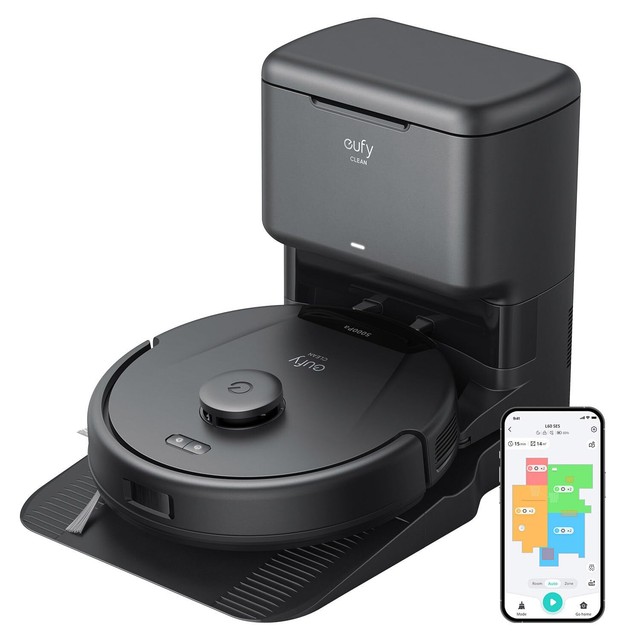
The value pick, and for a lot of homes the right one. LiDAR navigation, 5,000 Pa and a self-emptying base — so the daily reality, a robot that runs itself and needs emptying every few weeks, is identical to the expensive models. What you give up is mopping, the washing station and the sophisticated obstacle camera. If your floors are carpet and hard floor with no real mopping requirement, the L60 does the job people actually want a robot vacuum for at a fraction of the price.
- LiDAR mapping and navigation
- Self-empty base station
- 5,000 Pa suction
- Room and no-go zone mapping in the app
- Same day-to-day convenience as the flagships for far less
- Excellent on hair and dust, which is most of the job
- Smaller, less obtrusive base station
- No mopping, or basic mopping only depending on variant
- Simpler obstacle avoidance — pick up cables first

eufy Omni S1 Series
Sits between the L60 and the newest flagship, sharing the X10’s 8,000 Pa suction and the Omni station concept. Worth watching specifically because it is the model most often discounted as newer versions arrive — a previous-generation Omni at a clearance price is frequently better value than a current mid-range machine, since the base station capability is the expensive part and it does not date quickly. Check what the station does before buying: Omni branding covers several station specifications.
- 8,000 Pa suction
- Omni base station with mop handling
- LiDAR navigation and app mapping
- Carpet detection
- Frequently heavily discounted as newer models launch
- Station capability is what matters and it does not date
- Same core cleaning performance as the X10
- Older obstacle avoidance than current models
- Omni branding spans several different station specs

eufy RoboVac Entry Model (No Station)
The honest budget answer. A basic RoboVac with no base station has to be emptied by hand every couple of runs and navigates less cleverly — but it costs a fraction of the machines above and it still does the fundamental job of picking dust and hair off the floor every day. For a small flat, a single room, or a second machine for an upstairs floor, it makes complete sense. Do not buy one expecting to forget about it; the station is what buys the forgetting.
- Slim profile, often under 3 inches tall
- Manual dustbin emptying
- Basic or gyroscopic navigation
- App or remote control
- Very low price for a daily-use machine
- Slim enough to reach under low furniture
- Sensible as a second machine for another floor
- Needs emptying by hand every run or two
- Navigation is far less efficient without LiDAR

Replacement Dust Bags for the Base Station
The running cost nobody factors in. A self-emptying station uses a sealed bag, and depending on your house you will get through several a year — more with pets or long hair. Buy them in multipacks and buy them before you run out, because a station with no bag in it stops self-emptying, which removes the entire reason you bought the machine. Third-party bags exist and are usually fine; check that the collar seals properly, since a poorly moulded collar leaks dust into the station.
- Sealed disposable bags sized to the station
- Multipacks of three to six
- Genuine and third-party options
- Some are HEPA-rated
- Sealed disposal means no dust cloud when emptying
- Multipacks bring the per-bag cost down a lot
- Third-party bags are typically much cheaper
- A genuine recurring cost, not a one-off
- Poorly moulded third-party collars leak
Replacement Brush Rolls and Side Brushes
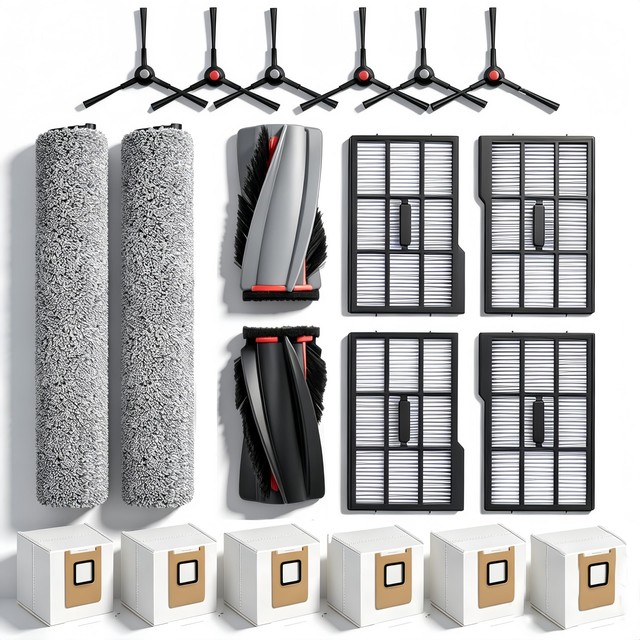
Wear items on a schedule, and the ones that most affect how well the machine still cleans a year in. A brush roll matted with hair does not agitate the carpet, and a bent side brush flicks debris away from the intake rather than into it — both produce a machine that seems to have got worse for no reason. Keep a spare set and swap on a schedule rather than waiting for a visible problem. Anti-tangle rubber brush rolls are worth the upgrade in a house with long hair.
- Main brush roll and two side brushes
- Rubber anti-tangle designs available
- Model-specific fitment
- Usually supplied as a kit with filters
- Restores cleaning performance that degraded invisibly
- Anti-tangle rubber rolls transform a hairy household
- Cheap relative to the machine
- Model-specific — check the exact number
- Cheap side brushes take a permanent bend in the packaging

Replacement Filters
The cheapest part and the one that silently costs you the most performance. A clogged filter chokes the airflow, and airflow is what actually picks dirt up — so the machine’s real suction drops steadily while the advertised Pascal figure stays exactly the same. Filters are washable on most models but they do not last forever, and a washed filter must be bone dry before it goes back in or you will grow mould in the machine. Keep two and alternate them so one is always dry.
- Washable pleated filters
- Usually sold in packs of two to four
- HEPA-grade versions for allergy households
- Model-specific sizing
- The cheapest way to restore lost cleaning power
- Alternating two means one is always dry and ready
- HEPA versions genuinely help with allergens
- Washing shortens their life despite the label
- A damp filter refitted will grow mould
Replacement Mop Pads
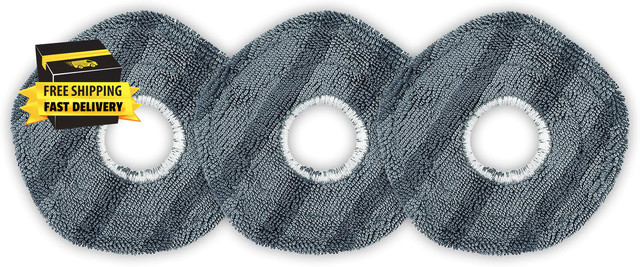
For the Omni models. Pads are consumables, and a matted or greasy pad smears rather than cleans — which is exactly the complaint people make about robot mopping in general, and it is usually a worn pad rather than the concept. Even with a station that washes them, they eventually stop absorbing properly. Keep a spare set so you can swap while one is drying, and wash them separately from clothes; floor grease does not belong in a washing machine full of shirts.
- Microfibre pads sized to the model
- Sold in packs of two to six
- Machine washable
- Genuine and third-party options
- Restores mopping performance that degraded gradually
- Cheap and widely available
- A spare set means no downtime
- Third-party pads vary in thickness and can foul the lift mechanism
- Wash separately — they carry floor grease
Cable Management Kit and Under-Furniture Risers
The preparation that decides whether a robot vacuum succeeds. The two things that reliably defeat these machines are loose cables and furniture with slightly too little clearance. Adhesive cable clips and raceways remove the first, and a set of furniture risers lifting a sofa by an inch or two removes the second — instantly making a large area the machine could not reach into floor it cleans daily. Spend an hour on this before the machine arrives and everything afterwards works better.
- Adhesive cable clips and raceway channels
- Furniture risers in several heights
- Cord covers for floor-crossing runs
- Non-marking pads on risers
- Removes the two most common causes of a stuck robot
- Risers open up large areas the machine could not reach
- Cheap, and improves the room regardless
- An hour of work before you get to use the machine
- Risers change the look of furniture
Buying tips
- Ignore the Pascal figure. It measures pressure against a sealed port, a state the machine is never in while cleaning. Eufy’s own range went from 5,000 to 30,000 Pa in two generations without carpets getting six times dirtier. Pickup depends on airflow, brush agitation and floor seal — none of which appear on the box.
- The base station is what you are really buying. Self-emptying is the difference between a machine you think about weekly and one you think about monthly. On the Omni models, pad washing and drying is the difference between mopping that saves work and mopping that creates a new chore. Decide which of those you want, then pick the model.
- Measure your furniture clearance before you buy. A robot that is 10 mm too tall cannot clean under the sofa where the dust actually accumulates, and no amount of suction fixes that. Measure the lowest point under every piece you care about, and if it is marginal, buy risers to lift the furniture rather than a shorter machine.
- Mop lift matters more than mop design if you have rugs. A robot that cannot raise its pads will drag a wet mop across your rug on the way past. The X10 Pro Omni lifts up to 12 mm, which covers most low-pile rugs but not a thick one. If your rugs are deep, plan to use no-go zones in the app instead.
- Spend an hour tidying cables before the first run. Loose charging cables are the single most common cause of a stuck robot, and even good obstacle recognition is not perfect. Adhesive clips and raceways cost very little. Do the same for rug tassels, which wrap round a brush roll and stop the machine dead.
- Budget for consumables. Bags, filters, brushes and mop pads are a genuine recurring cost, not a one-off — expect a meaningful annual figure, more with pets or long hair. Factor that into the comparison between a station model and a manual one, and buy in multipacks, which are considerably cheaper per unit.
- Clean the filter far more often than you think. A clogged filter chokes the airflow that does the actual work, so the machine gets quietly worse while its advertised suction figure stays the same. Keep two filters and alternate them, and make absolutely sure a washed one is bone dry before it goes back in.
- Run it daily, not weekly. A robot vacuum is a maintenance tool, not a deep cleaner. Running it every day on a lightly soiled floor keeps the house genuinely clean and is easy on the machine. Running it once a week on a heavily soiled floor produces a full bin, a matted brush and a disappointing result — and that is where most of the bad reviews come from.
As an Amazon Associate and eBay Partner, toptenpick.com earns from qualifying purchases. Prices and availability are subject to change.